How do I use the Watercolor Hanfu Celestial Princess template?
Choose the primary action to open PicX Studio with the available template settings. Review the model and format, personalize the creative direction, and generate when ready.
Generates a delicate full-body anime-style watercolor illustration of a floating young princess in ornate pastel hanfu for fantasy character art.
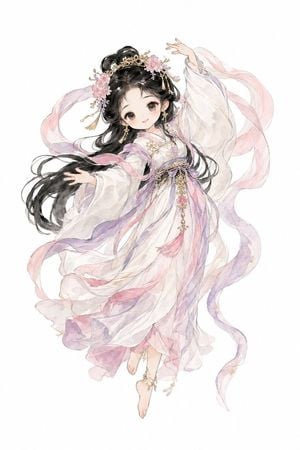
Create a full-body delicate watercolor anime illustration of a floating young celestial princess in traditional Chinese hanfu, centered on a clean {argument name="background color" default="white"} background with no scenery. She has a sweet childlike face, large soft brown eyes, pale skin, and very long flowing {argument name="hair color" default="black"} hair styled partly in high twin buns with loose waves streaming leftward. Her ornate gold crown and hair ornaments include exactly 2 prominent pink blossom clusters, small pearl-like beads, dangling gold tassels, and floral pins. Dress her in an ethereal layered {argument name="outfit color palette" default="white, blush pink, lavender, and soft gold"} hanfu with translucent oversized sleeves, a purple waist sash, embroidered floral details, dangling gold chains, a pink tassel pendant at the waist, and gauzy fabric layers that billow as if she is dancing in midair. Add exactly 4 long translucent ribbon streamers curling around her body: one pink ribbon arcing behind her head to the left, one pink ribbon looping around the right side, one lavender ribbon flowing down the right side, and one mixed pink-lavender ribbon wrapping across the lower dress. Pose her gracefully with one arm raised above her head, the other extended outward, one bare foot visible below the hem and the other slightly lifted; add delicate ankle jewelry. Use soft ink outlines, pastel washes, airy fabric transparency, subtle gold accents, gentle blush, and high-detail fantasy costume rendering while keeping the composition light, elegant, and uncluttered.
Choose the primary action to open PicX Studio with the available template settings. Review the model and format, personalize the creative direction, and generate when ready.
Yes. You can change the subject, setting, lighting, mood, format, and available model controls before creating your image.
This template is free to open and customize. Generation usage is shown in PicX Studio before you create.
Start with GPT Image 2, which is the model associated with this template. You can compare another compatible model for a different finish.
Follow a topic to a crawlable collection of related PicX Studio templates.