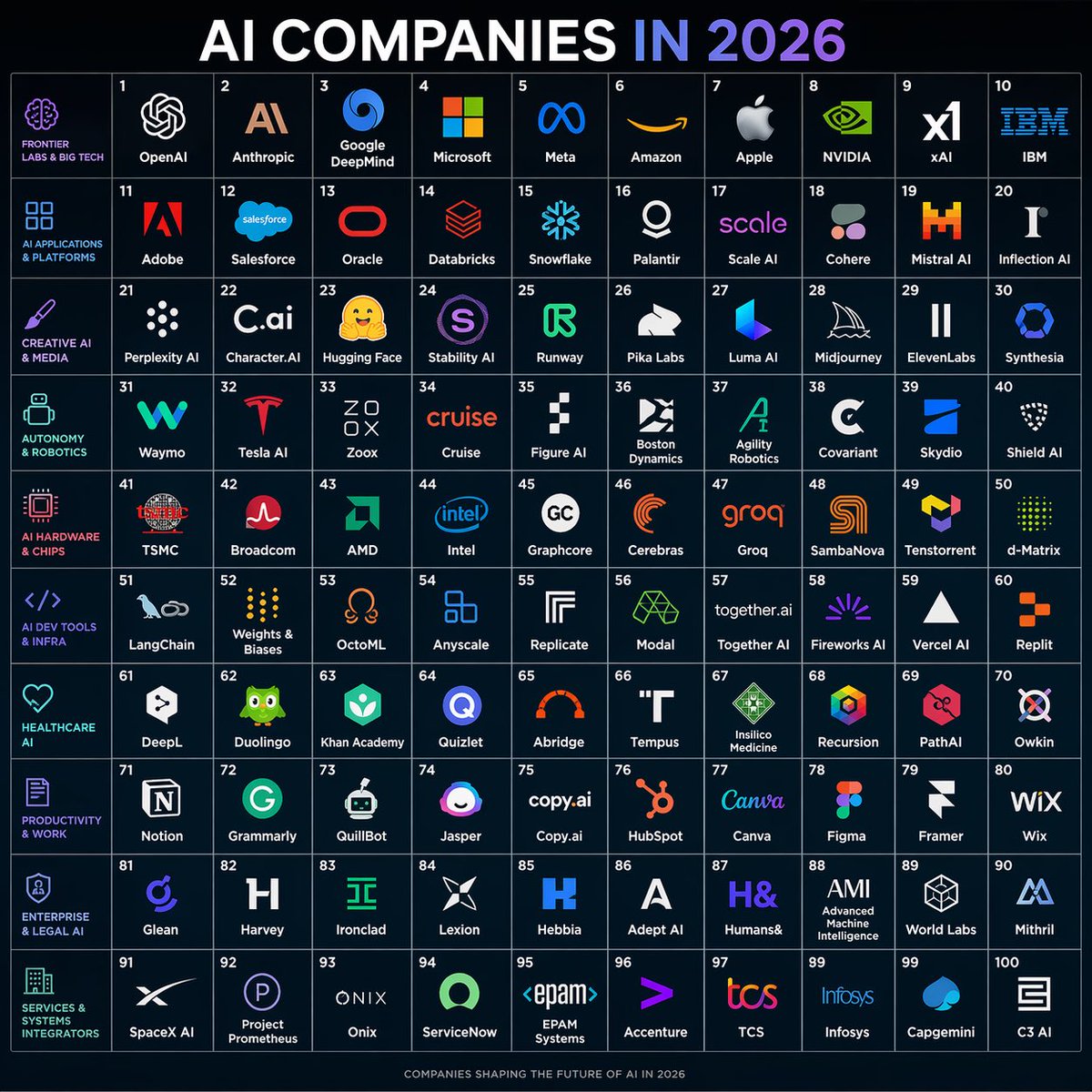
AI Companies in 2026 Grid Poster
futuristic infographic poster · a square 10x10 grid map of 100 AI companies for the year 2026 · clean dark-tech editorial infographic, flat vector logos on a deep navy background, thin glowing grid lines, crisp high-contrast typography, modern startup ecosystem poster · 1:1 · very dark navy blue · subtle gradient with faint glow · {argument name="headline text" default="AI COMPANIES IN 2026"} · top center · very large bold sans-serif uppercase, white text with the word '2026' in a blue-to-purple gradient · grid poster · 10 · 10 · 100 · cells numbered 1 through 100 in small white numerals at the top-left of each cell · uniform square cells with thin pale blue borders and centered company logos plus company names · 10 · far left vertical column of category labels aligned to each row · small uppercase cyan and magenta text with matching simple line icons · FRONTIER LABS & BIG TECH, AI APPLICATIONS & PLATFORMS, CREATIVE AI & MEDIA, AUTONOMY & ROBOTICS, AI HARDWARE & CHIPS, AI DEV TOOLS & INFRA, HEALTHCARE AI, PRODUCTIVITY & WORK, ENTERPRISE & LEGAL AI, SERVICES & SYSTEMS INTEGRATORS · FRONTIER LABS & BIG TECH · row 1 · 10 · OpenAI, Anthropic, Google DeepMind, Microsoft, Meta, Amazon, Apple, NVIDIA, xAI, IBM · AI APPLICATIONS & PLATFORMS · row 2 · 10 · Adobe, Salesforce, Oracle, Databricks, Snowflake, Palantir, Scale AI, Cohere, Mistral AI, Inflection AI · CREATIVE AI & MEDIA · row 3 · 10 · Perplexity AI, Character.AI, Hugging Face, Stability AI, Runway, Pika Labs, Luma AI, Midjourney, ElevenLabs, Synthesia · AUTONOMY & ROBOTICS · row 4 · 10 · Waymo, Tesla AI, Zoox, Cruise, Figure AI, Boston Dynamics, Agility Robotics, Covariant, Skydio, Shield AI · AI HARDWARE & CHIPS · row 5 · 10 · TSMC, Broadcom, AMD, Intel, Graphcore, Cerebras, Groq, SambaNova, Tenstorrent, d-Matrix · AI DEV TOOLS & INFRA · row 6 · 10 · LangChain, Weights & Biases, OctoML, Anyscale, Replicate, Modal, Together AI, Fireworks AI, Vercel AI, Replit · HEALTHCARE AI · row 7 · 10 · DeepL, Duolingo, Khan Academy, Quizlet, Abridge, Tempus, Insilico Medicine, Recursion, PathAI, Owkin · PRODUCTIVITY & WORK · row 8 · 10 · Notion, Grammarly, QuillBot, Jasper, Copy.ai, HubSpot, Canva, Figma, Framer, Wix · ENTERPRISE & LEGAL AI · row 9 · 10 · Glean, Harvey, Ironclad, Lexion, Hebbia, Adept AI, Humans&, AMI, World Labs, Mithril · SERVICES & SYSTEMS INTEGRATORS · row 10 · 10 · SpaceX AI, Project Prometheus, Onix, ServiceNow, EPAM Systems, Accenture, TCS, Infosys, Capgemini, C3 AI · small centered footer text reading 'COMPANIES SHAPING THE FUTURE OF AI IN 2026' · each company shown with a simplified recognizable logo mark in its brand colors above or beside its name; logos are centered within each tile and scaled consistently · deep navy · muted blue-gray · white · cyan, purple, magenta, electric blue, orange, green depending on brand logos · symmetrical poster composition, infographic precision, no perspective distortion, sharp vector edges, evenly spaced margins, polished social-media-shareable design



















![Naive doodle-style subject illustration — A doodle-style {argument name="subject" default="[subject]"}, naive lines, humorous shape exaggeration](https://pbs.twimg.com/media/G6Wl2YxbsAARB2b.jpg)






















![Flash-Lit Jester-Girl Editorial Anime — TYPE:
[Flash-Lit Close-up / Jester-Girl Performance Editorial Anime — lowkey sensual]
FORMAT:
[3:4 (…](https://pbs.twimg.com/media/HA1Qt43boAACo0r.jpg)