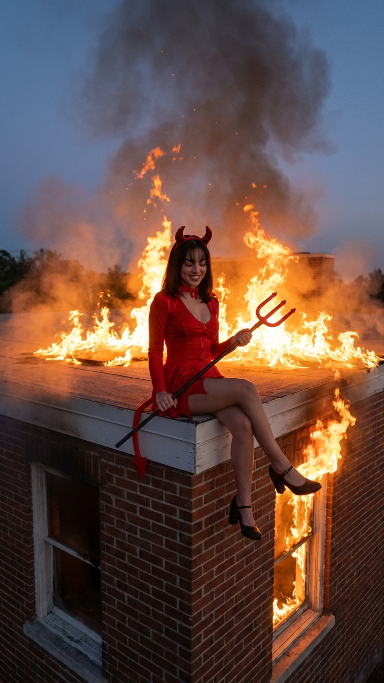
How do I use the Dramatic Devil Costume Portrait Prompt (JSON) template?
Choose the primary action to open PicX Studio with the available template settings. Review the model and format, personalize the creative direction, and generate when ready.
A highly detailed, JSON-structured prompt for Nano Banana Pro (Flow) to generate a dramatic evening scene featuring a young woman in a red devil costume sitting calmly on the ledge of a burning brick building. Change the subject, setting, or lighting one variable at a time.

{ "scene": "Dramatic evening scene of a woman in a devil costume sitting on the corner ledge of a burning brick building.", "subject": { "character": "Young woman dressed as a devil, looking remarkably serene amidst a roaring fire.", "face": { "structure": "Soft features, defined jawline, softly smiling.", "skin": "Smooth, intensely illuminated by warm firelight.", "eyes": { "shape": "Almond.", "color": "Dark.", "expression": "Closed or looking down peacefully." }, "mouth": { "lips": "Closed, gentle and subtle smile." }, "makeup": "Natural look enhanced by striking warm highlights from the flames." }, "hair": { "color": "Black.", "length": "Shoulder-length with straight front bangs.", "texture": "Straight.", "style": "Worn down.", "shine": "High reflective shine catching the orange glow of the fire." }, "accessories": { "headwear": "Shiny red devil horns attached to a thin headband.", "prop": "Long black pitchfork with a red trident tip held across her lap.", "tail": "Red devil tail with a pointed arrow tip hanging down the side of the building." } }, "pose": { "overall": "Sitting calmly on the absolute corner edge of a roof, legs dangling, holding a pitchfork.", "position": { "base": "Sitting on the white concrete ledge.", "orientation": "Body angled slightly to the right, facing forward." }, "torso": { "direction": "Forward.", "posture": "Relaxed, upright." }, "arms": { "position": "Resting across her lap, hands loosely gripping the handle of the pitchfork.", "other": "Elbows slightly bent and relaxed." }, "legs": { "position": "Dangling down the side of the building, right leg crossed gracefully over the left ankle.", "visible": "Exposed from the mid-thigh down to the feet." }, "head": { "turn": "Tilted slightly downward.", "expression": "Peaceful, serene, contrasting with the chaotic background." } }, "outfit": { "dress": { "type": "Mini dress.", "color": "Bright red.", "style": "Long-sleeve, V-neck, flared skirt.", "details": { "material": "Velvet or velour-like texture with a visible front zipper or seam.", "fit": "Form-fitting bodice." } }, "shoes": { "type": "Heels.", "color": "Black.", "style": "Chunky heel, closed round toe, ankle strap (Mary Jane style).", "details": { "design": "Classic, slightly vintage aesthetic." } } }, "body": { "type": "Slim.", "skin": "Warm tone enhanced by the heavy ambient firelight.", "midriff": "Covered.", "moles": "" }, "environment": { "location": "Corner ledge of a flat roof on a red brick building.", "foreground": { "building": "Exterior walls made
Choose the primary action to open PicX Studio with the available template settings. Review the model and format, personalize the creative direction, and generate when ready.
Yes. You can change the subject, setting, lighting, mood, format, and available model controls before creating your image.
This template is free to open and customize. Generation usage is shown in PicX Studio before you create.
Start with Nano Banana 2, which is the model associated with this template. You can compare another compatible model for a different finish.
Follow a topic to a crawlable collection of related PicX Studio templates.
43,474 public templates available. Verified via the PicX Studio public templates API; refreshed hourly.











![118-google-nano-banana-pro-skincare-product- — A professional skincare shot of a [product container] with [cap/lid], labeled [brand, product, descriptor, volume](/_next/image?url=https%3A%2F%2Fcdn.picxstudio.com%2Fuploads%2Fpost118_img0_332898b8-29ea-42a9-87ab-9ed746a3f944.jpg&w=828&q=100)




![69-untitled — FORMAT: 15s / 145 BPM / 14 SHOTS
SUBJECT: @[image1]
WARDROBE: Clean modern outfit
ENVIRONMENT: Street / indoor transitions
MOOD: Discovery → contr](/_next/image?url=https%3A%2F%2Fcdn.picxstudio.com%2Fuploads%2Fpost69_img0_d45faecf-38c3-4bcb-81a4-f6eb1cf42bb2.jpg&w=828&q=100)





![Naive doodle-style subject illustration — A doodle-style {argument name="subject" default="[subject]"}, naive lines, humorous shape exaggeration](https://pbs.twimg.com/media/G6Wl2YxbsAARB2b.jpg)