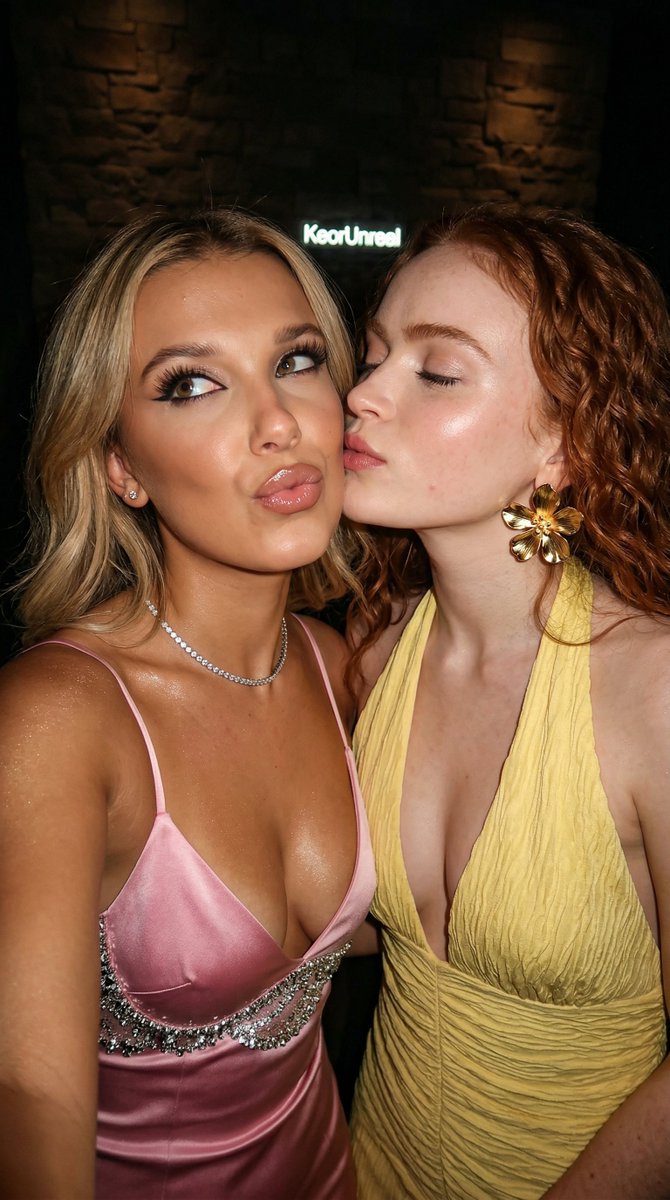
How do I use the Intimate Photorealistic Party Selfie Prompt template?
Choose the primary action to open PicX Studio with the available template settings. Review the model and format, personalize the creative direction, and generate when ready.
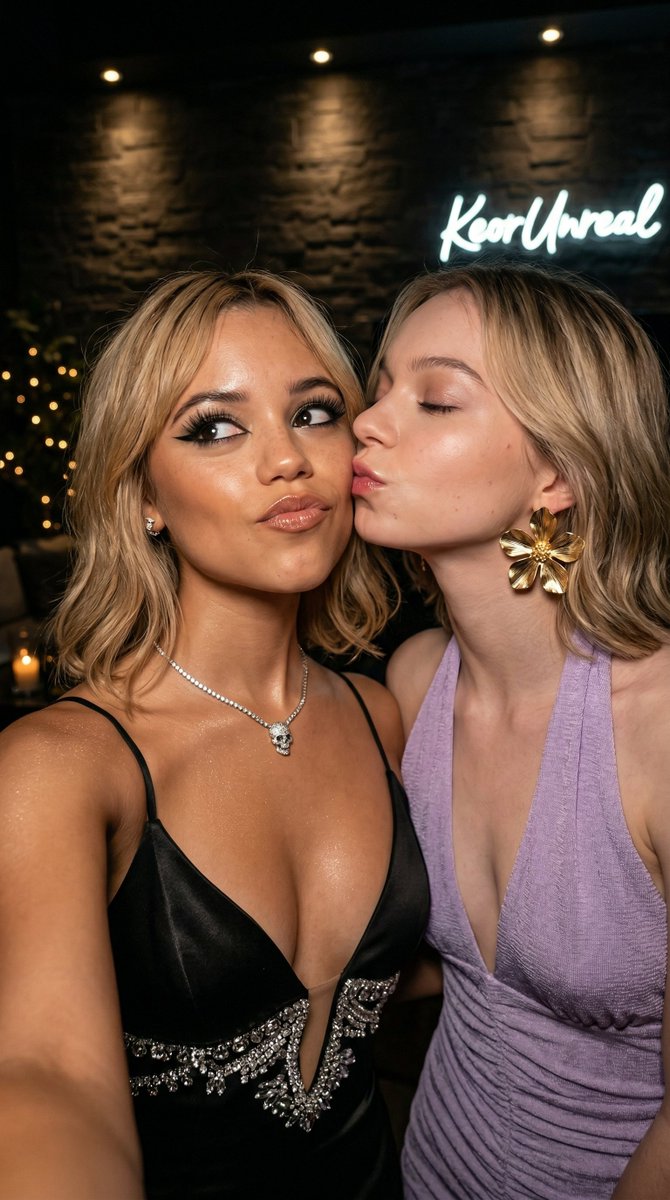
A highly structured JSON-based prompt for Nano Banana 2 designed to generate an intimate, hyper-realistic close-up selfie of two women sharing an affectionate cheek kiss at an upscale, dimly lit party. The prompt specifies detailed characteristics for both subjects, their clothing, makeup, the environment, lighting, and camera optics to achieve a cinematic, high-production aesthetic. (free to use) — Free AI image template on PicX Studio.
{ "image_type": "photorealistic intimate party selfie close-up, 8K ultra-detailed, sharp focus, masterpiece", "subjects": [ { "role": "blonde woman receiving kiss", "gender": "female", "age": "22-25", "hair": "shoulder-length blonde with soft waves and highlights", "makeup": "dramatic evening makeup (sharp black winged eyeliner, long false lashes, filled brows, glossy nude-pink lips)", "expression": "playful pouty lips slightly pursed, eyes looking upward/sideways at camera, subtle teasing smile", "clothing": "silver satin slip dress with thin straps, deep plunging neckline, silver sequin/crystal embellishment around bust", "accessories": "thin diamond tennis necklace, small stud earrings", "skin": "tanned/bronze with glossy/oiled highlight sheen on cheekbones, collarbones and décolletage" }, { "role": "platinum blonde woman giving kiss", "gender": "female", "age": "22-25", "hair": "long straight platinum blonde", "makeup": "soft natural makeup (subtle eyeliner, natural lashes, glossy pink lips)", "expression": "eyes gently closed, lips pressed to other woman's cheek in affectionate kiss", "clothing": "off-white/cream textured halter-neck dress with deep V-neckline, ruched/crinkled fabric", "accessories": "oversized gold flower statement earrings (petal-like design)", "skin": "very fair/pale with dewy glow" } ], "interaction": "intimate cheek kiss moment, faces very close together, flirtatious and affectionate energy, left woman tilting head toward kiss, right woman leaning in", "environment": { "location": "dimly lit upscale indoor party / VIP lounge", "backdrop": "dark textured stone or brick wall, subtle warm overhead spot lighting or candle glow, blurred bokeh lights in background corners", "lighting": "low-key warm ambient + focused highlights on faces, glossy skin and jewelry, strong rim lighting on hair and shoulders, cinematic moody contrast" }, "camera": { "angle": "close-up selfie perspective (slightly low angle from phone held at chest height)", "lens": "wide-angle phone lens with natural slight edge distortion, very shallow depth of field, razor-sharp focus on faces, lips, eyes and jewelry", "composition": "tight frame from upper chest to top of heads, both faces filling most of the image, cheek-to-cheek contact centered, dark background creating intimate isolation" }, "style": "hyper-realistic luxury party mirror/selfie photography, ultra-detailed textures (satin sheen, sequin/crystal sparkle, skin pores/oil glow, hair strands, lipstick gloss), cinematic warm-cool color grading with strong contrast, seductive and affectionate mood, high-production influencer aesthetic", "technical": "8K resolutio"
Use Intimate Photorealistic Party Selfie Prompt to plan an AI image around nano-banana-2 generation. Match the preview's composition first, then personalize the subject, setting, and mood for your own project.
Use the primary action to load the template settings in PicX Studio.
Adjust the subject and creative details for your destination.
Create the image, compare the result with the preview, and refine one variable at a time.
A continuous mix — similar concepts first, woven with same-model prompts and fresh picks from the catalog.
Choose the primary action to open PicX Studio with the available template settings. Review the model and format, personalize the creative direction, and generate when ready.
Yes. You can change the subject, setting, lighting, mood, format, and available model controls before creating your image.
This template is free to open and customize. Generation usage is shown in PicX Studio before you create.
Start with nano-banana-2, which is the model associated with this template. You can compare another compatible model for a different finish.
Follow a topic to a crawlable collection of related PicX Studio templates.
39,155 public templates available. Verified via the PicX Studio public templates API; refreshed hourly.
A continuous mix — similar concepts first, woven with same-model prompts and fresh picks from the catalog.