How do I use the Decorated Cheki Anime Portrait template?
Choose the primary action to open PicX Studio with the available template settings. Review the model and format, personalize the creative direction, and generate when ready.
Generates a cozy realistic cheki-style instant photo with an anime character portrait and hand-drawn star, bow, and ribbon decorations. Change the subject, setting, or lighting one variable at a time.
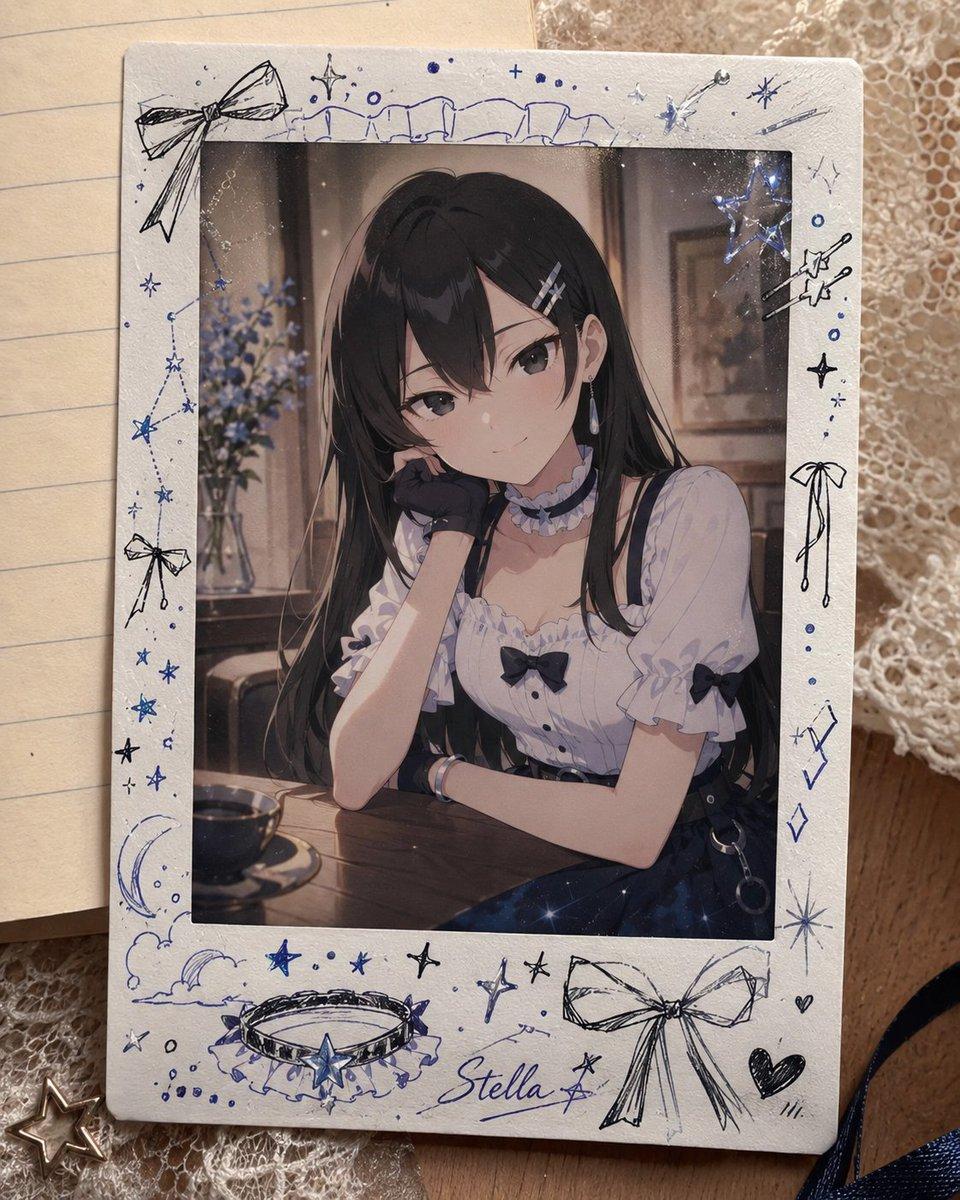
Create a realistic tabletop photo of a decorated instant-film cheki card featuring an anime-style portrait of {argument name="character name" default="Stella"}. The card is a vertical white Polaroid/Instax frame with rounded corners, lying slightly angled on a cozy desk surface over lined notebook paper and cream lace fabric. Inside the photo window, show a refined young anime girl with {argument name="hair color" default="long black hair"}, seated at a café table in a softly lit vintage interior; she wears a frilly white blouse with puff sleeves, black ribbons, a dark choker with a pale blue flower detail, dangling earrings, and a dark skirt or suspenders, resting one cheek on her gloved hand with her other arm folded on the wooden table. Keep the face area softly obscured or anonymized by a subtle square blur while preserving the outfit, hair, pose, and atmosphere. The cheki border is heavily hand-decorated in blue and black ink with exactly 21 distinct doodle elements: 3 bows (large top-left bow, small left-side bow, large bottom-right bow), 1 constellation on the left edge, 1 crescent moon with clouds at lower left, 1 jeweled choker/collar illustration at bottom center-left, 1 handwritten name label reading {argument name="handwritten name" default="Stella"} near the bottom, 3 star clusters/sparkle groups (top-right, right edge, bottom center), 2 shooting-star or wand-like motifs on the right, 2 heart doodles at lower right, 2 diamond/gem doodles on the lower right edge, 1 row of small dots at top center, 1 row of small dots at bottom left, 1 loose ribbon-string doodle on the right, 1 cloud-like outline across the top border, and 1 tiny star charm effect overlapping the upper-right corner of the inner photo. Use blue ballpoint pen and black fine liner strokes, slightly imperfect hand-drawn lines, scattered small dots and sparkles, and a faint glittery sheen on the photo. Background props include exactly 5 visible surrounding items: lined notebook paper on the left, cream lace cloth underneath, a small metallic star charm at bottom left, a strip of dark navy ribbon at bottom right, and a warm wooden surface edge. Lighting is warm, natural, and softly nostalgic, with shallow depth of field, realistic paper texture, mild shadows, and a handmade scrapbook aesthetic. No extra printed captions besides the handwritten name.
Choose the primary action to open PicX Studio with the available template settings. Review the model and format, personalize the creative direction, and generate when ready.
Yes. You can change the subject, setting, lighting, mood, format, and available model controls before creating your image.
This template is free to open and customize. Generation usage is shown in PicX Studio before you create.
Start with GPT Image 2, which is the model associated with this template. You can compare another compatible model for a different finish.
© 2026 PicX Studio. All rights reserved.

Follow a topic to a crawlable collection of related PicX Studio templates.
43,474 public templates available. Verified via the PicX Studio public templates API; refreshed hourly.











![118-google-nano-banana-pro-skincare-product- — A professional skincare shot of a [product container] with [cap/lid], labeled [brand, product, descriptor, volume](/_next/image?url=https%3A%2F%2Fcdn.picxstudio.com%2Fuploads%2Fpost118_img0_332898b8-29ea-42a9-87ab-9ed746a3f944.jpg&w=828&q=100)




![69-untitled — FORMAT: 15s / 145 BPM / 14 SHOTS
SUBJECT: @[image1]
WARDROBE: Clean modern outfit
ENVIRONMENT: Street / indoor transitions
MOOD: Discovery → contr](/_next/image?url=https%3A%2F%2Fcdn.picxstudio.com%2Fuploads%2Fpost69_img0_d45faecf-38c3-4bcb-81a4-f6eb1cf42bb2.jpg&w=828&q=100)








![Minimalist Flat Vector Travel Poster — Premium minimalist flat-vector travel poster for {argument name="city name" default="[CITY_NAME]"}, 3:4 vertical format.](https://cms-assets.youmind.com/media/1787917359711_3ug846_HQX205cbMAA6F6S-300x400.jpg)





















![Miniature Realism Prompt for Restoration Scene — Tiny [{argument name="subject" default="WORKERS"}] sitting, resting, or packing up beside a perfectl…](https://pbs.twimg.com/media/G9BA7DDb0AEJkiH.jpg)



![High-Fidelity Portrait with Extreme Identity Mapping and Technical Rib-Knit Texture — [Header] (9:16)
Raw high-fidelity photograph, iPhone 17 Pro sensor simulat](https://pbs.twimg.com/media/G_7z2zMWoAAWDOn.jpg)