How do I use the Scandinavian Beauty in Abandoned Onsen template?
Choose the primary action to open PicX Studio with the available template settings. Review the model and format, personalize the creative direction, and generate when ready.
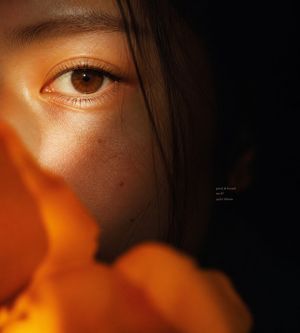
A highly detailed JSON prompt for generating a high-fashion editorial image of a Scandinavian woman with a voluptuous figure, sitting in an industrial ruin (abandoned Onsen). The prompt emphasizes the contrast between her delicate white string bikini and a heavy olive khaki winter parka, focusing on specific lighting, texture, and a pensive expression. (free to use) — Free AI image template on PicX Studio.
{ "subject": { "description": "A stunning Scandinavian beauty with a voluptuous figure, sitting in an industrial ruin, wearing a delicate white string bikini contrasted with a heavy winter parka draped off her shoulders.", "mirror_rules": "N/A", "age": "early 20s", "expression": { "eyes": { "look": "pensive and slightly melancholic", "energy": "quiet thoughtfulness", "direction": "looking to the side, towards the camera" }, "mouth": { "position": "lips slightly parted, relaxed", "slight smile", "energy": "soft and relaxed" }, "overall": "serene, contrasting deeply with the harsh environment" }, "face": { "preserve_original": true, "makeup": "exquisite Japanese editorial makeup, soft peach blush, delicate eyeliner, glossy pink lips, flawless foundation" }, "hair": { "color": "Golden brown", "style": "tied back into a loose ponytail with wispy bangs framing the face", "effect": "held back by a white mesh headband, slightly messy from the environment" }, "body": { "frame": "hourglass, curvy, prominent cleavage, slim toned waist", "chest": "large and full, beautifully highlighted by the bikini", "waist": "slender and smooth", "legs": "long, gracefully bent", "skin": { "visible_areas": "torso, arms, chest, thighs", "tone": "fair, translucent cold-white tone", "texture": "feels powdery and velvety soft, a stark contrast to the cold, stone surrounding her", "lighting_effect": "sliced by harsh, distinct geometric shadows cast by an unseen source" } }, "pose": { "position": "sitting on the tiled ground, leaning back slightly", "base": "weight supported by her hands resting beside her thighs, right knee raised", "overall": "a static, vulnerable posture that feels accidentally captured" }, "clothing": { "top": { "type": "string bikini top", "color": "pure white", "details": "tiny triangle cups, thin tie straps", "effect": "struggling to contain her curves" }, "bottom": { "type": "string bikini bottom", "color": "pure white", "details": "very thin side straps riding high on the hips" }, "outerwear": { "type": "heavy winter parka", "color": "olive khaki green", "details": "thick faux fur hood, unzipped, intentionally falling off her shoulders to expose her upper body" } } }, "accessories": { "headwear": "wide white mesh headband", "jewelry": "gold hoop earrings, a thick black leather choker with a small golden rabbit", "prop": "clear plastic high heels carelessly removed and resting near her bare feet" }, "photography": { "camera_style": "professional DSLR, high-fashion editorial gravure photography", "angle": "high angle, shooting downwards to emphasize her form and the ground", "shot_type": "full body to three-quarter shot", "aspect_ratio": "2:3", "texture": "hyper-realistic, sharp focus on the skin and fabric, and background", "lighting": "har" } }
Use Scandinavian Beauty in Abandoned Onsen to plan an AI image around nano-banana-2 generation. Match the preview's composition first, then personalize the subject, setting, and mood for your own project.
Use the primary action to load the template settings in PicX Studio.
Adjust the subject and creative details for your destination.
Create the image, compare the result with the preview, and refine one variable at a time.
A continuous mix — similar concepts first, woven with same-model prompts and fresh picks from the catalog.
Choose the primary action to open PicX Studio with the available template settings. Review the model and format, personalize the creative direction, and generate when ready.
Yes. You can change the subject, setting, lighting, mood, format, and available model controls before creating your image.
This template is free to open and customize. Generation usage is shown in PicX Studio before you create.
Start with nano-banana-2, which is the model associated with this template. You can compare another compatible model for a different finish.
Follow a topic to a crawlable collection of related PicX Studio templates.
39,155 public templates available. Verified via the PicX Studio public templates API; refreshed hourly.
A continuous mix — similar concepts first, woven with same-model prompts and fresh picks from the catalog.