
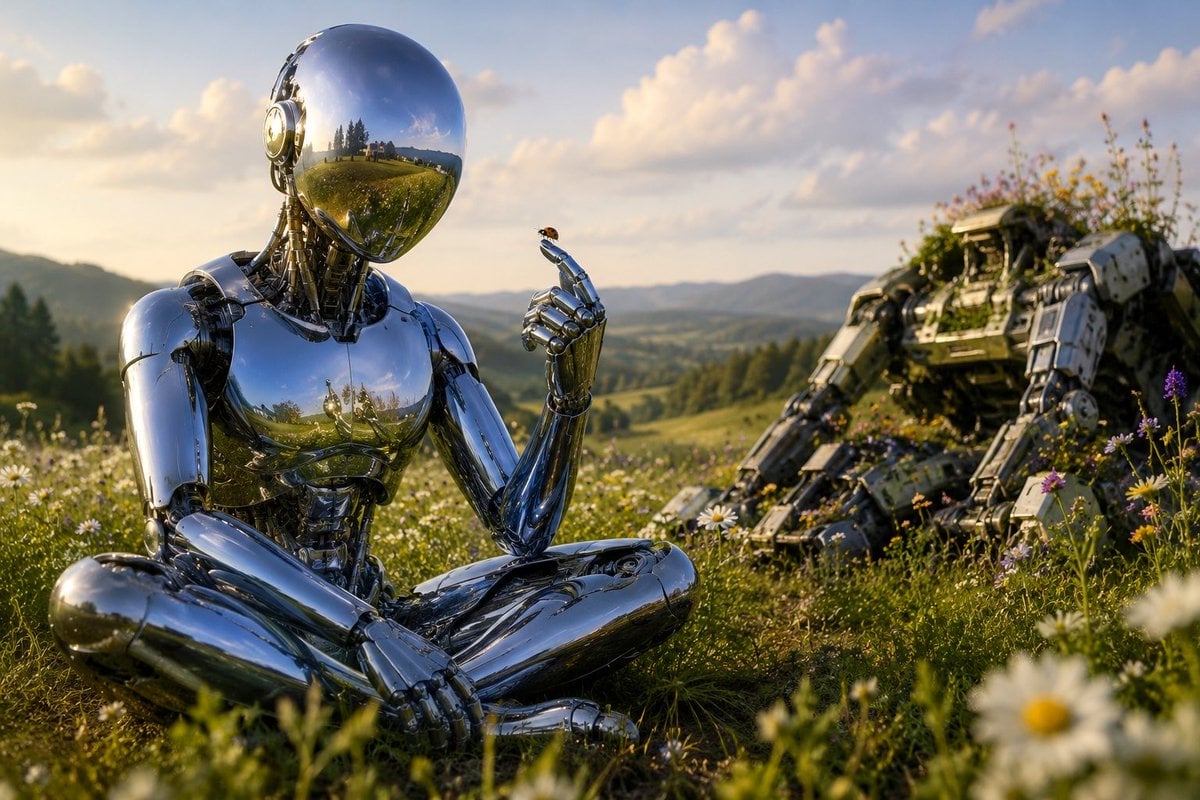
Chrome Robot Wondering in Meadow
A cinematic prompt for generating a peaceful sci-fi meadow scene with a reflective humanoid robot contemplating a tiny insect beside an overgrown mech wreck.
- Prompt included
- Model and format preset
- Free template
The prompt behind this image
Copy the exact prompt behind Chrome Robot Wondering in Meadow, or open it in the studio and make it yours.
Create a cinematic sci-fi pastoral scene titled by mood, “Where the Robots Came to Wonder”: a highly reflective chrome humanoid robot sits cross-legged in a wildflower meadow at golden hour, positioned left of center in the foreground. The robot has a smooth mirror-sphere head with no face, polished silver anatomical plating, exposed mechanical neck details, and a calm meditative posture. One hand rests on its lap while the other is raised delicately, index finger extended, holding or greeting a tiny {argument name="insect" default="ladybug"} perched on the fingertip. Its mirror surfaces reflect the meadow, sky, and distant hills. In the right midground, show exactly 1 large abandoned rugged robot or mech wreck, partially reclined and overgrown with grass and wildflowers, suggesting nature reclaiming machinery. The setting is a lush rolling countryside with exactly 1 seated chrome humanoid robot, exactly 1 tiny insect on its finger, exactly 1 derelict mech in the background, and abundant daisies and purple wildflowers in the foreground. Use {argument name="lighting" default="warm golden-hour sunlight"}, soft clouds, distant blue-green mountains, shallow depth of field with blurred flowers near the camera, realistic high-detail 3D rendering, cinematic composition, peaceful wonder, no text, no logos, no humans, no city skyline, no weapons firing.
How to use Chrome Robot Wondering in Meadow in 3 steps
- 1Upload ImagePNG, JPG or paste
Add your photo
Upload the photo the template builds on. The prompt, model and format are already set.
- 2…a portrait of your subject in softgolden-hour light, 85mm…
Personalize
Edit the subject and creative details for your destination.
- 3Generate
Generate
Press Generate — your image is created in PicX Studio, so you can compare it with the original and refine one variable at a time.
More like this
Templates with the same subject, style or setup. Open one to see its prompt.

Futuristic Chrome Helmet Fashion Portrait

Chrome Driftique Typography Poster
Retro-Futurist Chrome Humanoid Poster
Futuristic Mirrored Sunglasses Monochrome Portrait

Meadow Reading Lifestyle Photography
Minimalist Meadow Portrait

A in color-shifting chrome captured mid-transformation left side rigid
Cyberpunk Chrome Sci-Fi Portrait

Luxury Liquid Chrome Portrait

Meadow Lifestyle Quote Poster

Puppy and Robot Dog Ice Cream Scene

Wolf Boy Summer Meadow Nap
Make it yours
Chrome Robot Wondering in Meadow works as-is. These are the safest ways to change it without losing the look.
Change one field
Copy a single group, rewrite it, and generate again so you can see what that field is doing.
Keep the frame, change the subject
Hold the composition and light of Chrome Robot Wondering in Meadow, then swap wardrobe, props or the person for a new take.
| If the result… | Why | Fix |
|---|---|---|
| The result drifts from the preview | Too many fields changed at once. | Reuse Chrome Robot Wondering in Meadow as-is first, then change one group — subject, light, or setting. |
| The model over-stylizes the scene | The prose prompt leaves finish and camera underspecified. | Add one camera or lighting sentence and stay on GPT Image 2. |
More GPT Image 2 templates
Other prompts made for GPT Image 2.

Six VTuber Japanese Logo Sheet

Realistic Portrait of Woman and Deer

The Vista Modular Condo Poster

AI Model Routing Comparison Infographic

2.5D Anime Art Board

Isometric Productivity Desk Scene

New York Double Exposure Poster

Four-Panel AI Landscape Comparison

Japanese Tatami Lifestyle Magazine Cover

NESCAFÉ Coffee Map Poster
More image prompts
Fresh picks from across the catalog.

Japanese Tabloid Magazine Cover

untitled

3D Caricature Avatar With Privacy Block

Soft Watercolor Storybook Illustration
Fisheye Perspective of a Fish

Cheesy Quesadilla Japanese Food Ad
Car Transformation Prompt
3D Animated Scene of Chicks and a Monster on Lily Pads

Gpt2 Social Media Post Bmw Performance Social Poster
Structured Prompt for Black and White Fine-Art Portrait
Browse template categories
Chrome Robot Wondering in Meadow questions
How do I use the Chrome Robot Wondering in Meadow template?
Add your photo if the template asks for one, edit the prompt if you like — the template's model and format are already selected — and press Generate. Your version opens in PicX Studio.
Can I customize the Chrome Robot Wondering in Meadow template?
Yes. You can change the subject, setting, lighting, mood, format, and available model controls before creating your image.
Is the Chrome Robot Wondering in Meadow template free?
Opening and editing this template is free. Generating uses credits, shown on the Generate button when you are signed in.
Which AI model should I use?
Start with GPT Image 2, which is the model associated with this template. You can compare another compatible model for a different finish.
Looking for something else? Browse all templates.

Your photo, any look
Thousands of ready templates for every top image and video model, from one credit balance.