How do I use the Reclining Curvaceous Figure Bedroom Prompt template?
Choose the primary action to open PicX Studio with the available template settings. Review the model and format, personalize the creative direction, and generate when ready.
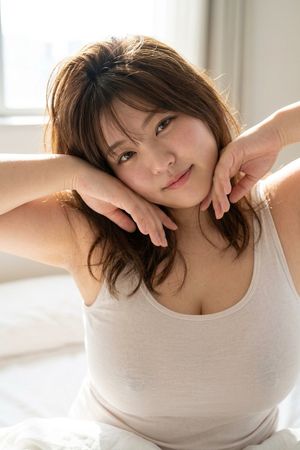
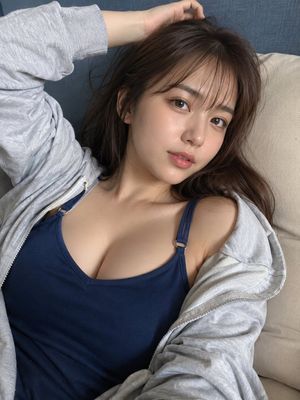
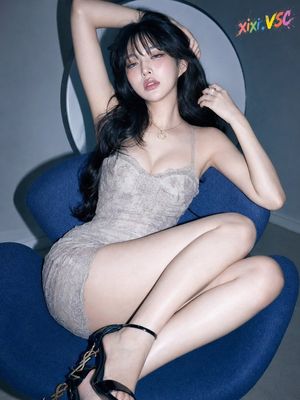
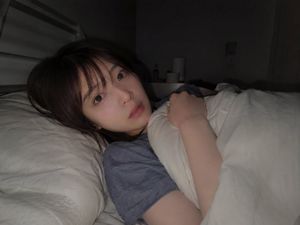
A highly explicit JSON prompt focusing on generating a photorealistic image of a curvaceous young woman reclining on a bed. The prompt meticulously details the subject's anatomy (emphasizing voluminous bust affected by gravity), attire (mismatching bikini/lingerie), pose (reclining against a headboard), environment (messy sheets, pink ambient light), and technical aspects (high-fidelity photorealism, candid social media aesthetic). (free to use) — Free AI image template on PicX Studio.
{ "subject": "Young woman with long, layered dark brown hair and fair skin lying on a bed. She has a curvaceous figure with a very full, heavy natural bust that is significantly voluminous and clearly affected by gravity in the reclining position. She is wearing a mismatching bikini/lingerie set: a sparkly, textured red/dark pink triangle top with thin straps that barely contains the chest volume, and solid black thong-style bottoms. Her skin texture is natural with subtle variations, showing soft stomach contours and a visible navel. The bust projects forward and outward, maintaining significant mass relative to the ribcage.", "pose": "Reclining pose on a bed, leaning back against a white headboard. Her body is angled slightly diagonally across the frame. Her right arm is raised, elbow bent, with her hand resting on the top edge of the headboard. Her head is tilted slightly to her right, facing the camera directly. Her torso is relaxed, allowing soft tissue to settle naturally. Her hips are slightly turned, and her legs extend towards the bottom right of the frame.", "environment": "A bedroom interior. The subject is on a bed with messy white sheets and pillows. Behind her is a white, textured upholstered headboard. A crumpled dark grey or teal piece of clothing lies on the pillows behind her shoulder. To the right, a floor lamp with a gold stand and a pink shade stands against a white wall, casting a soft magenta/purple glow. A small white square device (possibly a thermostat or remote) sits on the mattress in the foreground.", "camera": "Medium shot captured from a slightly elevated angle looking down at the bed. The framing captures the subject from the top of the head to the upper thighs. The perspective emphasizes the depth of the torso and the volume of the chest. Sharp focus on the subject's face and upper body.", "lighting": "Soft, diffused interior lighting. The primary light source illuminates the subject from the front-left, creating gentle highlights on the skin and defining the curvature of the body. Secondary lighting comes from the lamp in the background, adding a pink/purple ambient hue to the right side of the image and the back wall. Shadows are soft and natural.", "mood_and_expression": "Relaxed, intimate, and inviting. The subject has a gentle, pleasant smile and is making direct, engaging eye contact with the viewer. The atmosphere is casual and comfortable.", "style_and_realism": "High-fidelity photorealism with a candid, social media aesthetic. The image retains natural skin texture, realistic body physics, and unpolished details like messy sheets, avoiding a hyper-processed or studio-artificial look.", "colors_and_tone": "Natural skin tones contrasted with the bright white of the bedding and the pop of red/pink from the bikini top. The background features cool white walls warmed by the pink lamp light. The overall palette is soft with a mix of neutral whites
Use Reclining Curvaceous Figure Bedroom Prompt to plan an AI image around nano-banana-2 generation. Match the preview's composition first, then personalize the subject, setting, and mood for your own project.
Use the primary action to load the template settings in PicX Studio.
Adjust the subject and creative details for your destination.
Create the image, compare the result with the preview, and refine one variable at a time.
A continuous mix — similar concepts first, woven with same-model prompts and fresh picks from the catalog.
Choose the primary action to open PicX Studio with the available template settings. Review the model and format, personalize the creative direction, and generate when ready.
Yes. You can change the subject, setting, lighting, mood, format, and available model controls before creating your image.
This template is free to open and customize. Generation usage is shown in PicX Studio before you create.
Start with nano-banana-2, which is the model associated with this template. You can compare another compatible model for a different finish.
Follow a topic to a crawlable collection of related PicX Studio templates.
39,155 public templates available. Verified via the PicX Studio public templates API; refreshed hourly.
A continuous mix — similar concepts first, woven with same-model prompts and fresh picks from the catalog.