How do I use the Paparazzi Arrival at Luxury Hotel template?
Choose the primary action to open PicX Studio with the available template settings. Review the model and format, personalize the creative direction, and generate when ready.
A realistic celebrity street-photo scene showing an elegant woman exiting a luxury hotel amid security, photographers, and a parked black sedan. Change the subject, setting, or lighting one variable at a time.
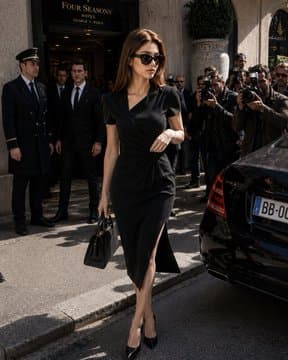
Create a realistic paparazzi-style street photograph of {argument name="character name" default="an elegant woman"} stepping out of the Four Seasons hotel entrance in a busy city. She is centered full-body, walking confidently from the curb toward the camera, wearing a fitted black short-sleeve wrap dress with a deep V neckline and a high thigh slit, black pointed-toe stiletto pumps, and carrying a small structured black handbag in her left hand. Her face is intentionally anonymized with a soft rectangular blur, while her medium brown shoulder-length hair is visible in natural sunlight. Surround her with exactly 3 hotel security or doorman figures on the left near the doorway and a dense crowd of photographers on the right holding cameras with flashes aimed at her. Include a glossy black luxury sedan parked at the curb on the right foreground with a partial European-style license plate. The background should show the Four Seasons entrance sign, stone architecture, doorway shadows, and bright midday sunlight casting strong realistic shadows on the pavement. Style: high-end celebrity candid photo, editorial realism, 35mm street photography, natural contrast, slight motion energy, no glamour retouching, vertical 3:4 composition.
Choose the primary action to open PicX Studio with the available template settings. Review the model and format, personalize the creative direction, and generate when ready.
Yes. You can change the subject, setting, lighting, mood, format, and available model controls before creating your image.
This template is free to open and customize. Generation usage is shown in PicX Studio before you create.
Start with GPT Image 2, which is the model associated with this template. You can compare another compatible model for a different finish.
© 2026 PicX Studio. All rights reserved.

Follow a topic to a crawlable collection of related PicX Studio templates.
43,474 public templates available. Verified via the PicX Studio public templates API; refreshed hourly.












![Minimalist Flat Vector Travel Poster — Premium minimalist flat-vector travel poster for {argument name="city name" default="[CITY_NAME]"}, 3:4 vertical format.](https://cms-assets.youmind.com/media/1787917359711_3ug846_HQX205cbMAA6F6S-300x400.jpg)































![Raw High-Fidelity iPhone 17 Pro Simulation — [Header]
(9:16). Raw high-fidelity full-body photograph, iPhone 17 Pro wide-angle lens simulation, captured from a](https://pbs.twimg.com/media/G_o8oBRWQAAdw5f.jpg)