
FACS Action Units Reference Grid
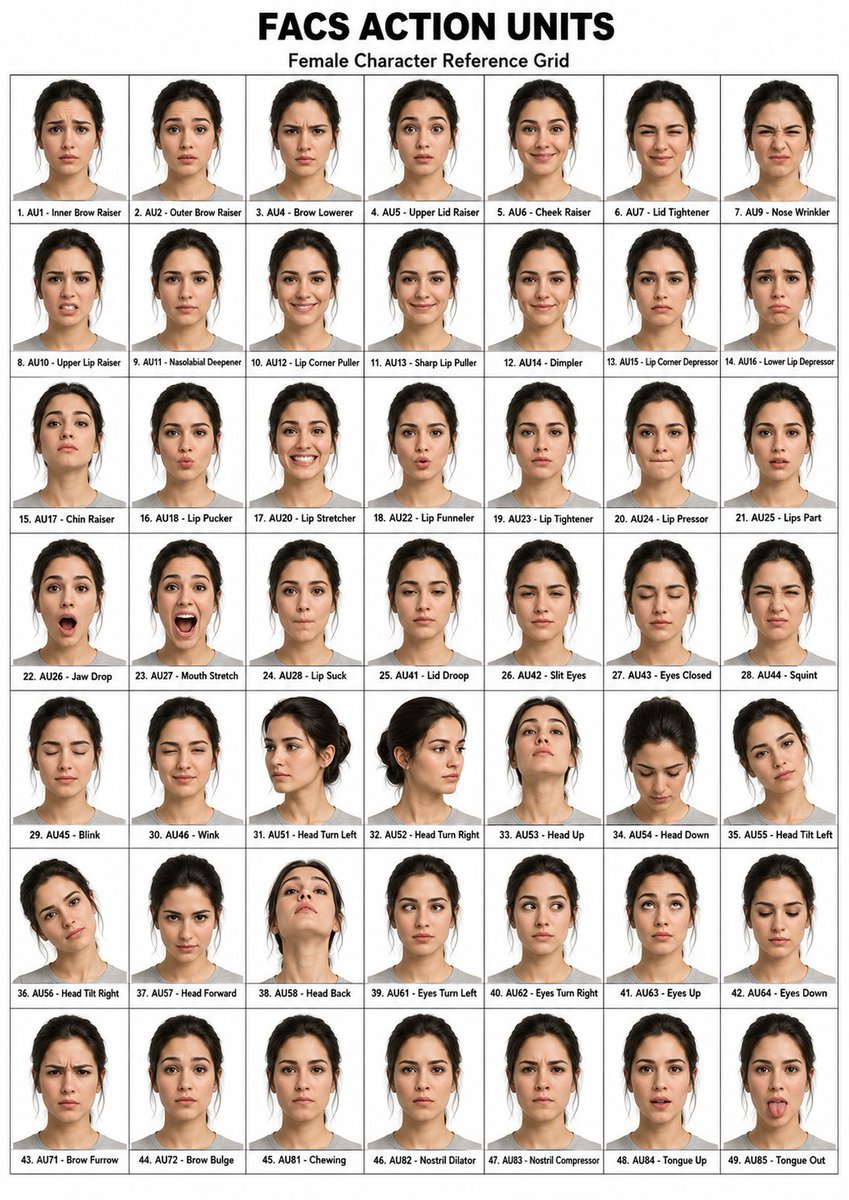
Generates a photorealistic poster-style reference grid of a female model demonstrating labeled FACS action units for facial animation or expression study.
- Prompt included
- Model and format preset
- Free template
The prompt behind this image
Copy the exact prompt behind FACS Action Units Reference Grid, or open it in the studio and make it yours.
- Type
- photorealistic facial expression reference chart
- Title
- {argument name="headline text" default="FACS ACTION UNITS"}
- Subtitle
- Female Character Reference Grid
- Style
- clean clinical studio reference sheet, white background, thin black grid lines, bold black typography, consistent passport-photo framing, realistic female model repeated in every cell, neutral gray crew-neck shirt, dark hair tied back, face anonymized with a soft rectangular blur over facial features while head pose and silhouette remain visible
- Layout › Format
- portrait poster
- Layout › Grid › Columns
- 7
- Layout › Grid › Rows
- 7
- Layout › Grid › Total Cells
- 48
- Layout › Grid › Cell Style
- each cell contains one bust portrait centered above a small numbered label
- Subject › Gender
- female
- Subject › Age
- young adult
- Subject › Ethnicity
- light to medium skin tone
- Subject › Hair
- {argument name="hair color" default="dark brown to black hair tied in a loose bun"}
- Subject › Clothing
- {argument name="shirt color" default="light gray crew-neck T-shirt"}
- Subject › Face Treatment
- {argument name="face anonymization" default="large soft beige rectangular blur masking the face"}
- Cells › Count
- 48
- Cells › Labels
- 1. AU1 - Inner Brow Raiser, 2. AU2 - Outer Brow Raiser, 3. AU4 - Brow Lowerer, 4. AU5 - Upper Lid Raiser, 5. AU6 - Cheek Raiser, 6. AU7 - Lid Tightener, 7. AU9 - Nose Wrinkler, 8. AU10 - Upper Lip Raiser, 9. AU11 - Nasolabial Deepener, 10. AU12 - Lip Corner Puller, 11. AU13 - Sharp Lip Puller, 12. AU14 - Dimpler, 13. AU15 - Lip Corner Depressor, 14. AU16 - Lower Lip Depressor, 15. AU17 - Chin Raiser, 16. AU18 - Lip Pucker, 17. AU20 - Lip Stretcher, 18. AU22 - Lip Funneler, 19. AU23 - Lip Tightener, 20. AU24 - Lip Presser, 21. AU25 - Lips Part, 22. AU26 - Jaw Drop, 23. AU27 - Mouth Stretch, 24. AU28 - Lip Suck, 25. AU41 - Lid Droop, 26. AU42 - Slit Eyes, 27. AU43 - Eyes Closed, 28. AU44 - Squint, 29. AU45 - Blink, 30. AU46 - Wink, 31. AU51 - Head Turn Left, 32. AU52 - Head Turn Right, 33. AU53 - Head Up, 34. AU54 - Head Down, 35. AU55 - Head Tilt Left, 36. AU56 - Head Tilt Right, 37. AU57 - Head Forward, 38. AU58 - Head Back, 39. AU61 - Eyes Turn Left, 40. AU62 - Eyes Turn Right, 41. AU63 - Eyes Up, 42. AU64 - Eyes Down, 43. AU71 - Brow Furrow, 44. AU72 - Brow Bulge, 45. AU81 - Chewing, 46. AU82 - Nostril Dilator, 47. AU83 - Nostril Compressor, 48. AU84 - Tongue Up, 49. AU85 - Tongue Out
- Composition Notes
- Place the large title centered at the top, subtitle directly beneath it, then the grid filling most of the poster. Keep all portraits consistent in scale and lighting, with subtle variations in facial action or head direction corresponding to the label. Use small bold black sans-serif labels inside each cell along the bottom edge. Make the overall image look like a generated FACS Action Units dataset reference grid.
Raw JSON
{"type":"photorealistic facial expression reference chart","title":"{argument name=\"headline text\" default=\"FACS ACTION UNITS\"}","subtitle":"Female Character Reference Grid","style":"clean clinical studio reference sheet, white background, thin black grid lines, bold black typography, consistent passport-photo framing, realistic female model repeated in every cell, neutral gray crew-neck shirt, dark hair tied back, face anonymized with a soft rectangular blur over facial features while head pose and silhouette remain visible","layout":{"format":"portrait poster","grid":{"columns":7,"rows":7,"total_cells":48,"cell_style":"each cell contains one bust portrait centered above a small numbered label"}},"subject":{"gender":"female","age":"young adult","ethnicity":"light to medium skin tone","hair":"{argument name=\"hair color\" default=\"dark brown to black hair tied in a loose bun\"}","clothing":"{argument name=\"shirt color\" default=\"light gray crew-neck T-shirt\"}","face_treatment":"{argument name=\"face anonymization\" default=\"large soft beige rectangular blur masking the face\"}"},"cells":{"count":48,"labels":["1. AU1 - Inner Brow Raiser","2. AU2 - Outer Brow Raiser","3. AU4 - Brow Lowerer","4. AU5 - Upper Lid Raiser","5. AU6 - Cheek Raiser","6. AU7 - Lid Tightener","7. AU9 - Nose Wrinkler","8. AU10 - Upper Lip Raiser","9. AU11 - Nasolabial Deepener","10. AU12 - Lip Corner Puller","11. AU13 - Sharp Lip Puller","12. AU14 - Dimpler","13. AU15 - Lip Corner Depressor","14. AU16 - Lower Lip Depressor","15. AU17 - Chin Raiser","16. AU18 - Lip Pucker","17. AU20 - Lip Stretcher","18. AU22 - Lip Funneler","19. AU23 - Lip Tightener","20. AU24 - Lip Presser","21. AU25 - Lips Part","22. AU26 - Jaw Drop","23. AU27 - Mouth Stretch","24. AU28 - Lip Suck","25. AU41 - Lid Droop","26. AU42 - Slit Eyes","27. AU43 - Eyes Closed","28. AU44 - Squint","29. AU45 - Blink","30. AU46 - Wink","31. AU51 - Head Turn Left","32. AU52 - Head Turn Right","33. AU53 - Head Up","34. AU54 - Head Down","35. AU55 - Head Tilt Left","36. AU56 - Head Tilt Right","37. AU57 - Head Forward","38. AU58 - Head Back","39. AU61 - Eyes Turn Left","40. AU62 - Eyes Turn Right","41. AU63 - Eyes Up","42. AU64 - Eyes Down","43. AU71 - Brow Furrow","44. AU72 - Brow Bulge","45. AU81 - Chewing","46. AU82 - Nostril Dilator","47. AU83 - Nostril Compressor","48. AU84 - Tongue Up","49. AU85 - Tongue Out"]},"composition_notes":"Place the large title centered at the top, subtitle directly beneath it, then the grid filling most of the poster. Keep all portraits consistent in scale and lighting, with subtle variations in facial action or head direction corresponding to the label. Use small bold black sans-serif labels inside each cell along the bottom edge. Make the overall image look like a generated FACS Action Units dataset reference grid."}How to use FACS Action Units Reference Grid in 3 steps
- 1Upload ImagePNG, JPG or paste
Add your photo
Upload the photo the template builds on. The prompt, model and format are already set.
- 2…a portrait of your subject in softgolden-hour light, 85mm…
Personalize
Edit the subject and creative details for your destination.
- 3Generate
Generate
Press Generate — your image is created in PicX Studio, so you can compare it with the original and refine one variable at a time.
More like this
Templates with the same subject, style or setup. Open one to see its prompt.
FACS Action Unit Reference Grid

Movement Sheet - Dance Reference (Seedance 2.0)

Paris Travel Collage Grid - Face Reference

Korean Luxury Fashion Editorial 2x2 Grid Series

Minimalist Fashion Editorial Split Layout

Ultra-Realistic Vogue-Style Editorial Fashion Grid

Venom SpongeBob Hyperreal Cinematic Mix

Hero Portrait Comic Multi-Panel Poster

Panning Motion Soccer Kick Poster
Dual Composition Hero Action Football Poster

Headphones Lifestyle Nine Panel Grid
Photoreal FACS Expression Grid
Make it yours
FACS Action Units Reference Grid works as-is. These are the safest ways to change it without losing the look.
Change one field
Copy a single group, rewrite it, and generate again so you can see what that field is doing.
Keep the frame, change the subject
Hold the composition and light of FACS Action Units Reference Grid, then swap wardrobe, props or the person for a new take.
| If the result… | Why | Fix |
|---|---|---|
| The result drifts from the preview | Too many fields changed at once. | Reuse FACS Action Units Reference Grid as-is first, then change one group — subject, light, or setting. |
| GPT Image 2 ignores part of the JSON | Some models flatten or skip nested keys. | Keep the same values and paste them as a short paragraph instead. |
More GPT Image 2 templates
Other prompts made for GPT Image 2.

Six VTuber Japanese Logo Sheet

Realistic Portrait of Woman and Deer

The Vista Modular Condo Poster

AI Model Routing Comparison Infographic

2.5D Anime Art Board

Isometric Productivity Desk Scene

New York Double Exposure Poster

Four-Panel AI Landscape Comparison

Japanese Tatami Lifestyle Magazine Cover

NESCAFÉ Coffee Map Poster
More image prompts
Fresh picks from across the catalog.
Sun-Drenched Candid Selfie Portrait

Character Generation from Google Slides Shapes
Romantic Voxel Dinner Date
Old Photo Restoration and Modernization
Google Gemini Nano Banana 2 Chatgpt Grok
Censored Glam Selfie
Ultra Woman Kaiju Battle Variations
Japanese Suburb in 2000s Atmosphere

Cinematic Profile Portrait Prompt with Backlighting and Bokeh
3D Tiny Anime Girl 'Gugu' Sequence
Browse template categories
FACS Action Units Reference Grid questions
How do I use the FACS Action Units Reference Grid template?
Add your photo if the template asks for one, edit the prompt if you like — the template's model and format are already selected — and press Generate. Your version opens in PicX Studio.
Can I customize the FACS Action Units Reference Grid template?
Yes. You can change the subject, setting, lighting, mood, format, and available model controls before creating your image.
Is the FACS Action Units Reference Grid template free?
Opening and editing this template is free. Generating uses credits, shown on the Generate button when you are signed in.
Which AI model should I use?
Start with GPT Image 2, which is the model associated with this template. You can compare another compatible model for a different finish.
Looking for something else? Browse all templates.

Your photo, any look
Thousands of ready templates for every top image and video model, from one credit balance.