How do I use the Anime Clerk in PS5 Game Store template?
Choose the primary action to open PicX Studio with the available template settings. Review the model and format, personalize the creative direction, and generate when ready.
This prompt generates a vertical anime-style promotional illustration of a suited young woman presenting a PS5 game inside a PlayStation-branded retail store, ideal for social posts, posters, or mock advertisement art. Change the subject, setting, or lighting one variable at a time.
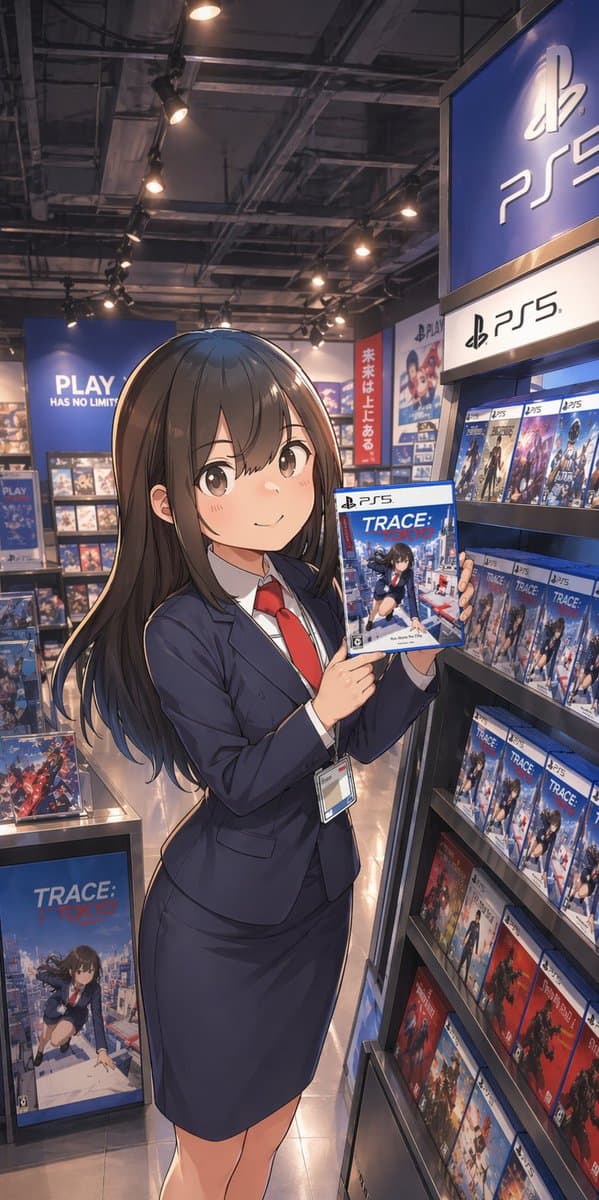
A polished anime-style illustration of a young Japanese woman standing in a modern video game store aisle, posed like a store clerk or promotional staff member. She has long, straight {argument name="hair color" default="dark brown"} hair with soft shine and gentle layered ends, and she wears a fitted navy business suit with exactly 4 visible clothing/accessory pieces: a navy blazer, a matching pencil skirt, a white dress shirt, and a bright red necktie, plus a staff ID badge hanging from her waist. Her face is intentionally obscured by a smooth blank blur with no facial features. She stands in a relaxed three-quarter pose, slightly turned toward the viewer, holding up a PS5 game case with both hands at chest height to present it. The game cover title should read {argument name="game title" default="TRACE: TOKYO"}, showing an anime schoolgirl over a Tokyo city background. Set the scene inside a PlayStation-branded retail section with 2 dominant PS5 signs visible on the right side, multiple blue PlayStation displays, and shelves densely stocked with PS5 game boxes. Include 1 large floor display box for the same featured game near the lower left, and many repeated PS5 cases on the right shelf, with a few red-spined game cases on the lower shelves for color contrast. In the back left, add a large blue wall sign reading {argument name="store slogan" default="PLAY HAS NO LIMITS"}. In the mid-background, add 1 vertical red banner with Japanese text reading {argument name="banner text" default="未来は上にある。"}. Use warm overhead spotlights, a realistic game shop interior with exposed industrial ceiling fixtures, glossy tile floor reflections, and cinematic depth. Composition is vertical smartphone aspect ratio, full-body framing, slightly low eye-level perspective, with the woman centered-left and the PS5 shelf dominating the right side. Render in high-detail contemporary anime key art style, clean linework, soft shading, realistic store lighting, rich blue tones, and a premium promotional illustration feel.
Choose the primary action to open PicX Studio with the available template settings. Review the model and format, personalize the creative direction, and generate when ready.
Yes. You can change the subject, setting, lighting, mood, format, and available model controls before creating your image.
This template is free to open and customize. Generation usage is shown in PicX Studio before you create.
Start with GPT Image 2, which is the model associated with this template. You can compare another compatible model for a different finish.
© 2026 PicX Studio. All rights reserved.

Follow a topic to a crawlable collection of related PicX Studio templates.
43,474 public templates available. Verified via the PicX Studio public templates API; refreshed hourly.















![Minimalist Flat Vector Travel Poster — Premium minimalist flat-vector travel poster for {argument name="city name" default="[CITY_NAME]"}, 3:4 vertical format.](https://cms-assets.youmind.com/media/1787917359711_3ug846_HQX205cbMAA6F6S-300x400.jpg)























![Magazine-Style Travel Photo Collection Generation — 提示词(封面版)
请将指定角色融入到位于 [{argument name="地点" default="上海迪士尼"}] 的实景中,呈现他们在此地观光的场景。务必确保角色本人脸部特征(包括五官、比例等)100% 保](https://pbs.twimg.com/media/G7ups-ha0AIvBjq.jpg)


![Advertising-Style Food Photography Prompt — Advertising-style food photography of {argument name="subject 1" default="[subject 1]"} arranged on a rustic table,](https://pbs.twimg.com/media/G7hnikwWwAEjlEP.jpg)