
Gritty Evangelion Poster
This prompt generates a dark, distressed retro-anime mecha poster suitable for cinematic fan art, collectible prints, or editorial-style sci-fi key visuals.
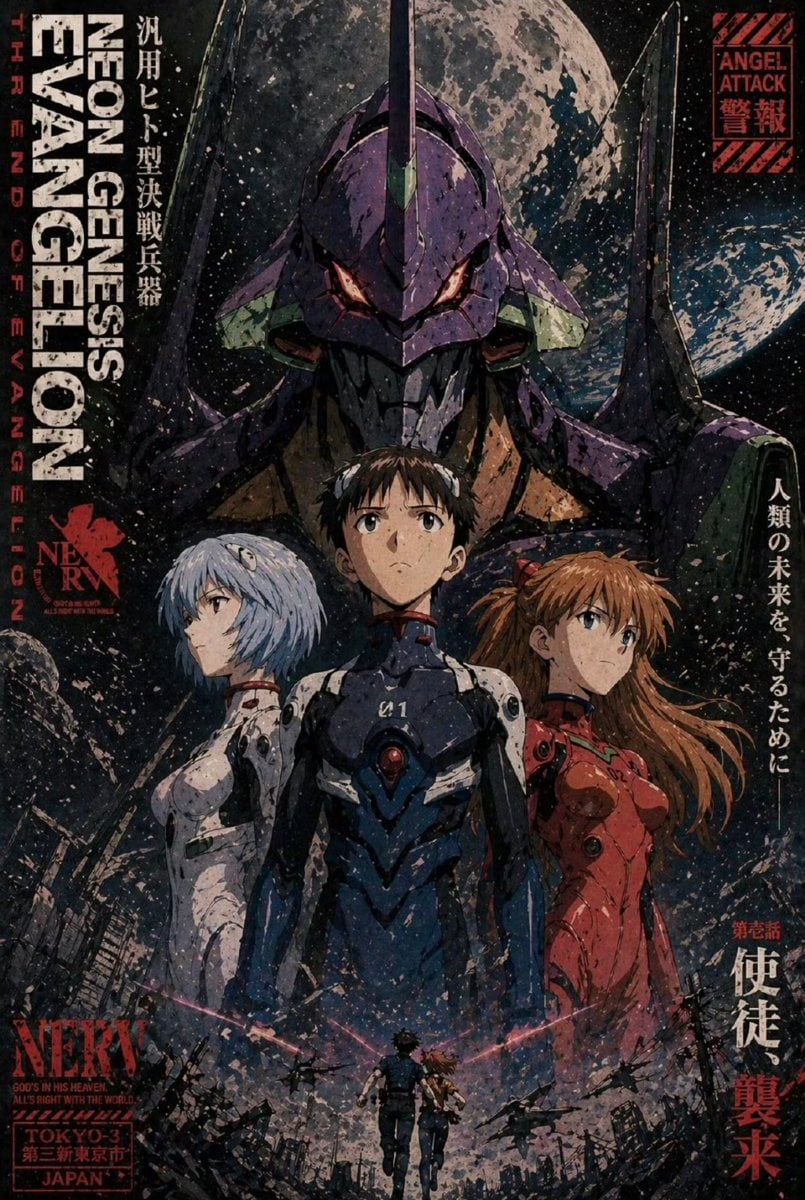
- Prompt included
- Model and format preset
- Free template
The prompt behind this image
Copy the exact prompt behind Gritty Evangelion Poster, or open it in the studio and make it yours.
A dramatic vintage anime poster in the style of a gritty sci-fi mecha key visual, featuring three teenage pilots standing back-to-back in the foreground and a towering purple biomechanical robot looming directly behind them. The center pilot is a slim teenage boy in a dark navy and black plug suit with white shoulder panels and a glowing red circular core on the chest, standing front-facing with a serious expression. On the left is a pale teenage girl with short icy blue bob-cut hair and a white futuristic bodysuit, turned slightly away in profile. On the right is a teenage girl with long auburn hair flowing to the side, wearing a vivid red plug suit, looking outward with determination. Behind all three, the giant mecha head dominates the composition, centered and symmetrical, with a single horn, glowing orange eyes, angular armor, and massive shoulder structures rising like black wings. The background is outer space with 2 visible celestial bodies: 1 huge cratered moon directly behind the mecha’s head and 1 smaller planet at the right side. The bottom of the poster shows a ruined futuristic cityscape with broken buildings, rubble, sparks, and debris. At the very bottom center, include 2 tiny human silhouettes running forward through destruction, framed by pink energy streaks arcing left and right. Use a dark indigo, black, purple, rust red, and ash gray palette with heavy film grain, distressed ink texture, weathered paper wear, paint splatter, scratched print damage, and a rough screen-printed poster finish. Compose it as a full theatrical one-sheet with dense typography integrated into the edges: large vertical English title text on the left reading "NEON GENESIS EVANGELION", smaller vertical red text beside it reading "HIRANO OF EVANGELION", a red NERV insignia and the word "NERV" near the lower left, a boxed label at bottom left reading "TOKYO-3" and "JAPAN", a red warning box at the upper right reading "ANGEL ATTACK" with Japanese characters beneath, and multiple vertical Japanese taglines along the left and right borders. Cinematic, moody, apocalyptic, highly detailed, iconic 1990s anime poster design with premium modern illustration quality.
How to use Gritty Evangelion Poster in 3 steps
- 1Upload ImagePNG, JPG or paste
Add your photo
Upload the photo the template builds on. The prompt, model and format are already set.
- 2…a portrait of your subject in softgolden-hour light, 85mm…
Personalize
Edit the subject and creative details for your destination.
- 3Generate
Generate
Press Generate — your image is created in PicX Studio, so you can compare it with the original and refine one variable at a time.
More like this
Templates with the same subject, style or setup. Open one to see its prompt.
Gritty Evangelion Unit-01 Poster

Japan Travel Brochure Poster

Cartoon TV Show Poster Pack

Trendy Cafe Drink Promo Poster

Urban Fashion Editorial Collage Streetwear Poster

Premium Fashion Editorial Cover Layout System

Polo Ralph Lauren Luxury American Heritage Fashion Campaign

Monochrome Halftone Editorial Fashion Poster

Retro Mirror Luxury Fashion Campaign Poster

Luxury Fashion Campaign Typography Poster System

Premium Fashion Editorial Campaign Poster System

Ultra-Stylized High-Fashion Streetwear Poster
Make it yours
Gritty Evangelion Poster works as-is. These are the safest ways to change it without losing the look.
Change one field
Copy a single group, rewrite it, and generate again so you can see what that field is doing.
Keep the frame, change the subject
Hold the composition and light of Gritty Evangelion Poster, then swap wardrobe, props or the person for a new take.
| If the result… | Why | Fix |
|---|---|---|
| The result drifts from the preview | Too many fields changed at once. | Reuse Gritty Evangelion Poster as-is first, then change one group — subject, light, or setting. |
| The model over-stylizes the scene | The prose prompt leaves finish and camera underspecified. | Add one camera or lighting sentence and stay on GPT Image 2. |
More GPT Image 2 templates
Other prompts made for GPT Image 2.

Six VTuber Japanese Logo Sheet

Realistic Portrait of Woman and Deer

The Vista Modular Condo Poster

AI Model Routing Comparison Infographic

2.5D Anime Art Board

Isometric Productivity Desk Scene

New York Double Exposure Poster

Four-Panel AI Landscape Comparison

Japanese Tatami Lifestyle Magazine Cover

NESCAFÉ Coffee Map Poster
More image prompts
Fresh picks from across the catalog.
Candid Denim Overall Event Photo
Anime Pop-Up Business Card
Blonde Woman in Pink Satin Pajamas
Google Maps to Illustration Transformation
Biomechanical Surrealism with Gold Leaf
Olympic Gymnast Broadcast

Product Review Lifestyle Shot Prompt (Winter Porch)

Small Angel Figure with Text Overlay

Pop Surreal Kawaii Cat on Roller Skates

ID verification character with visible passport
Browse template categories
Gritty Evangelion Poster questions
How do I use the Gritty Evangelion Poster template?
Add your photo if the template asks for one, edit the prompt if you like — the template's model and format are already selected — and press Generate. Your version opens in PicX Studio.
Can I customize the Gritty Evangelion Poster template?
Yes. You can change the subject, setting, lighting, mood, format, and available model controls before creating your image.
Is the Gritty Evangelion Poster template free?
Opening and editing this template is free. Generating uses credits, shown on the Generate button when you are signed in.
Which AI model should I use?
Start with GPT Image 2, which is the model associated with this template. You can compare another compatible model for a different finish.
Looking for something else? Browse all templates.

Your photo, any look
Thousands of ready templates for every top image and video model, from one credit balance.