
Surreal Floating Market Cinematic Editorial
A complex, cinematic editorial prompt for generating a surreal scene: a protagonist standing on a gondola in a hyper-cluttered canal marketplace, surrounded by vibrant textures and mist-shrouded gothic spires.
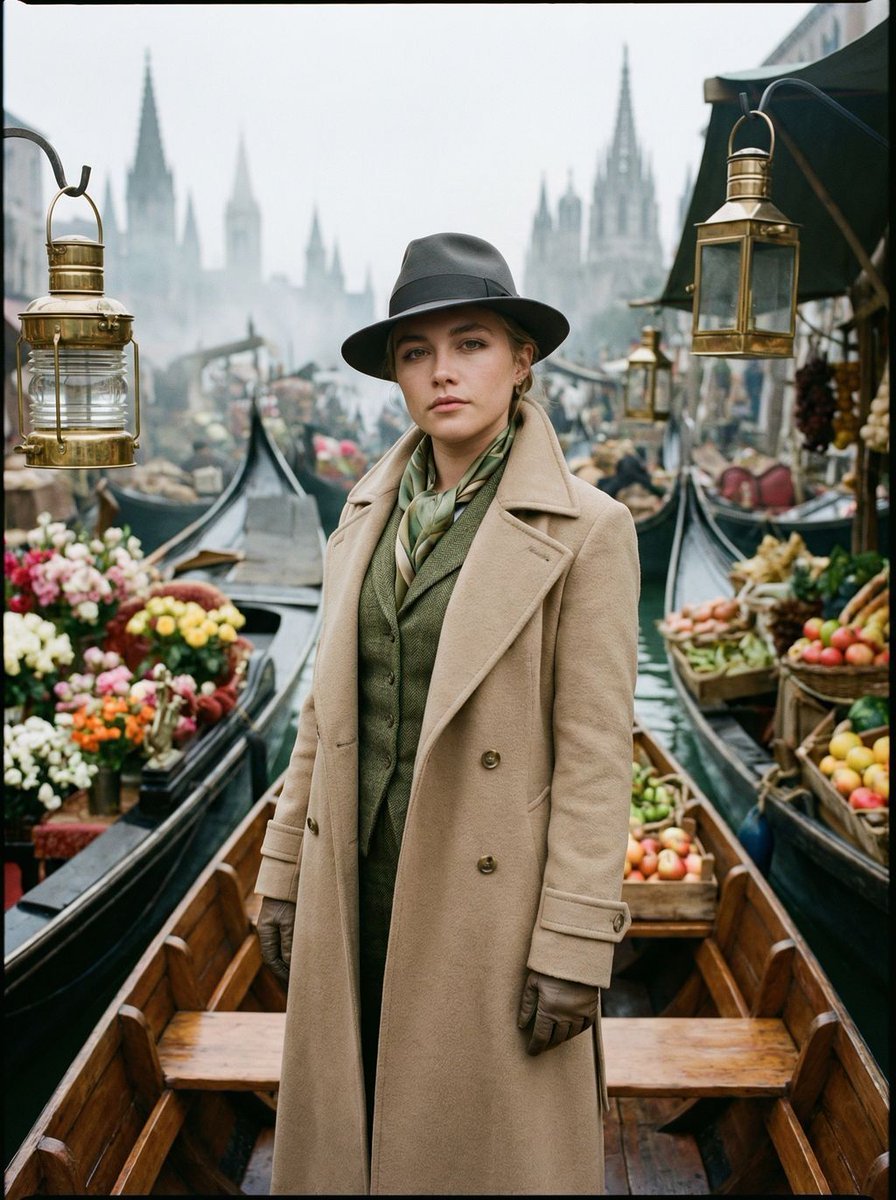
- Prompt included
- Model and format preset
- Free template
The prompt behind this image
Copy the exact prompt behind Surreal Floating Market Cinematic Editorial, or open it in the studio and make it yours.
{ "vibe_title_en": "Floating Market Mirage", "master_prompt": "A medium-long shot of The Protagonist standing confidently on the bow of a weathered wooden gondola, drifting through a hyper-cluttered, surreal canal marketplace. The scene is a dense explosion of tactile details: wicker baskets overflowing with vibrant magenta bougainvillea and waxy citrus fruits, floating crates bobbing in the teal water, and antique brass lanterns swaying from overhead lines. The Protagonist wears a heavy, textured trench coat with a popped collar and a vintage silk scarf, captured in a moment of scanning the horizon. The background features looming, mist-shrouded gothic spires that stretch impossibly high, creating a dizzying vertical depth. Shot on a Hasselblad H6D-100c with a 50mm f/2.8 lens to compress the busy background while keeping the subject sharp. The lighting is soft, diffuse 'magic hour' daylight, enhancing the rich textures of wool, wood, and water. Applied Kodak Portra 400 film emulation for warm skin tones and fine, organic grain. No neon, no plastic feel; purely cinematic, production-design realism.", "meta": { "intent": "Cinematic Editorial", "priorities": "Texture, Density, Atmospheric Depth", "device_profile": "High-End Medium Format" }, "frame": { "aspect": "9:16", "composition": "Medium-Long Shot (Knees Up), Central Framing", "layout": "Vertical symmetry with busy peripheral framing", "camera_angle": "Eye-level to slightly low angle", "tilt_roll_degrees": "0" }, "subject": { "gender": "Male", "identity": "The Protagonist / The Traveler", "demographics": "Adult, ambiguously aged", "face": "Neutral, observant gaze, sharp focus on eyes", "hair": "Hidden or styled neatly under headwear", "body": "Standing posture, weight shifted slightly, hand on railing or coat pocket", "expression": "Contemplative, focused adventure", "pose": "Standing on a moving vessel, dynamic stability" }, "wardrobe_accessories": { "garments": [ { "item": "Trench Coat", "material": "Heavy wool or gabardine, weathered texture", "color": "{argument name="coat color" default="Beige / Camel"}", "fit": "Tailored but layered" }, { "item": "Vest/Waistcoat", "material": "Tweed or textured fabric", "color": "Forest Green or Muted Teal", "fit": "Fitted" }, { "item": "Dress Shirt", "material": "Crisp cotton", "color": "White / Off-white", "fit": "Standard" } ], "accessories": [ { "item": "Fedora / Wide-brim Hat", "color": "Dark Grey or Charcoal", "material": "Felt", "brand_style": "Vintage Millinery" }, { "item": "Bowtie or Scarf", "color": "Emerald Green", "material": "Silk", "brand_style": "Classic" }, { "item": "Gloves", "color": "Dark Brown" } ] } }
How to use Surreal Floating Market Cinematic Editorial in 3 steps
- 1
Open
The prompt is already in the box next to the preview, with the template's model and format selected.
- 2…a portrait of your subject in softgolden-hour light, 85mm…
Personalize
Edit the subject and creative details for your destination.
- 3Generate
Generate
Press Generate — your image is created in PicX Studio, so you can compare it with the original and refine one variable at a time.
More like this
Templates with the same subject, style or setup. Open one to see its prompt.

Korean Model Floating Magazine Pages Campaign
Surreal Mirror Clone Editorial

Surreal Cat Astronaut — Humanoid Face Freefall

Surreal Luxury Handbag Editorial

Urban Fashion Editorial Collage Streetwear Poster

Monochrome Hypebeast Street Fashion Editorial Motion

Elegant Green Evening Gown Studio Fashion Portrait

Artistic Patchwork Fashion Portrait Spring Festival

Japanese Architectural Concrete Studio Fashion Campaign

Monroe and Ash Mediterranean Luxury Fashion Campaign

Premium Fashion Editorial Cover Layout System

Korean Luxury Fashion Editorial 2x2 Grid Series
Make it yours
Surreal Floating Market Cinematic Editorial works as-is. These are the safest ways to change it without losing the look.
Change one field
Copy a single group, rewrite it, and generate again so you can see what that field is doing.
Keep the frame, change the subject
Hold the composition and light of Surreal Floating Market Cinematic Editorial, then swap wardrobe, props or the person for a new take.
| If the result… | Why | Fix |
|---|---|---|
| The result drifts from the preview | Too many fields changed at once. | Reuse Surreal Floating Market Cinematic Editorial as-is first, then change one group — subject, light, or setting. |
| The model over-stylizes the scene | The prose prompt leaves finish and camera underspecified. | Add one camera or lighting sentence and stay on Nano Banana 2. |
More Nano Banana 2 templates
Other prompts made for Nano Banana 2.

Photorealistic Leaf Shaped Like a Dragon

K-Pop Idol Portrait Grid for Rapid Selection

Poetic Rain Forest Portrait During Golden Hour

Urban Street Portrait with Cartoon Inner Self Duo

Candid Nighttime Photo with Cat Prompt

High-Concept 3D Diorama Generation Prompt

Cinematic Futuristic Studio Portrait Template

Skincare Editorial Photography Collage Prompt

Hyper-Realistic Commercial Product Photography (Splash Effect)

Hyper-Realistic Nightclub Portrait Prompt
More image prompts
Fresh picks from across the catalog.
Hyper-realistic Origami Sculpture
Expressive Mixed-Media Ink Portrait

Creating LINE Stickers with Nano Banana 2
Warrior Princess Artistic Poster

Luxury Holiday Couple Editorial Portrait
Casual Collegiate Lifestyle Portrait with Iced Drink

Coastal Bench Portrait — Navy Floral Sundress
Cinematic Beach Portrait at Golden Hour

Futuristic Life System Hologram Portrait

Low-Poly Geometric Character Art
Browse template categories
Surreal Floating Market Cinematic Editorial questions
How do I use the Surreal Floating Market Cinematic Editorial template?
Add your photo if the template asks for one, edit the prompt if you like — the template's model and format are already selected — and press Generate. Your version opens in PicX Studio.
Can I customize the Surreal Floating Market Cinematic Editorial template?
Yes. You can change the subject, setting, lighting, mood, format, and available model controls before creating your image.
Is the Surreal Floating Market Cinematic Editorial template free?
Opening and editing this template is free. Generating uses credits, shown on the Generate button when you are signed in.
Which AI model should I use?
Start with Nano Banana 2, which is the model associated with this template. You can compare another compatible model for a different finish.
Looking for something else? Browse all templates.

Your photo, any look
Thousands of ready templates for every top image and video model, from one credit balance.