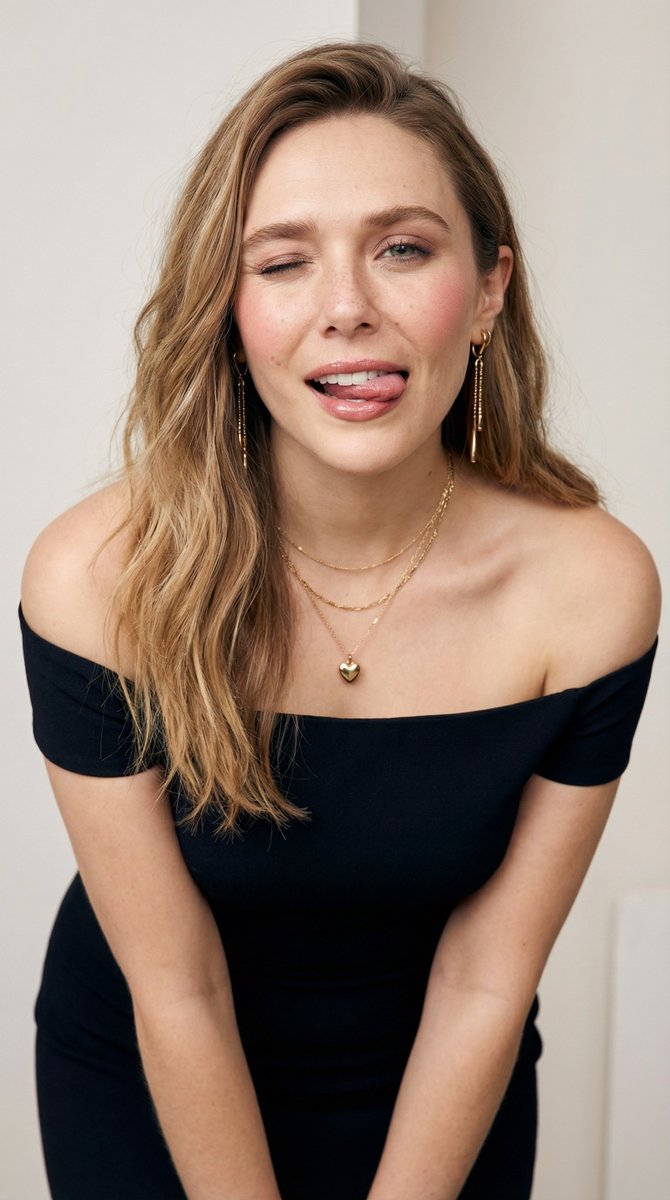
High-Fashion Chessboard Editorial with Ana de Armas
{
"subject": {
"identity": {
"biometric_reference": "{argument name="celebrity reference" default="Ana de Armas"}",
"facial_structure": {
"morphology": "heart-shaped face, high-set prominent zygomatic arches, soft mandibular curve",
"eyes": "almond-shaped, hazel-green iris with complex radial stroma patterns, dark limbal rings, dense lash density",
"nose": "straight dorsum, refined tip projection, narrow alar base",
"mouth": "defined vermilion border, pronounced Cupid's bow, symmetrical labial volume, Type I dental occlusion with natural incisor alignment",
"skin": "Fitzpatrick scale Type II, porcelain tone (Hex: #F5E1D2), high-fidelity pore texture, visible vellus hair, subsurface scattering (SSS) enabled"
},
"hair": {
"style": "platinum blonde (Hex: #E5E4E2), slicked back, wet-look texture, high specular gloss, visible root separation"
}
},
"body": {
"somatotype": "mesomorph-ectomorph hybrid, athletic lean mass",
"proportions": "1:1.618 golden ratio application, 0.7 waist-to-hip ratio, defined clavicle projection, anatomical skeletal integrity",
"skin_physics": "micro-texture mapping, realistic joint folding, absence of procedural smoothing"
},
"wardrobe": {
"outerwear": "oversized black wool blazer (Hex: #000000), structured shoulders, satin peak lapels, matte fabric weave",
"innerwear": "sheer white silk lace blouse (Hex: #FFFFFF), intricate floral embroidery, deep V-neckline, ruffled Victorian-style cuffs",
"legwear": "white micro-mesh fishnet stockings, high elastic tension, procedural transparency",
"accessories": [
"white pleated folding fan (Hex: #FDFDFD), matte finish",
"single-strand pearl necklace, high luster",
"silver cross brooch on left lapel (Hex: #C0C0C0)"
]
},
"pose_action": {
"description": "seated on a checkered floor, legs spread in an asymmetric V-shape, right arm extended back for support, left hand holding an open fan across the chest, intense direct eye contact (power gaze)",
"muscle_tension": "engaged core, relaxed distal phalanges"
},
"scene": {
"environment": "giant surrealist chessboard, polished marble flooring (Hex: #0A0A0A black tiles, #F5F5F5 white tiles with grey veins)",
"props": "oversized Carrara marble chess pieces (King, Rook, Pawn, Bishop), high-gloss reflection, volumetric weight",
"atmosphere": "Vogue editorial aesthetic, high-fashion minimalism, zero atmospheric haze"
},
"lighting": {
"setup": "high-contrast studio lighting, dual-point key light, sharp fall-off shadows",
"technical_details": "specular highlights on marble and wet hair, rim lighting for subject-background separation, 5500K color temperature"
},
"camera": {
"technical_specs": "9:16 aspect ratio, 35mm prime lens, f/8 aperture for deep focus














![nano-banana-grwm-mirror-selfie-pink — Nano Banana 2
Prompt (JSON):
{
"type": "image_prompt",
"description": {
"subject": {
"main": "[NAME] com o](/_next/image?url=https%3A%2F%2Fcdn.picxstudio.com%2Fuploads%2Ftweet_img_10a_612da6f9-cf6d-417e-bdd5-cc1300d1d830.jpg&w=828&q=100)



![Naive doodle-style subject illustration — A doodle-style {argument name="subject" default="[subject]"}, naive lines, humorous shape exaggeration](https://pbs.twimg.com/media/G6Wl2YxbsAARB2b.jpg)


















![Fictional Music CD Jacket — 架空の音楽アルバムのCDジャケット風デザイン。中央に、{argument name="キャラクター設定" default="[キャラクターの容姿]が[ポーズ]"}で描かれている。背景は{argument name="背景" default="[背景]"}。画像の[](https://cms-assets.youmind.com/media/1778490963493_ekw54r_HH5CYhAbUAAomC5.jpg)