Stranger Things Inspired High-Fashion Editorial Prompt
{
"vibe_title_en": "Interdimensional Runway",
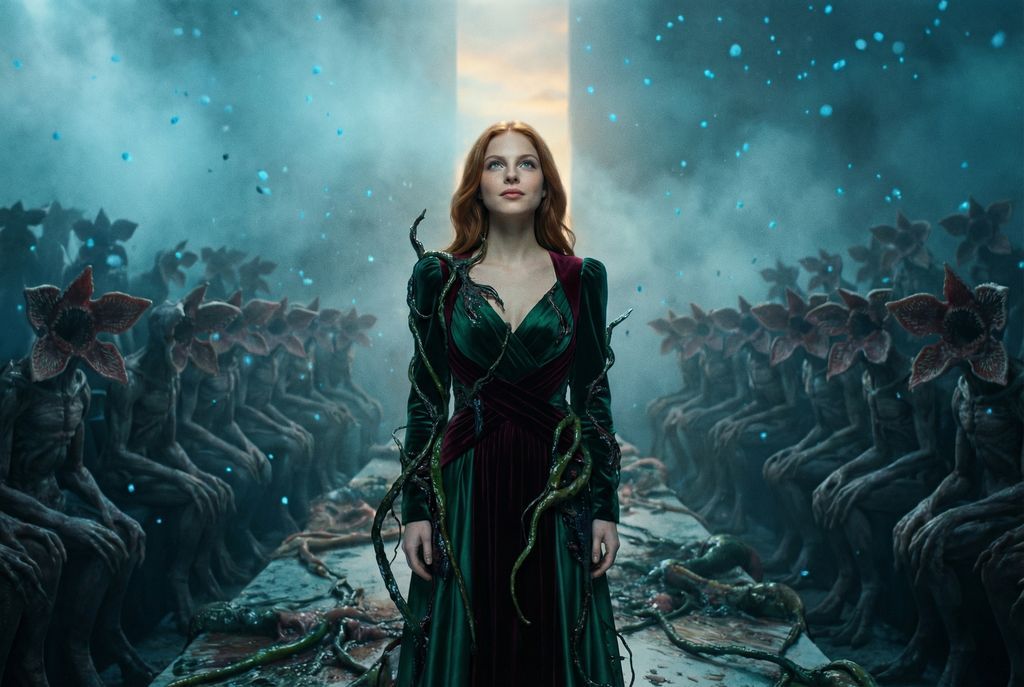
"master_prompt": "Cinematic wide shot, rule of thirds composition. The Protagonist stands on the far side of the frame, modeled as a high-fashion visionary amidst a surreal nightmare. They are looking slightly upward toward a sliver of warm light breaking through the darkness, expression hopeful and determined. The setting is a decaying, biological fashion runway located in the 'Upside Down' dimension; the air is thick with floating ash, blue spores, and cold mist. The background is dense and busy, packed with silhouettes of Demogorgon-like creatures sitting in rows like a fashion week audience, their flower-petal faces barely visible in the gloom. The environment is cluttered with twisting vines, slimy organic matter, and debris. The subject wears an eclectic, Gucci-inspired avant-garde ensemble—rich velvets and silks—that is partially entangled with the living vines of the environment. Lighting is dramatic: cold cyan ambient fog contrasted by a sharp, warm key light illuminating the subject's face. Shot on Kodak Vision3 500T film with a Panavision C-Series Anamorphic lens, emphasizing heavy film grain, practical creature effects, atmospheric depth, and hyper-realistic skin textures.",
"meta": {
"intent": "Surreal High-Fashion Editorial",
"priorities": "Atmosphere, Texture, Contrast, Cinematic Composition",
"device_profile": "Cinema Camera / Anamorphic"
},
"frame": {
"aspect": "2.39:1",
"composition": "Rule of Thirds with Negative Space",
"layout": "Subject offset to the side, vast busy background",
"camera_angle": "Eye-level with slight upward tilt",
"tilt_roll_degrees": "0"
},
"subject": {
"gender": "Female",
"identity": "The Protagonist / The Model",
"demographics": "Adult, High-Fashion Model Archetype",
"face": "Striking features, glowing highlights from the key light",
"hair": "Styled in an avant-garde manner, perhaps slightly windblown by the atmospheric storm",
"body": "Statuesque, poised mid-movement",
"expression": "Hopeful, determined, looking upward towards the light",
"pose": "Standing with confident posture, head tilted up, ignoring the monsters"
},
"wardrobe_accessories": {
"garments": [
{
"item": "Avant-garde Layered Gown/Suit",
"material": "Velvet, Silk, and Brocade",
"color": "Deep Emerald and Burgundy",
"fit": "Oversized shoulders, flowing train"
},
{
"item": "Organic Overgrowth Accents",
"material": "Biological vines (surreal)",
"color": "Dark Blue/Black",
"fit": "Entwined with the fabric"
}
],
"accessories": [
{
"item": "Statement Earrings",
"color": "Gold",
"material": "Metal",
"brand_style": "Baroque Luxury"
}
]
},
"environment": {
"setting": "The Upside Down Fashion Show",
"surfaces"




![69-untitled — FORMAT: 15s / 145 BPM / 14 SHOTS
SUBJECT: @[image1]
WARDROBE: Clean modern outfit
ENVIRONMENT: Street / indoor transitions
MOOD: Discovery → contr](/_next/image?url=https%3A%2F%2Fcdn.picxstudio.com%2Fuploads%2Fpost69_img0_d45faecf-38c3-4bcb-81a4-f6eb1cf42bb2.jpg&w=828&q=100)















![118-google-nano-banana-pro-skincare-product- — A professional skincare shot of a [product container] with [cap/lid], labeled [brand, product, descriptor, volume](/_next/image?url=https%3A%2F%2Fcdn.picxstudio.com%2Fuploads%2Fpost118_img0_332898b8-29ea-42a9-87ab-9ed746a3f944.jpg&w=828&q=100)


![Naive doodle-style subject illustration — A doodle-style {argument name="subject" default="[subject]"}, naive lines, humorous shape exaggeration](https://pbs.twimg.com/media/G6Wl2YxbsAARB2b.jpg)