Rainy Day Anime Vocabulary Sheet
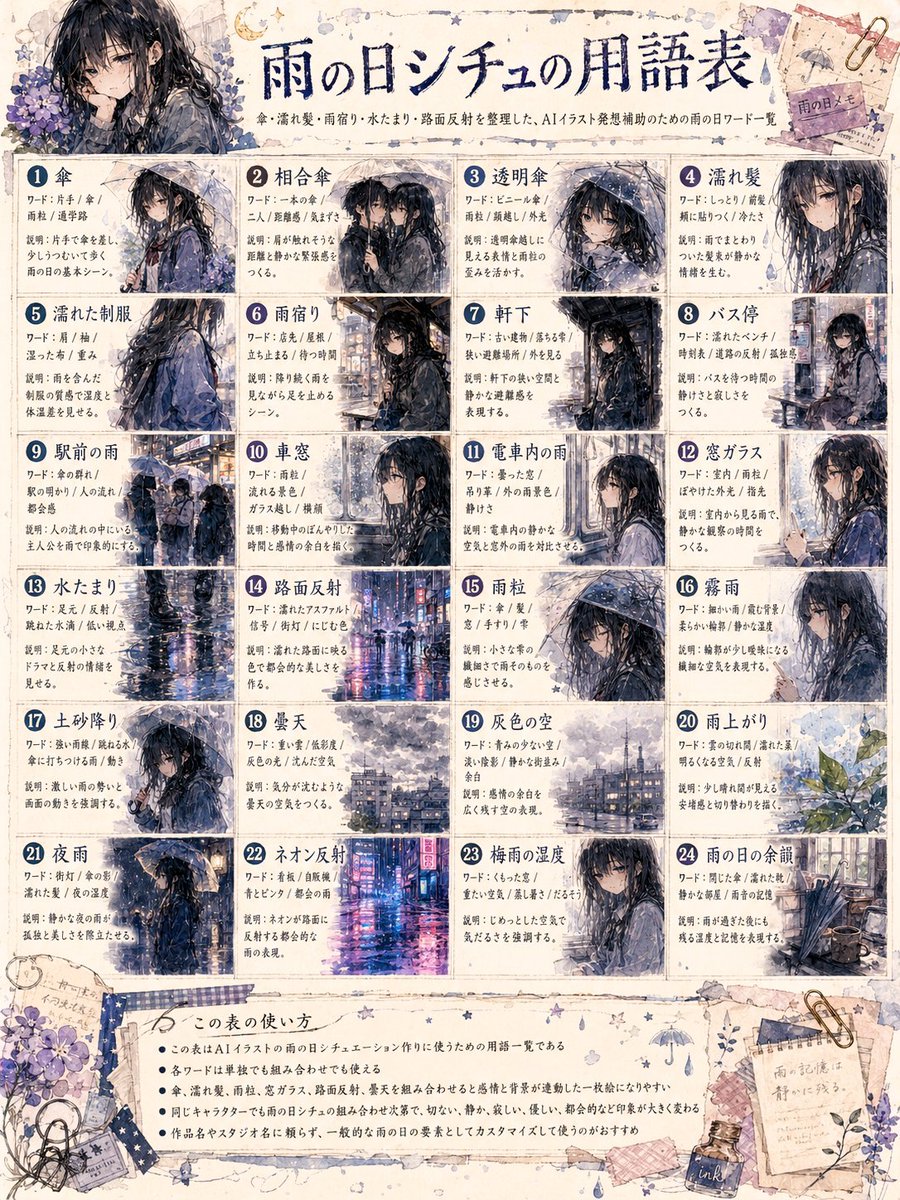
Goal: Create a detailed Japanese-style illustrated reference sheet infographic titled {argument name="headline text" default="雨の日シチュの用語表"}, explaining useful rainy-day scene vocabulary for AI illustration prompts.
Canvas: Portrait 3:4 poster, aged cream watercolor paper with ink stains, tape, paperclips, torn memo scraps, tiny stars, raindrop doodles, umbrella doodles, and purple hydrangea decorations in the corners. Use a handmade scrapbook notebook aesthetic with thin navy divider lines and slightly worn edges.
Overall visual style: Soft anime watercolor and ink wash, melancholic rainy atmosphere, muted navy, gray, lavender, and beige palette. The recurring subject is {argument name="main character" default="a black-haired anime girl in a dark raincoat"}, usually wet from rain, carrying or standing under {argument name="umbrella color" default="a transparent or black umbrella"}. Add reflective wet streets, mist, puddles, raindrops on glass, and blurred city lights. Keep the text dense but neatly organized like a prompt-writing cheat sheet.
Header: Large centered brush-calligraphy Japanese headline using the headline text. Under it, add a smaller Japanese subtitle line explaining that the sheet organizes rain, rainy season, puddles, and road-reflection words for AI illustration prompt support. Place a large decorative character portrait at the upper left with hydrangeas; the face area is covered by a soft square blur, matching the generated look. At the upper right, add small taped memo papers and a decorative umbrella sketch.
Main layout: A grid of exactly 24 numbered vocabulary cards, arranged 4 columns by 6 rows. Each card has a dark blue circular number badge, a bold Japanese term title, two or three short Japanese explanatory text lines, and a small anime rainy-scene thumbnail. Use thin navy borders and off-white card backgrounds. Count and label the 24 cards as follows, with these visible concepts: 1 umbrella, 2 shared umbrella, 3 transparent umbrella, 4 wet hair, 5 wet school uniform, 6 rain lodging or taking shelter from rain, 7 under the eaves, 8 bus stop, 9 rain in front of the station, 10 sudden shower, 11 rain inside a train car, 12 window glass, 13 puddle, 14 road surface reflection, 15 raindrops, 16 misty rain, 17 muddy ground, 18 cloudy sky, 19 gray sky, 20 after the rain, 21 night rain, 22 neon reflections, 23 rainy-season humidity, 24 rainy-day aftermath.
Thumbnail details: Vary every card image while keeping the same rainy anime mood. Include close-up portraits, walking scenes, umbrellas, wet clothes, bus stop, station crowd, train window, puddle reflection, neon city street, hydrangea after rain, and rainy room or alley aftermath. Cards 10 and 11 should include soft gray square blurs over part of the character face area, echoing the original censored-looking artifacts.
Bottom section: Add a wide bordered note panel titled in Japanese as a usage guide, with exactly 5 bullet points in small Japanese text explaining how to use the vocabulary list for AI illustration prompts. Decorate the bottom with washi tape, a fountain pen ink bottle, scattered clips, handwritten memo scraps, small flowers, and tiny rain icons.
Constraints: The final image must feel like an information-dense printable reference sheet, not a single illustration. Use exactly 24 numbered cards and exactly 5 bottom bullet points. Keep the Japanese calligraphy headline prominent, maintain legible grid structure, and avoid adding logos or watermarks.



![69-untitled — FORMAT: 15s / 145 BPM / 14 SHOTS
SUBJECT: @[image1]
WARDROBE: Clean modern outfit
ENVIRONMENT: Street / indoor transitions
MOOD: Discovery → contr](/_next/image?url=https%3A%2F%2Fcdn.picxstudio.com%2Fuploads%2Fpost69_img0_d45faecf-38c3-4bcb-81a4-f6eb1cf42bb2.jpg&w=828&q=100)
















![118-google-nano-banana-pro-skincare-product- — A professional skincare shot of a [product container] with [cap/lid], labeled [brand, product, descriptor, volume](/_next/image?url=https%3A%2F%2Fcdn.picxstudio.com%2Fuploads%2Fpost118_img0_332898b8-29ea-42a9-87ab-9ed746a3f944.jpg&w=828&q=100)



![Naive doodle-style subject illustration — A doodle-style {argument name="subject" default="[subject]"}, naive lines, humorous shape exaggeration](https://pbs.twimg.com/media/G6Wl2YxbsAARB2b.jpg)




















![Monochromatic Ivory Cinematic Portrait — [SUBJECT], contemplative cinematic frame, ultra-realistic film still; soft diffused window light wrapping gently around](https://pbs.twimg.com/media/G9ab356bAAAPE1n.jpg)





![Supermarket sale flyer in Japanese — スーパーマーケットの特売チラシを作って。{argument name="店名" default="[お店の名前]"}の名前も入れてください。](https://pbs.twimg.com/media/G6O7tn_acAECV3k.jpg)
