
Nano Banana Pro Pictogram Generation Prompt
A structured prompt template for Nano Banana Pro designed to generate sets of pictograms (icons) for various themes, such as YouTube content creation, ensuring a unified design, ratio, line width, and color scheme.
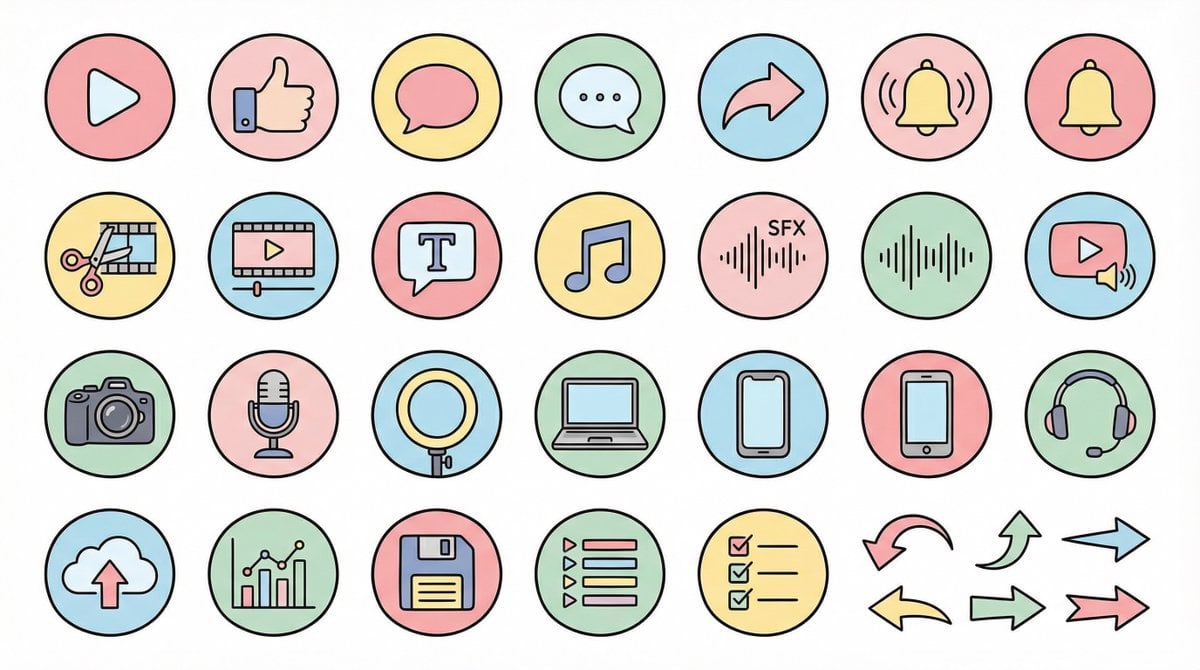
- Prompt included
- Model and format preset
- Free template
The prompt behind this image
Copy the exact prompt behind Nano Banana Pro Pictogram Generation Prompt, or open it in the studio and make it yours.
●生成テーマ {argument name="生成テーマ" default="YouTube動画に使うアイコン素材セット"} ●内容 {argument name="内容" default="YouTube制作・編集・投稿・分析に使うアイコンを統一デザインで作成。例)アクション:再生ボタン、高評価、コメント、共有、通知ベル・編集:カット、タイムライン、テロップ、BGM、効果音・撮影機材:カメラ、マイク、ライト、PC、スマホ、ヘッドセット・運用:アップロード、分析、保存、プレイリスト、リスト、矢印"} ●制作条件 ・統一された比率・線幅・色味・世界観 ・視認性が高い ・テキスト不要 ・背景:白単色 ・解像度「2K」 ・アスペクト比「16:9」 ●デザインイメージ →ここに下記のデザインイメージを挿入してください💡 【Negative prompt】 リアル、写真質感、立体、3D、複雑すぎるディテール、メタル質感、濃い影、ホラー、暗すぎる色 ------------------- ●デザインイメージ①(ゆるふわ) 丸みがある形、柔らかい配色、黒の細線、パステルカラー、親しみやすい雰囲気、手書きイラスト風 ------------------- ●デザインイメージ②(YouTube風シンプルフラット) 太ライン、Red×White×Black重視、シャープな角、強調ライン、視認性優先、モダンなUIアイコン ------------------- ●デザインイメージ③(シンプル) ミニマル、細ライン、洗練された間隔、無彩色中心、アイコンフォント風、上品で落ち着いたデザイン ------------------- ●デザインイメージ④(ゲーム実況・配信者) 蛍光系アクセントカラー(ネオンブルー/紫/赤)、SF感、Sharp edges、HUD UIスタイル、サイバーでエッジの効いたデザイン ------------------- ●デザインイメージ⑤(カラフルポップ・KIDS教育系) 太めの丸みのあるシルエット、明るいカラフル配色(赤・黄・緑・青・ピンク)、絵本風、柔らかくて楽しげな雰囲気、シンプルで認識しやすいアイコン、かわいいけど幼児向けすぎない教育系デザイン。 ------------------- ●デザインイメージ⑥(解説系・歴史・レトロ) 落ち着いたレトロ配色(ブラウン・濃緑・深紺・セピア)、小説風・掲示板風・考察系の雰囲気、細ライン、少し重厚感のあるアイコン、古地図/資料感/アーカイブ感、世界観に統一感のあるミステリアスなトーン。 ------------------- ●デザインイメージ⑦(派手・躍動感) 太めの線、強めのコントラスト、派手めのカラー(赤・黄色・黒)、エネルギッシュで動きがある印象、日本の漫画的強調表現(ビックリマーク、スピード線、強調文字風)、視聴者の注意を引くパワフルなポップデザイン。
How to use Nano Banana Pro Pictogram Generation Prompt in 3 steps
- 1
Open
The prompt is already in the box next to the preview, with the template's model and format selected.
- 2…a portrait of your subject in softgolden-hour light, 85mm…
Personalize
Edit the subject and creative details for your destination.
- 3Generate
Generate
Press Generate — your image is created in PicX Studio, so you can compare it with the original and refine one variable at a time.
More like this
Templates with the same subject, style or setup. Open one to see its prompt.

Woman in Mall with Chanel Bag - Heart Gesture
Isometric Pictogram Diagram Prompt for Nano Banana Pro

Manga Generation Prompt Template for Nano Banana Pro

VFX Comparison Image Prompt (Before/After) for Nano Banana Pro

Nano Banana Prompt for Consistent Character Jumpshots

Cinematic Camera Instructions for Nano Banana Pro

Hyper-Realistic Commercial Food Photography Prompt for Gemini Nano Banana Pro
Cinematic Portrait Prompt for Google Nano Banana Pro

Multi-Frame Lifestyle Portrait Prompt for Nano Banana Pro

Low-Key Product Photography Prompt for Gemini Nano Banana Pro

Masterpiece Political Caricature Prompt for Nano Banana 2
Commercial Perfume Photography Prompt for Nano Banana Pro
Make it yours
Nano Banana Pro Pictogram Generation Prompt works as-is. These are the safest ways to change it without losing the look.
Change one field
Copy a single group, rewrite it, and generate again so you can see what that field is doing.
Keep the frame, change the subject
Hold the composition and light of Nano Banana Pro Pictogram Generation Prompt, then swap wardrobe, props or the person for a new take.
| If the result… | Why | Fix |
|---|---|---|
| The result drifts from the preview | Too many fields changed at once. | Reuse Nano Banana Pro Pictogram Generation Prompt as-is first, then change one group — subject, light, or setting. |
| The model over-stylizes the scene | The prose prompt leaves finish and camera underspecified. | Add one camera or lighting sentence and stay on Nano Banana 2. |
More Nano Banana 2 templates
Other prompts made for Nano Banana 2.

Photorealistic Leaf Shaped Like a Dragon

K-Pop Idol Portrait Grid for Rapid Selection

Poetic Rain Forest Portrait During Golden Hour

Urban Street Portrait with Cartoon Inner Self Duo

Candid Nighttime Photo with Cat Prompt

High-Concept 3D Diorama Generation Prompt

Cinematic Futuristic Studio Portrait Template

Skincare Editorial Photography Collage Prompt

Hyper-Realistic Commercial Product Photography (Splash Effect)

Hyper-Realistic Nightclub Portrait Prompt
More image prompts
Fresh picks from across the catalog.
Explosive Japanese AI Threat Thumbnail
Detailed Storyboard Prompt for Brand Visuals
Giant Woman Filmmaker with Miniature Model
Drama Film Character Design
Luxury Art Figure Museum Display
Hyper-realistic Surreal Lemonade Can
E-commerce Studio Portrait with UI Overlay
Ink Drawing Style Transfer Prompt
Hyper-real honey-covered woman with bees close-up
Melancholic K-Drama Subway Poster
Browse template categories
Nano Banana Pro Pictogram Generation Prompt questions
How do I use the Nano Banana Pro Pictogram Generation Prompt template?
Add your photo if the template asks for one, edit the prompt if you like — the template's model and format are already selected — and press Generate. Your version opens in PicX Studio.
Can I customize the Nano Banana Pro Pictogram Generation Prompt template?
Yes. You can change the subject, setting, lighting, mood, format, and available model controls before creating your image.
Is the Nano Banana Pro Pictogram Generation Prompt template free?
Opening and editing this template is free. Generating uses credits, shown on the Generate button when you are signed in.
Which AI model should I use?
Start with Nano Banana 2, which is the model associated with this template. You can compare another compatible model for a different finish.
Looking for something else? Browse all templates.

Your photo, any look
Thousands of ready templates for every top image and video model, from one credit balance.