
Seedance 2.0 Video Prompt: 'What are you looking at?'
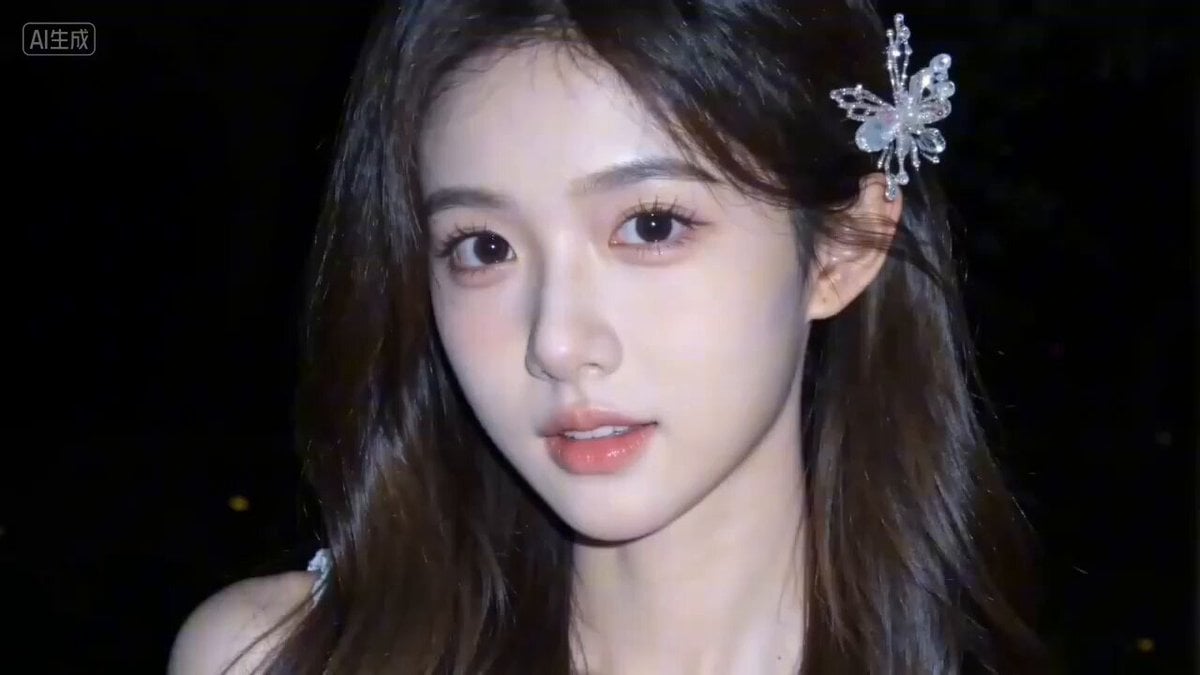
A detailed, multi-scene video prompt for Seedance 2.0, generating a 'pure desire' style video featuring a cold-skinned girl with long curly hair and a crystal butterfly hairpin.
- Prompt included
- Model and format preset
- Free template
The prompt behind this video
Copy the exact prompt behind Seedance 2.0 Video Prompt: 'What are you looking at?', or open it in the studio and make it yours.
0-3秒:初遇 画面:冷白皮少女【@图1】,深棕长卷发,水晶蝴蝶发饰在夜色中闪烁,她微微歪头,眼波流转,轻咬下唇,背景是模糊的夏夜树影。 风格:纯欲风,暗朦调,高噪点胶片颗粒感,柔光滤镜,低分辨率手机摄影感。 关键词:特写面部,慢推近景,夏夜虫鸣,轻柔钢琴前奏。 3-6秒:撩发 画面:中景,少女抬手,指尖轻拂发间的蝴蝶发饰,动作慵懒又不经意,发丝轻晃,露出锁骨处的白色蕾丝吊带。 风格:跟拍手部动作,镜头微下移,柔光打在锁骨,轻微呼吸感运镜。 关键词:指尖划过发丝的轻响,钢琴旋律渐入,细碎风铃音,蕾丝花边特写。 6-10秒:侧笑 画面:半身景,少女缓缓侧身,对着镜头眨眼,嘴角勾起浅笑,白色蕾丝吊带在夜色里温柔发光,背景是模糊的夏夜树影。 风格:环绕运镜,捕捉侧身曲线,暖调柔光,轻微动态模糊。 关键词:少女轻声呢喃“你在看什么呀?”,轻鼓点渐强,甜暖氛围拉满。 10-13秒:对视 画面:近景,少女撩开挡在眼前的碎发,眼神慵懒带笑,直视镜头,仿佛与镜头后的人对视,发间蝴蝶发饰闪着微光。 风格:快速切近景,定格眼神特写,柔光打在侧脸,冷白皮质感突出。 关键词:撩发轻响,鼓点卡点,旋律甜暖高潮,眼神拉丝。 13-15秒:回眸 画面:远景,少女转身,发间蝴蝶发饰在夜色里一闪,回头对镜头wink,随后消失在夏夜树影中,镜头拉远淡出。 风格:拉远淡出,暗朦调,低饱和度,高噪点胶片颗粒感。 关键词:虫鸣渐弱,钢琴旋律收尾,蝴蝶发饰闪光,背影消失。
How to use Seedance 2.0 Video Prompt: 'What are you looking at?' in 3 steps
- 1
Open
The prompt is already in the box next to the preview, with the template's model and format selected.
- 2…a portrait of your subject in softgolden-hour light, 85mm…
Personalize
Edit the subject and creative details for your destination.
- 3Generate
Generate
Press Generate — your video is created in PicX Studio, so you can compare it with the original and refine one variable at a time.
More like this
Templates with the same subject, style or setup. Open one to see its prompt.
Skincare Product Commercial 3
Chibi Cave Adventure — He Doesn't Know What's Coming

Wholesome Puppy and Kitten Story - Seedance 2.5

Mysterious Home Exploration Vlog - Seedance 2.5

Dark Tokusatsu Transformation - Seedance 2.5

Cinematic Xinjiang Drone Landscapes - Seedance 2.5

Late Night Kitchen Phone Recording - Seedance 2.5

3D Animated Cat and Old Man - Seedance

Realistic City Street Story Cinematic Video - Seedance

Seedance 2.0 First Test — Dynamic Motion Showcase

Dragon Rider Cinematic Flight — Seedance 2.5

Sneaker Product Commercial
Make it yours
Seedance 2.0 Video Prompt: 'What are you looking at?' works as-is. These are the safest ways to change it without losing the look.
Change one field
Copy a single group, rewrite it, and generate again so you can see what that field is doing.
Keep the frame, change the subject
Hold the composition and light of Seedance 2.0 Video Prompt: 'What are you looking at?', then swap wardrobe, props or the person for a new take.
| If the result… | Why | Fix |
|---|---|---|
| The result drifts from the preview | Too many fields changed at once. | Reuse Seedance 2.0 Video Prompt: 'What are you looking at?' as-is first, then change one group — subject, light, or setting. |
| The model over-stylizes the scene | The prose prompt leaves finish and camera underspecified. | Add one camera or lighting sentence and stay on Seedance 2.0. |
More Seedance 2.0 templates
Other prompts made for Seedance 2.0.

Comical Martial Arts Punch Scene

Maglev Train Action Sequence

Martial Arts Fight Sequence

Wuxia Protection and Trust Script

Vintage Korean Arcade MiniDV Vlog

Mercedes 190 SL Luxury Ad

Rainy Night Supernatural Reverse Comedy Video Script

Amazon Civilization Discovery

Futuristic South Asian City Transformation

Cozy Luxury Cafe Commercial
More video prompts
Fresh picks from across the catalog.
Realistic Street Commercial Character Reveal

Bioluminescent Jellyfish Alien Encounter
Reality-Shattering Glitch Metamorphosis

Floating in Space Flight

Animated Tomato Character Giving Food Storage Advice
Minimalist Photography Studio Golden Hour
FPV Cinematic Camera Path

Blooming Fractal Flowers Video
Pleiadian Woman Crystal City
Gritty Cyber-Noir Alley Fight
Browse template categories
Seedance 2.0 Video Prompt: 'What are you looking at?' questions
How do I use the Seedance 2.0 Video Prompt: 'What are you looking at?' template?
Add your photo if the template asks for one, edit the prompt if you like — the template's model and format are already selected — and press Generate. Your version opens in PicX Studio.
Can I customize the Seedance 2.0 Video Prompt: 'What are you looking at?' template?
Yes. You can change the subject, setting, lighting, mood, format, and available model controls before creating your video.
Is the Seedance 2.0 Video Prompt: 'What are you looking at?' template free?
Opening and editing this template is free. Generating uses credits, shown on the Generate button when you are signed in.
Which AI model should I use?
Start with Seedance 2.0, which is the model associated with this template. You can compare another compatible model for a different finish.
Looking for something else? Browse all templates.

Your photo, any look
Thousands of ready templates for every top image and video model, from one credit balance.