How do I use the Anime Angel Schoolgirl Character template?
Choose the primary action to open PicX Studio with the available template settings. Review the model and format, personalize the creative direction, and generate when ready.
Generates a full-body anime angel schoolgirl character reference with crimson twin tails, spread wings, halo, and detailed fantasy school-uniform styling. Change the subject, setting, or lighting one variable at a time.
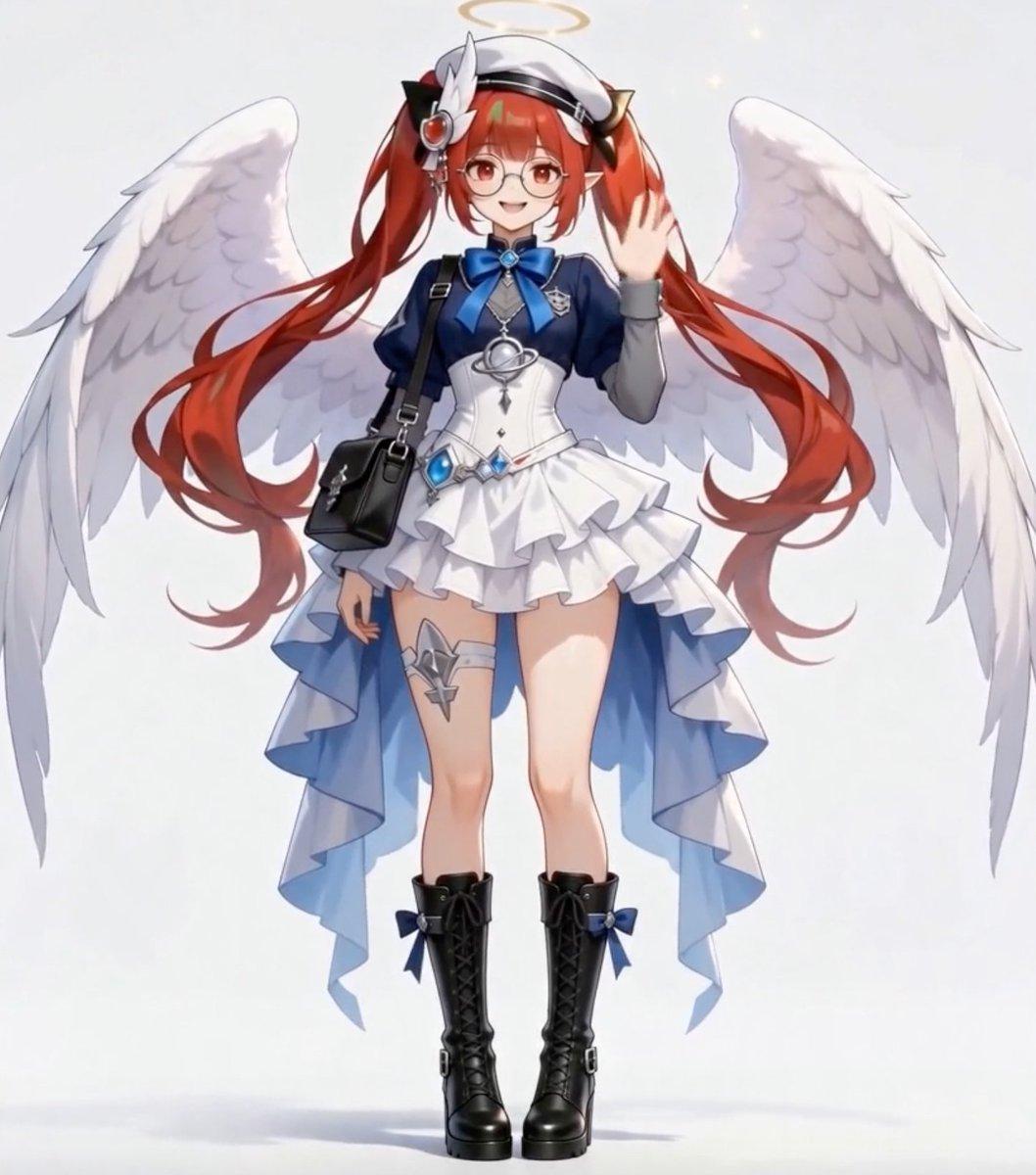
Create a full-body anime character reference illustration of a cute angel schoolgirl, centered on a clean pale gray-white studio background with soft lighting and a faint floor shadow. The character is {argument name="character name" default="a cheerful angel schoolgirl"}, standing front-facing in a relaxed pose with one hand raised in a friendly wave and the other arm lowered. Give her very long flowing {argument name="hair color" default="crimson red"} twin-tail hair with large curled ends, a white sailor-style cap, black bow accents, and small metallic hair ornaments. Her face should be cute and cheerful, with round glasses and bright red eyes, though the overall composition may partially obscure the face with a soft rectangular blur-like area if matching the source exactly. Add one glowing golden halo floating above her head and exactly two large white feathered angel wings fully spread behind her, one wing on each side, with layered feather detail. Outfit: a navy-blue school-uniform-inspired top with gray sleeves, a large glossy blue bow at the collar, a fitted white corset bodice, a silver celestial pendant at the chest, and a short white layered ruffle skirt with a dramatic asymmetrical blue-and-white trailing overskirt. Count exactly 9 prominent outfit/accessory elements: 1 white cap, 1 pair of glasses, 1 blue neck bow, 1 white corset bodice, 1 layered ruffle skirt, 1 blue trailing overskirt, 1 black shoulder bag, 1 thigh strap ornament on the left thigh, and 1 pair of black lace-up boots. Add blue gemstone details at the waist and small blue bows on the boots. The shoulder bag should hang diagonally from her shoulder across the torso on a black strap. Use polished modern anime game character art, clean linework, soft gradients, delicate highlights, high-detail fabric folds, graceful hair ribbons, and a bright ethereal angelic mood. Keep the entire figure visible from halo to boots, no cropped limbs, no text, no watermark.
Choose the primary action to open PicX Studio with the available template settings. Review the model and format, personalize the creative direction, and generate when ready.
Yes. You can change the subject, setting, lighting, mood, format, and available model controls before creating your image.
This template is free to open and customize. Generation usage is shown in PicX Studio before you create.
Start with GPT Image 2, which is the model associated with this template. You can compare another compatible model for a different finish.
© 2026 PicX Studio. All rights reserved.

Follow a topic to a crawlable collection of related PicX Studio templates.
43,474 public templates available. Verified via the PicX Studio public templates API; refreshed hourly.















![Minimalist Flat Vector Travel Poster — Premium minimalist flat-vector travel poster for {argument name="city name" default="[CITY_NAME]"}, 3:4 vertical format.](https://cms-assets.youmind.com/media/1787917359711_3ug846_HQX205cbMAA6F6S-300x400.jpg)





















![Hand-drawn isometric landmark schematic — Create a hand drawn isometric schematic diagram of {argument name="landmark" default="[LANDMARK]"}. {argument name="di](https://pbs.twimg.com/media/G6inJYdXcAAtK84.jpg)