
Cinematic Luxury Chip Commercial
A highly detailed, cinematic scene for a luxury commercial, featuring product styling and cosmic, cyberpunk lighting elements.
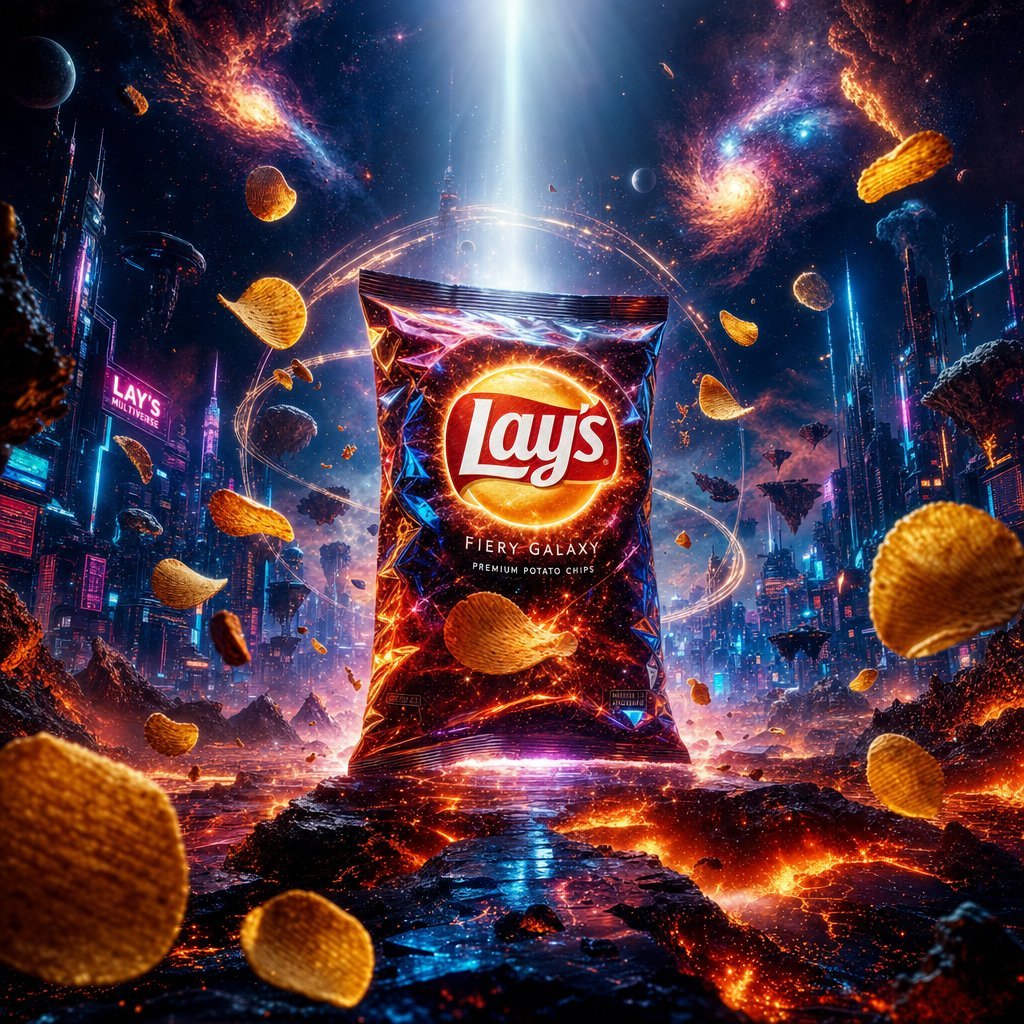
- Prompt included
- Model and format preset
- Free template
The prompt behind this image
Copy the exact prompt behind Cinematic Luxury Chip Commercial, or open it in the studio and make it yours.
- { "master_prompt": { "resolution": "8K ultra photoreal cinematic masterpiece", "aspect_ratio": "3:4 vertical global luxury advertising frame", "style": "ultimate fusion commercial (Apple + Nike + Blade Runner + Interstellar + luxury perfume ad aesthetics)", "camera": { "type": "ARRI Alexa 65 cinematic IMAX look", "lens": "85mm anamorphic ultra cinematic lens", "angle": "low heroic god-level angle", "focus": "perfect razor sharp focus on product as divine centerpiece" }, "lighting": { "key_light": "cosmic white divine light from above", "secondary_light": "neon cyan + magenta cyber rim glow", "environment_light": "molten lava orange + deep space blue + city neon reflections combined", "volumetric_light": "god rays cutting through smoke, fog, and cosmic dust simultaneously" }, "render_quality": "ultra HDR, ray tracing, global illumination, film grain cinematic, hyper-real micro texture detail, volumetric realism", "depth_of_field": "extreme cinematic shallow DOF with layered multi-reality bokeh", "atmosphere": { "particles": "cosmic dust + neon holographic pixels + volcanic embers combined", "environmental_fx": "slow motion floating energy fragments across dimensions", "smoke": "volumetric smoke blending lava fire + cyber fog + nebula clouds" }, "composition": { "structure": "perfect centered god-tier hero composition", "scale": "product appears as legendary multiverse artifact", "symmetry": "cinematic balanced chaos with controlled visual harmony", "impact": "maximum visual dominance and brand hero elevation" } }, "module_ultimate_lays": { "subject": { "product": "Lay’s premium chips packet", "pack_material": "ultra reflective holographic luxury foil with micro-detail imperfections", "logo_effect": "Lay’s logo glowing like a universal energy core", "color_identity": "dynamic shifting between red lava, neon cyber blue, cosmic violet, and golden highlights", "floating_elements": [ "crispy chips suspended in zero gravity", "lava sparks transforming into digital pixels mid-air", "tiny orbiting energy rings like planets around product", "salt crystals glowing like stars" ] }, "environment": { "scene_fusion": "volcanic inferno base merging into cyberpunk city rising into cosmic nebula sky", "ground": "cracked obsidian with molten lava + holographic grid floor", "mid_layer": "futuristic neon megacity floating structures", "sky": "massive swirling galaxy with supernova explosions", "horizon": "infinite layered multiverse transition zones" }, "energy_system": { "core_effect": "product emits gravitational energy pulse controlling all environments", "interaction": "lava, neon lights, and nebula clouds all reacting to product aura", "aura_field": "multi-layer divine halo (fire + neon + cosmic light combined)" }, "final_mood": { "emotion": "legendary, divine, futuristic, mythic, ultra-premium energy", "brand_feel": "snack transformed into multiversal god-tier artifact", "impact": "maximum cinematic advertising shock value — unforgettable global luxury visual" } } }
How to use Cinematic Luxury Chip Commercial in 3 steps
- 1
Open
The prompt is already in the box next to the preview, with the template's model and format selected.
- 2…a portrait of your subject in softgolden-hour light, 85mm…
Personalize
Edit the subject and creative details for your destination.
- 3Generate
Generate
Press Generate — your image is created in PicX Studio, so you can compare it with the original and refine one variable at a time.
More like this
Templates with the same subject, style or setup. Open one to see its prompt.










Make it yours
Cinematic Luxury Chip Commercial works as-is. These are the safest ways to change it without losing the look.
Change one field
Copy a single group, rewrite it, and generate again so you can see what that field is doing.
Keep the frame, change the subject
Hold the composition and light of Cinematic Luxury Chip Commercial, then swap wardrobe, props or the person for a new take.
| If the result… | Why | Fix |
|---|---|---|
| The result drifts from the preview | Too many fields changed at once. | Reuse Cinematic Luxury Chip Commercial as-is first, then change one group — subject, light, or setting. |
| The model over-stylizes the scene | The prose prompt leaves finish and camera underspecified. | Add one camera or lighting sentence and stay on GPT Image 2. |
More GPT Image 2 templates
Other prompts made for GPT Image 2.

Six VTuber Japanese Logo Sheet

Realistic Portrait of Woman and Deer

The Vista Modular Condo Poster

AI Model Routing Comparison Infographic

2.5D Anime Art Board

Isometric Productivity Desk Scene

New York Double Exposure Poster

Four-Panel AI Landscape Comparison

Japanese Tatami Lifestyle Magazine Cover

NESCAFÉ Coffee Map Poster
More image prompts
Fresh picks from across the catalog.
LEGO Plaza de España at Sunset

Image Replacement Prompt

Database Mascot Boxing Match
Ultra-Realistic Luxury Body Oil Product Photography

Generating Visuals from Real-Time Korean News
Romantic Sunflower Field Portrait
Kawaii Pastel Goth Editorial
2x2 Grid Car Development Phases

Japanese 4-Panel Ad Collage

Abstract Geometric Pattern Generation
Browse template categories
Cinematic Luxury Chip Commercial questions
How do I use the Cinematic Luxury Chip Commercial template?
Add your photo if the template asks for one, edit the prompt if you like — the template's model and format are already selected — and press Generate. Your version opens in PicX Studio.
Can I customize the Cinematic Luxury Chip Commercial template?
Yes. You can change the subject, setting, lighting, mood, format, and available model controls before creating your image.
Is the Cinematic Luxury Chip Commercial template free?
Opening and editing this template is free. Generating uses credits, shown on the Generate button when you are signed in.
Which AI model should I use?
Start with GPT Image 2, which is the model associated with this template. You can compare another compatible model for a different finish.
Looking for something else? Browse all templates.

Your photo, any look
Thousands of ready templates for every top image and video model, from one credit balance.