
Modern Luxury Mansion Exterior
This prompt generates a polished photorealistic front-view image of an upscale contemporary mansion, ideal for luxury real estate, architectural visualization, or dream-home concept art.
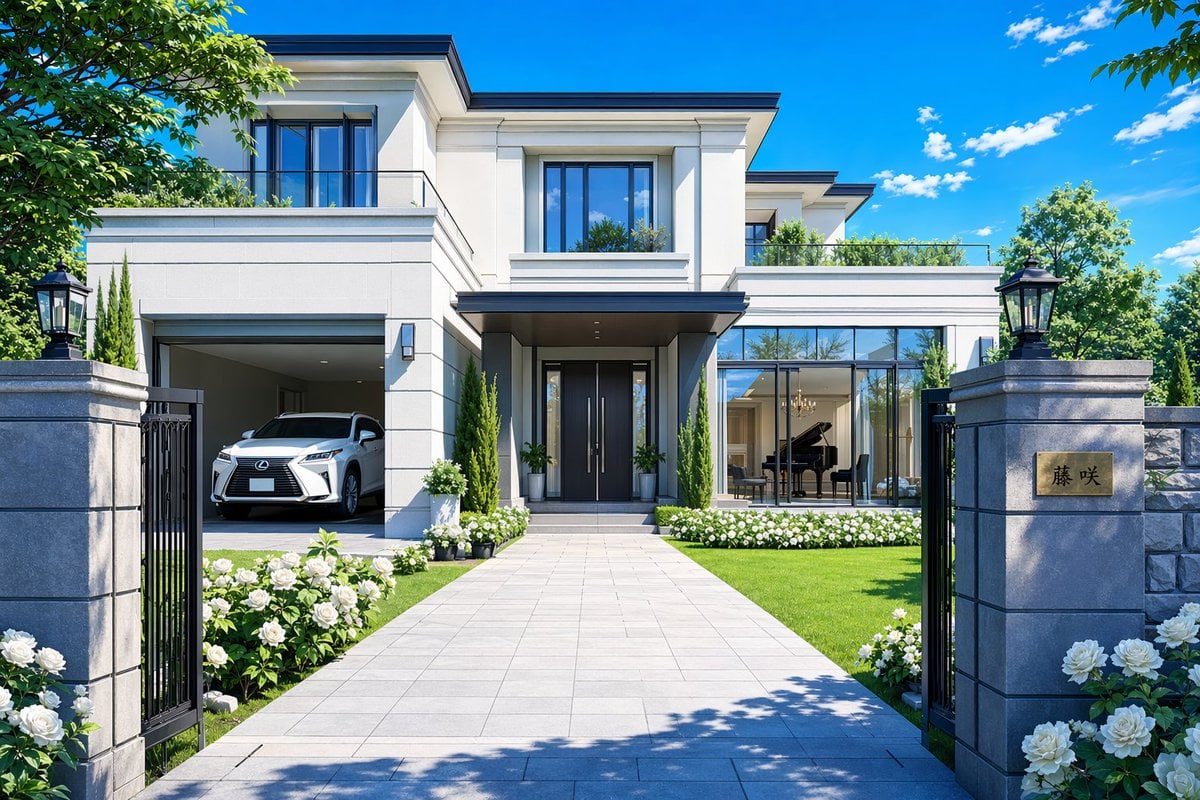
- Prompt included
- Model and format preset
- Free template
The prompt behind this image
Copy the exact prompt behind Modern Luxury Mansion Exterior, or open it in the studio and make it yours.
A photorealistic architectural exterior rendering of a large modern luxury family house viewed straight on from the front gate, perfectly centered and symmetrical. The house is a two-story contemporary mansion with smooth off-white stone or stucco walls, dark charcoal roof trim, large black-framed windows, and a grand recessed entrance with tall dark double doors under a flat canopy. On the left side, an open garage clearly reveals 1 white luxury SUV parked inside. On the right side, a floor-to-ceiling glass living room window shows 1 black grand piano inside, with elegant interior lighting faintly visible. In the foreground, 2 tall gray stone gate pillars frame the entrance, each topped with 1 classic black lantern for a total of 2 lanterns, and the right pillar has a gold nameplate engraved with Japanese text {argument name="nameplate text" default="藤 咲"}. A wide light-gray tiled walkway leads from the gate to the front door, bordered by neatly manicured green lawn and abundant white rose flowerbeds on both sides. Add trimmed shrubs, slender cypress-like trees near the doorway, low hedges, and rooftop terrace greenery. Surround the property with lush leafy trees at the edges of the frame. Use bright midday summer sunlight, crisp shadows, a vivid deep blue sky with a few small white clouds, ultra-clean materials, high-end residential design, realistic reflections in the glass, and a polished aspirational real-estate advertisement look.
How to use Modern Luxury Mansion Exterior in 3 steps
- 1Upload ImagePNG, JPG or paste
Add your photo
Upload the photo the template builds on. The prompt, model and format are already set.
- 2…a portrait of your subject in softgolden-hour light, 85mm…
Personalize
Edit the subject and creative details for your destination.
- 3Generate
Generate
Press Generate — your image is created in PicX Studio, so you can compare it with the original and refine one variable at a time.
More like this
Templates with the same subject, style or setup. Open one to see its prompt.











Make it yours
Modern Luxury Mansion Exterior works as-is. These are the safest ways to change it without losing the look.
Change one field
Copy a single group, rewrite it, and generate again so you can see what that field is doing.
Keep the frame, change the subject
Hold the composition and light of Modern Luxury Mansion Exterior, then swap wardrobe, props or the person for a new take.
| If the result… | Why | Fix |
|---|---|---|
| The result drifts from the preview | Too many fields changed at once. | Reuse Modern Luxury Mansion Exterior as-is first, then change one group — subject, light, or setting. |
| The model over-stylizes the scene | The prose prompt leaves finish and camera underspecified. | Add one camera or lighting sentence and stay on GPT Image 2. |
More GPT Image 2 templates
Other prompts made for GPT Image 2.

Six VTuber Japanese Logo Sheet

Realistic Portrait of Woman and Deer

The Vista Modular Condo Poster

AI Model Routing Comparison Infographic

2.5D Anime Art Board

Isometric Productivity Desk Scene

New York Double Exposure Poster

Four-Panel AI Landscape Comparison

Japanese Tatami Lifestyle Magazine Cover

NESCAFÉ Coffee Map Poster
More image prompts
Fresh picks from across the catalog.
Luxury Shoe Brand LINE Rich Menu

Bali Rice Field Photography
Clay Astronaut Moon Market

Photorealistic Mango Energy Drink Product Shot Prompt

Cinematic Teal Goblin Warrior
Zhao Lusi High-Fashion Editorial Prompt
Girl in Daisy Meadow Portrait
Stylized Miniature Diorama of Forest Waterfall Village

Surrealist Koi Fish Illustration

Multi-Tool Workflow for Animation Production
Browse template categories
Modern Luxury Mansion Exterior questions
How do I use the Modern Luxury Mansion Exterior template?
Add your photo if the template asks for one, edit the prompt if you like — the template's model and format are already selected — and press Generate. Your version opens in PicX Studio.
Can I customize the Modern Luxury Mansion Exterior template?
Yes. You can change the subject, setting, lighting, mood, format, and available model controls before creating your image.
Is the Modern Luxury Mansion Exterior template free?
Opening and editing this template is free. Generating uses credits, shown on the Generate button when you are signed in.
Which AI model should I use?
Start with GPT Image 2, which is the model associated with this template. You can compare another compatible model for a different finish.
Looking for something else? Browse all templates.

Your photo, any look
Thousands of ready templates for every top image and video model, from one credit balance.