
Soufflé Pancake Anime Storyboard
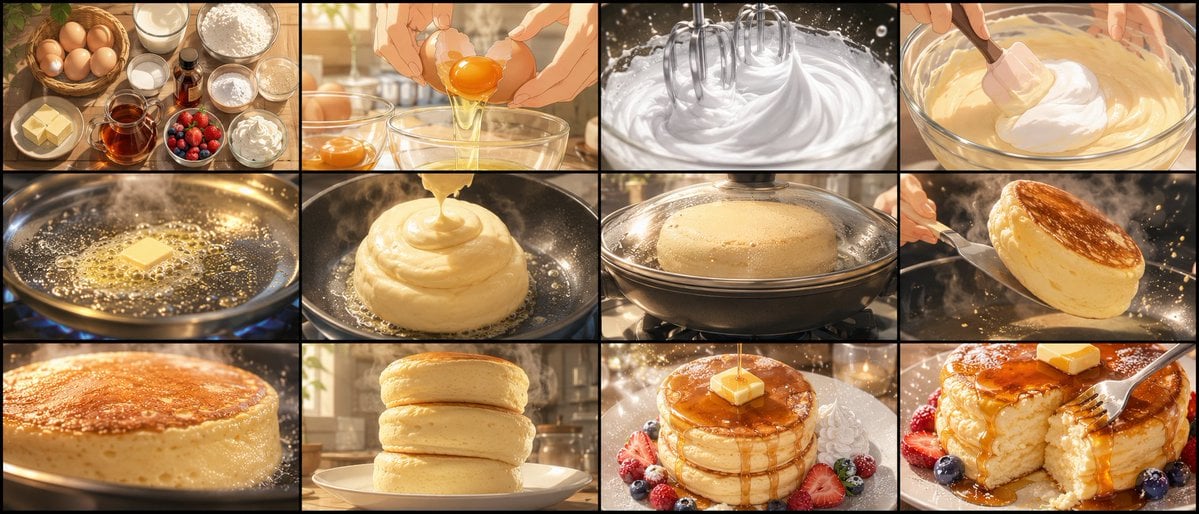
Generates a 12-panel cinematic anime storyboard sheet showing the full cooking process for jiggly extra-thick soufflé pancakes.
- Prompt included
- Model and format preset
- Free template
The prompt behind this image
Copy the exact prompt behind Soufflé Pancake Anime Storyboard, or open it in the studio and make it yours.
Goal: Create an ultra-high-quality anime cooking storyboard sheet for a 15-second food video about {argument name="dish theme" default="jiggly extra-thick soufflé pancakes"}. Canvas: One wide horizontal 21:9 storyboard sheet with a black outer border and thin black grid lines. Arrange exactly 12 panels in chronological order, in a 3-row by 4-column grid. Each panel is cinematic, warm, golden, highly detailed, with shallow depth of field, glossy food highlights, steam, sparkles, and realistic anime-style rendering. Visual style: Premium Japanese anime food commercial look, painterly-realistic textures, close-up camera angles, warm morning kitchen lighting, amber reflections, soft bokeh background, appetizing macro detail, no captions, no panel numbers, no watermark. Storyboard panels, exactly 12: 1. Ingredient flat lay: eggs in a wicker basket, milk, flour, sugar, butter cubes, vanilla, honey or syrup, berries, cream, and bowls on a rustic wooden table. 2. Egg separation close-up: hands crack an egg over a glass bowl, bright yolk suspended while egg white drips down. 3. Meringue whipping: electric beaters whip glossy white egg whites into stiff peaks, with splashes and sparkling highlights. 4. Batter folding: a spatula gently folds fluffy meringue into pale yellow pancake batter in a glass bowl. 5. Butter melting: a cube of butter sizzles and foams in a frying pan over a blue gas flame. 6. Batter piping/pouring: thick soufflé batter is poured into a tall mound in the pan, forming a soft spiral shape. 7. Covered steaming: the thick pancake cooks under a glass lid in the pan, condensation and steam visible, pancake rising high. 8. Flipping moment: a spatula lifts and flips a tall golden soufflé pancake, showing a browned top and airy sides, with flying crumbs and steam. 9. Browning close-up: extreme close-up of the pancake surface becoming evenly golden and crisp around the edges. 10. Stacking: three thick soufflé pancakes stacked on a white plate in a cozy sunlit kitchen, perfectly round and fluffy. 11. Final plating: stack topped with a square pat of butter and glossy syrup pouring down, surrounded by strawberries, blueberries, raspberries, powdered sugar, and a small whipped cream garnish. 12. Eating shot: fork cuts into the pancake, revealing soft airy interior; syrup flows over the cut edge, berries around the plate, dramatic appetizing close-up. Subject details: The pancakes should look very thick, soft, springy, and trembling with a soufflé-like texture. Emphasize golden-brown tops, pale fluffy sides, syrup shine, melting butter, and visible air bubbles. Constraints: Use exactly 12 panels, exactly 3 rows and 4 columns, chronological cooking sequence from ingredients to eating, no text inside the image, no people’s faces, only hands and tools where needed. Keep the overall theme centered on {argument name="main ingredient" default="extra-thick soufflé pancakes"}, with {argument name="lighting mood" default="warm golden morning kitchen light"}, {argument name="art style" default="high-detail cinematic anime food illustration"}, and {argument name="aspect ratio" default="21:9 wide storyboard sheet"}.
How to use Soufflé Pancake Anime Storyboard in 3 steps
- 1Upload ImagePNG, JPG or paste
Add your photo
Upload the photo the template builds on. The prompt, model and format are already set.
- 2…a portrait of your subject in softgolden-hour light, 85mm…
Personalize
Edit the subject and creative details for your destination.
- 3Generate
Generate
Press Generate — your image is created in PicX Studio, so you can compare it with the original and refine one variable at a time.
More like this
Templates with the same subject, style or setup. Open one to see its prompt.












Make it yours
Soufflé Pancake Anime Storyboard works as-is. These are the safest ways to change it without losing the look.
Change one field
Copy a single group, rewrite it, and generate again so you can see what that field is doing.
Keep the frame, change the subject
Hold the composition and light of Soufflé Pancake Anime Storyboard, then swap wardrobe, props or the person for a new take.
| If the result… | Why | Fix |
|---|---|---|
| The result drifts from the preview | Too many fields changed at once. | Reuse Soufflé Pancake Anime Storyboard as-is first, then change one group — subject, light, or setting. |
| The model over-stylizes the scene | The prose prompt leaves finish and camera underspecified. | Add one camera or lighting sentence and stay on GPT Image 2. |
More GPT Image 2 templates
Other prompts made for GPT Image 2.

Six VTuber Japanese Logo Sheet

Realistic Portrait of Woman and Deer

The Vista Modular Condo Poster

AI Model Routing Comparison Infographic

2.5D Anime Art Board

Isometric Productivity Desk Scene

New York Double Exposure Poster

Four-Panel AI Landscape Comparison

Japanese Tatami Lifestyle Magazine Cover

NESCAFÉ Coffee Map Poster
More image prompts
Fresh picks from across the catalog.
Line Art Correction Prompt for Nano Banana Pro
Reflection in Pupil Image Generation Prompt
Cyberpunk Portrait with Neon Lighting
High-Speed Cinematic Food Splash Photography

Ultra-Realistic Cinematic Night Street Selfie Prompt
High-Quality Photo of Elegant Chinese Woman in Luxury Car
Dreamy Dessert Advertisement Poster
Found a Small Spring
Google Nano Banana 2 — Cozy Bedroom Editorial
Japanese Legal Services LP Banner
Browse template categories
Soufflé Pancake Anime Storyboard questions
How do I use the Soufflé Pancake Anime Storyboard template?
Add your photo if the template asks for one, edit the prompt if you like — the template's model and format are already selected — and press Generate. Your version opens in PicX Studio.
Can I customize the Soufflé Pancake Anime Storyboard template?
Yes. You can change the subject, setting, lighting, mood, format, and available model controls before creating your image.
Is the Soufflé Pancake Anime Storyboard template free?
Opening and editing this template is free. Generating uses credits, shown on the Generate button when you are signed in.
Which AI model should I use?
Start with GPT Image 2, which is the model associated with this template. You can compare another compatible model for a different finish.
Looking for something else? Browse all templates.

Your photo, any look
Thousands of ready templates for every top image and video model, from one credit balance.