How do I use the Crowned Pixel Ninja Meme template?
Choose the primary action to open PicX Studio with the available template settings. Review the model and format, personalize the creative direction, and generate when ready.
Generates a rough chibi pixel-art ninja with a floating crown and customizable speech bubble for meme-style social posts. Change the subject, setting, or lighting one variable at a time.
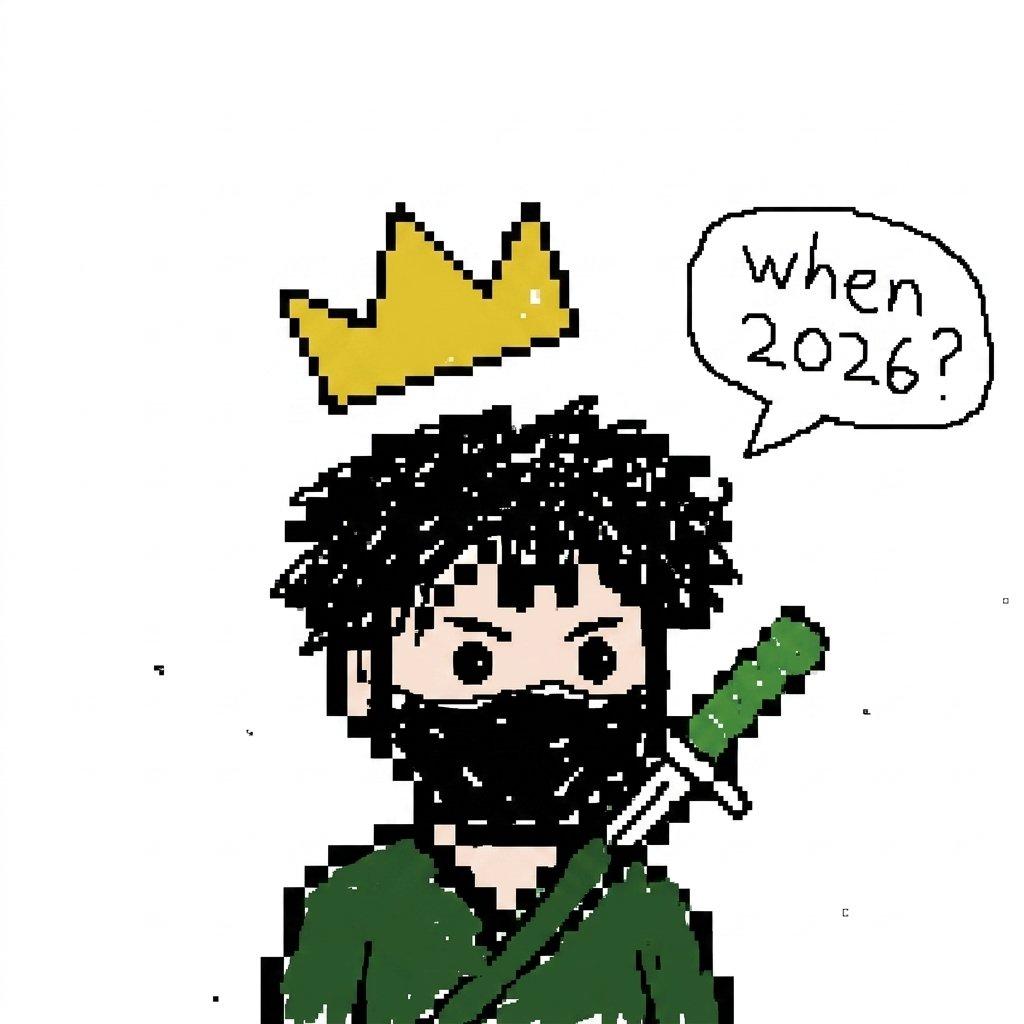
Create a simple low-resolution pixel art illustration on a plain white background, centered on a chibi-style ninja or masked warrior with messy black spiky hair, round black eyes, pale skin, and a black face covering. The character wears a dark green robe or cloak and carries a katana diagonally across the back, with a green handle and white guard visible over the right shoulder. Above the character floats a chunky yellow pixel crown with black outline and tiny white shine marks, tilted slightly. To the upper right, add a hand-drawn comic speech bubble outlined in black containing the text {argument name="speech bubble text" default="When 2026?"} in uneven handwritten black lettering. Use a deliberately rough, viral meme-like aesthetic with thick black pixel outlines, jagged edges, scattered tiny black specks, minimal shading, and a cropped square composition where the lower body is cut off at the bottom. The character should feel cute but mysterious, like a crowned pixel ninja asking a question.
Choose the primary action to open PicX Studio with the available template settings. Review the model and format, personalize the creative direction, and generate when ready.
Yes. You can change the subject, setting, lighting, mood, format, and available model controls before creating your image.
This template is free to open and customize. Generation usage is shown in PicX Studio before you create.
Start with GPT Image 2, which is the model associated with this template. You can compare another compatible model for a different finish.
© 2026 PicX Studio. All rights reserved.

Follow a topic to a crawlable collection of related PicX Studio templates.
43,474 public templates available. Verified via the PicX Studio public templates API; refreshed hourly.














![Minimalist Flat Vector Travel Poster — Premium minimalist flat-vector travel poster for {argument name="city name" default="[CITY_NAME]"}, 3:4 vertical format.](https://cms-assets.youmind.com/media/1787917359711_3ug846_HQX205cbMAA6F6S-300x400.jpg)
































![Candid 2026 Japanese Calendar Prompt — [テーマ]参照画像の人物をモデルとした、{argument name="年" default="2026年"}{argument name="期間" default="4月~9月"}の{argument name="月数" default="](https://cms-assets.youmind.com/media/1777022523492_228788_HGk_U6CbkAARWMV.jpg)