How do I use the Agritech magazine cover from app screenshot template?
Edit the prompt in the box under the preview — the template's model and format are already selected — and press Generate. Your version appears right on this page.
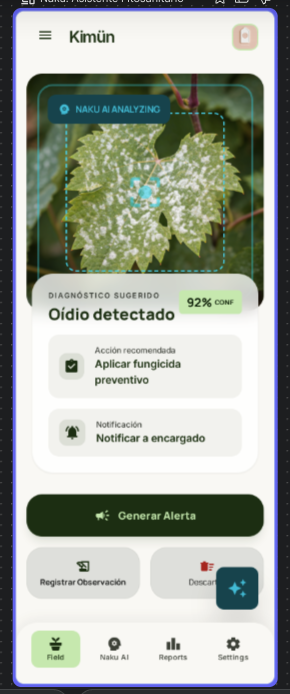
This prompt turns a mobile app screenshot into a realistic Spanish-language agricultural magazine cover, useful for product marketing, launch visuals, and editorial-style mockups.

This template uses your photo — add one with the + button.
Using the provided reference image of the mobile app screen, transform it into a premium editorial magazine cover mockup about agricultural innovation. Keep the app UI recognizable on the phone display, but place it in a realistic lifestyle context: a vineyard worker in the foreground holding a smartphone that shows the app, with vineyard rows, mountains, and a few workers in the background under natural daylight. Design the full page as a Spanish-language magazine cover with a refined agricultural-business aesthetic in green, cream, and earthy tones. Add a large masthead at the top reading “REVISTA CAMPO FUTURO”, a thin top strapline with 3 items separated by vertical bars: “Especial Viñas de Chile”, “Innovación agrícola”, and “Abril 2026”, plus a subtitle line beneath the masthead: “Agricultura, innovación y gestión rural”. On the left, add a green section tag reading “TECNOLOGÍA AGRÍCOLA” and a bold stacked main cover headline: “La app con IA que está revolucionando el campo”, followed by a short deck about Kimün replacing the traditional notebook and giving real-time control to vineyards and agricultural businesses. Add a circular callout badge mentioning a special feature about Kimün as an intelligent field notebook with AI. Include 2 bottom teaser photos: one close-up of the worker holding the phone in the vineyard with page label “p.18” and a caption about field diagnosis and cellphone alerts, and one small group scene with 3 people reviewing the app together with page label “p.24” and a caption about connected field teams, voice, records, and instant costs. On the right column, add 3 article teasers with icons and page numbers: one about the end of paper and the new era of the intelligent field notebook (p.30), one about more efficient vineyards through better data-driven decisions (p.36), and one about water management 4.0 and smarter, more profitable irrigation (p.42). Add a footer strip with 5 category labels: “AGRICULTURA”, “FRUTALES”, “VIÑAS”, “GANADERÍA”, “SUSTENTABILIDAD”, plus a barcode and a small price. Make it look like a polished real magazine cover photo shoot and editorial layout, not a flat app screenshot.
Using the provided reference image of the mobile app screen, transform it into a premium editorial magazine cover mockup about agricultural innovation. Keep the app UI recognizable on the phone display, but place it in a realistic lifestyle context: a vineyard worker in the foreground holding a smartphone that shows the app, with vineyard rows, mountains, and a few workers in the background under natural daylight. Design the full page as a Spanish-language magazine cover with a refined agricultural-business aesthetic in green, cream, and earthy tones. Add a large masthead at the top reading “REVISTA CAMPO FUTURO”, a thin top strapline with 3 items separated by vertical bars: “Especial Viñas de Chile”, “Innovación agrícola”, and “Abril 2026”, plus a subtitle line beneath the masthead: “Agricultura, innovación y gestión rural”. On the left, add a green section tag reading “TECNOLOGÍA AGRÍCOLA” and a bold stacked main cover headline: “La app con IA que está revolucionando el campo”, followed by a short deck about Kimün replacing the traditional notebook and giving real-time control to vineyards and agricultural businesses. Add a circular callout badge mentioning a special feature about Kimün as an intelligent field notebook with AI. Include 2 bottom teaser photos: one close-up of the worker holding the phone in the vineyard with page label “p.18” and a caption about field diagnosis and cellphone alerts, and one small group scene with 3 people reviewing the app together with page label “p.24” and a caption about connected field teams, voice, records, and instant costs. On the right column, add 3 article teasers with icons and page numbers: one about the end of paper and the new era of the intelligent field notebook (p.30), one about more efficient vineyards through better data-driven decisions (p.36), and one about water management 4.0 and smarter, more profitable irrigation (p.42). Add a footer strip with 5 category labels: “AGRICULTURA”, “FRUTALES”, “VIÑAS”, “GANADERÍA”, “SUSTENTABILIDAD”, plus a barcode and a small price. Make it look like a polished real magazine cover photo shoot and editorial layout, not a flat app screenshot.
Agritech magazine cover from app screenshot needs input media to work. Open it in the studio and these load alongside the prompt — pick whichever ones your chosen model can take.
Edit the prompt in the box under the preview — the template's model and format are already selected — and press Generate. Your version appears right on this page.
Yes. You can change the subject, setting, lighting, mood, format, and available model controls before creating your image.
Opening and editing this template is free. Generating uses credits, shown on the Generate button when you are signed in.
Start with GPT Image 2, which is the model associated with this template. You can compare another compatible model for a different finish.
Follow a topic to a crawlable collection of related PicX Studio templates.