How do I use the Vogue Watercolor Photo Transformation template?
Edit the prompt in the box under the preview — the template's model and format are already selected — and press Generate. Your version appears right on this page.
Transforms a phone photo into an elegant Vogue-inspired ink-and-watercolor editorial illustration while preserving the original composition.

This template uses your photo — add one with the + button.
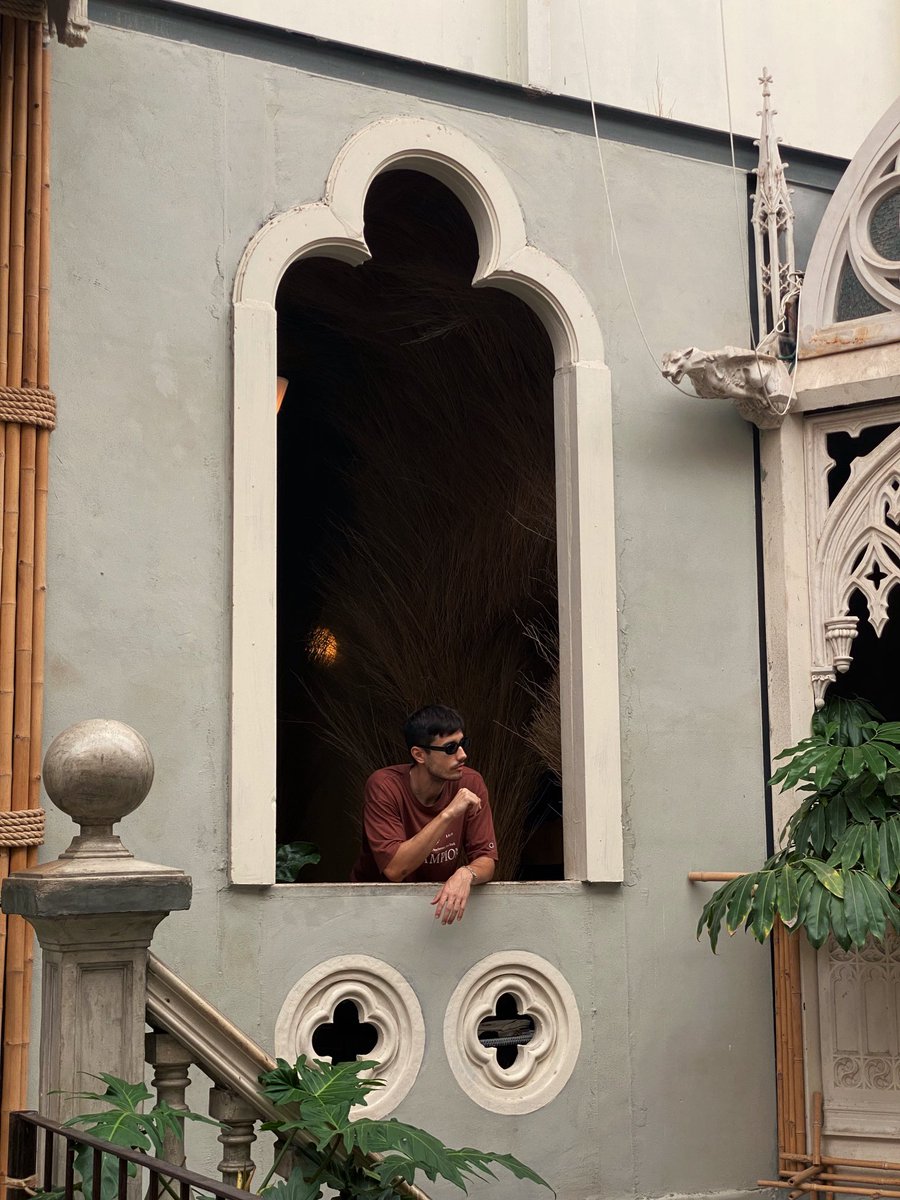
Using REFERENCE_0 as the source image, transform the phone photo into a refined Vogue-style fashion/architectural illustration. Keep the same vertical composition, the same person leaning out of the arched window in the same pose, and preserve the anonymized blurred face. Convert the scene into elegant ink-and-watercolor line art on a mostly white paper background, with loose black sketch outlines, soft beige shadows, muted green foliage, and a warm rust-red shirt. Simplify the photographic wall into clean white negative space while retaining the key architectural features: the tall scalloped arch window, the Gothic ornament and gargoyle-like detail on the right, the stone stair post with round finial on the left, the bamboo poles, leafy plants, and exactly 2 small circular quatrefoil vents below the window. Make it look like a high-fashion travel illustration from {argument name="magazine style" default="Vogue"}, polished but hand-drawn, with airy editorial spacing and no added text, logos, or extra people.
Using REFERENCE_0 as the source image, transform the phone photo into a refined Vogue-style fashion/architectural illustration. Keep the same vertical composition, the same person leaning out of the arched window in the same pose, and preserve the anonymized blurred face. Convert the scene into elegant ink-and-watercolor line art on a mostly white paper background, with loose black sketch outlines, soft beige shadows, muted green foliage, and a warm rust-red shirt. Simplify the photographic wall into clean white negative space while retaining the key architectural features: the tall scalloped arch window, the Gothic ornament and gargoyle-like detail on the right, the stone stair post with round finial on the left, the bamboo poles, leafy plants, and exactly 2 small circular quatrefoil vents below the window. Make it look like a high-fashion travel illustration from {argument name="magazine style" default="Vogue"}, polished but hand-drawn, with airy editorial spacing and no added text, logos, or extra people.
Vogue Watercolor Photo Transformation needs input media to work. Open it in the studio and these load alongside the prompt — pick whichever ones your chosen model can take.
Edit the prompt in the box under the preview — the template's model and format are already selected — and press Generate. Your version appears right on this page.
Yes. You can change the subject, setting, lighting, mood, format, and available model controls before creating your image.
Opening and editing this template is free. Generating uses credits, shown on the Generate button when you are signed in.
Start with GPT Image 2, which is the model associated with this template. You can compare another compatible model for a different finish.
Follow a topic to a crawlable collection of related PicX Studio templates.