
Street Musician Magical Realism Film
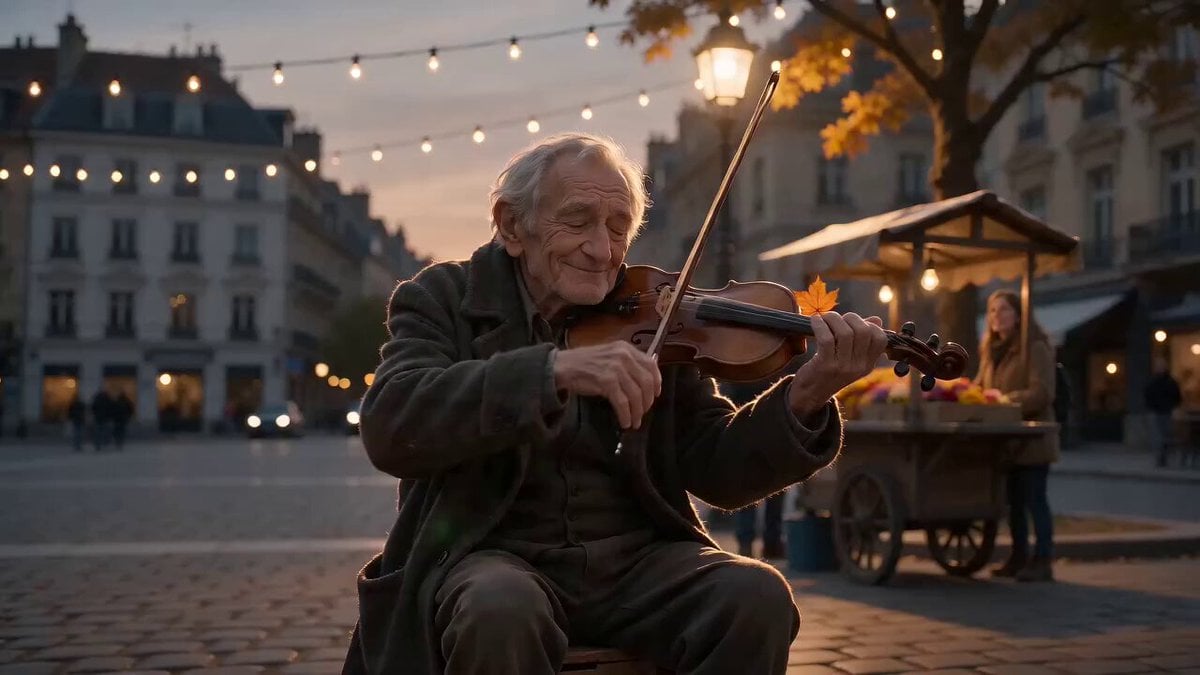
A magical realism prompt for a street performance video featuring an older musician whose violin music causes subtle, impossible environmental changes in a cobblestone square.
- Prompt included
- Model and format preset
- Free template
The prompt behind this video
Copy the exact prompt behind Street Musician Magical Realism Film, or open it in the studio and make it yours.
15 second cinematic video, 16:9 aspect ratio. Single continuous handheld POV shot with smooth dreamlike transitions and no hard cuts. A surreal magical realism street performance film set in a quiet cobblestone city square at dusk. Soft anamorphic lens, subtle lens flare, slow handheld drift, shallow depth of field, warm painterly color grade. String lights hang overhead, with a few scattered onlookers nearby. An older street musician in a weathered coat sits on a wooden crate, playing a violin. His appearance, clothing, hands, and violin remain consistent and realistic throughout. As he plays, the weather and light around him subtly respond to the music, impossible but treated as completely natural. Ambient sound: emotional live violin melody, distant city hum, gentle wind. 0:00–0:03 He draws the bow across the strings, eyes closed, fully absorbed. As the first note rings out, a single leaf detaches from a nearby tree and slowly drifts upward instead of down, catching the streetlight. The camera slowly pushes in toward his face. 0:03–0:06 The music quickens. Soft ripples of wind swirl around his feet, gently lifting loose papers and flower petals from a nearby cart into a slow spiral above the crowd. Onlookers watch with quiet delight, not fear. The camera smoothly pans across their faces. 0:06–0:09 He plays a soaring high note. The streetlights above dim and flicker, then bloom into a soft shower of glowing ember-like particles drifting like fireflies. A child reaches up to touch one, and it dissolves into light. The camera slowly dollies around the musician. 0:09–0:12 The melody slows. The petals and glowing embers gently settle. For a brief moment, light rain begins to fall upward, evaporating into mist just above head height and catching the last orange light of dusk. The camera pulls back into a wider view. 0:12–0:15 He finishes the final note and opens his eyes. Everything returns to stillness, becoming an ordinary square again. He smiles faintly, bows his head, and his open violin case rests at his feet for tips. Fade to black. Style notes: grounded human performance, subtle atmospheric magic, no CGI heavy spectacle, warm cinematic realism, physically plausible handheld camera movement, no distorted hands, no broken violin anatomy, no text overlays. Audio: soft emotional violin music, gentle city ambience, light wind. No vocals, no dialogue, no lyrics.
How to use Street Musician Magical Realism Film in 3 steps
- 1
Open
The prompt is already in the box next to the preview, with the template's model and format selected.
- 2…a portrait of your subject in softgolden-hour light, 85mm…
Personalize
Edit the subject and creative details for your destination.
- 3Generate
Generate
Press Generate — your video is created in PicX Studio, so you can compare it with the original and refine one variable at a time.
More like this
Templates with the same subject, style or setup. Open one to see its prompt.
Japan Street Musician Vlog

Magical Room Transformation - Seedance 2.5

Realistic City Street Story Cinematic Video - Seedance
Tokyo Street Style Travel Film
Hospital Car Park Dialogue Lip Sync

Global Flower Thank-You Film

Youth Racing Short Film

Mechanical Flower Bloom Brand Film

Oceanic Civilization Epic Sci-Fi Film

Floating Desert Museum Cinematic Film

Haute Couture Dream Bokeh Film
Window-to-Eye Concept Film
Make it yours
Street Musician Magical Realism Film works as-is. These are the safest ways to change it without losing the look.
Change one field
Copy a single group, rewrite it, and generate again so you can see what that field is doing.
Keep the frame, change the subject
Hold the composition and light of Street Musician Magical Realism Film, then swap wardrobe, props or the person for a new take.
| If the result… | Why | Fix |
|---|---|---|
| The result drifts from the preview | Too many fields changed at once. | Reuse Street Musician Magical Realism Film as-is first, then change one group — subject, light, or setting. |
| The model over-stylizes the scene | The prose prompt leaves finish and camera underspecified. | Add one camera or lighting sentence and stay on Seedance 2.0. |
More Seedance 2.0 templates
Other prompts made for Seedance 2.0.

Comical Martial Arts Punch Scene

Maglev Train Action Sequence

Martial Arts Fight Sequence

Wuxia Protection and Trust Script

Vintage Korean Arcade MiniDV Vlog

Mercedes 190 SL Luxury Ad

Rainy Night Supernatural Reverse Comedy Video Script

Amazon Civilization Discovery

Futuristic South Asian City Transformation

Cozy Luxury Cafe Commercial
More video prompts
Fresh picks from across the catalog.
Cinematic Tsunami Disaster Video Prompt

3D Cartoon Ramen Eating Animation
Cyberpunk City Chase Animation
POV Rooftop Chase Prompt

Cinematic East Asian Woman Selfie Video
NBA Courtside Fan Reaction
Chinese Xianxia Suspense Emotional Short Film
Futuristic Armor Heroine

Library of Forgotten Dreams
Artemis Space Mission Video Prompt
Browse template categories
Street Musician Magical Realism Film questions
How do I use the Street Musician Magical Realism Film template?
Add your photo if the template asks for one, edit the prompt if you like — the template's model and format are already selected — and press Generate. Your version opens in PicX Studio.
Can I customize the Street Musician Magical Realism Film template?
Yes. You can change the subject, setting, lighting, mood, format, and available model controls before creating your video.
Is the Street Musician Magical Realism Film template free?
Opening and editing this template is free. Generating uses credits, shown on the Generate button when you are signed in.
Which AI model should I use?
Start with Seedance 2.0, which is the model associated with this template. You can compare another compatible model for a different finish.
Looking for something else? Browse all templates.

Your photo, any look
Thousands of ready templates for every top image and video model, from one credit balance.