
Phoenix Transformation Sequence
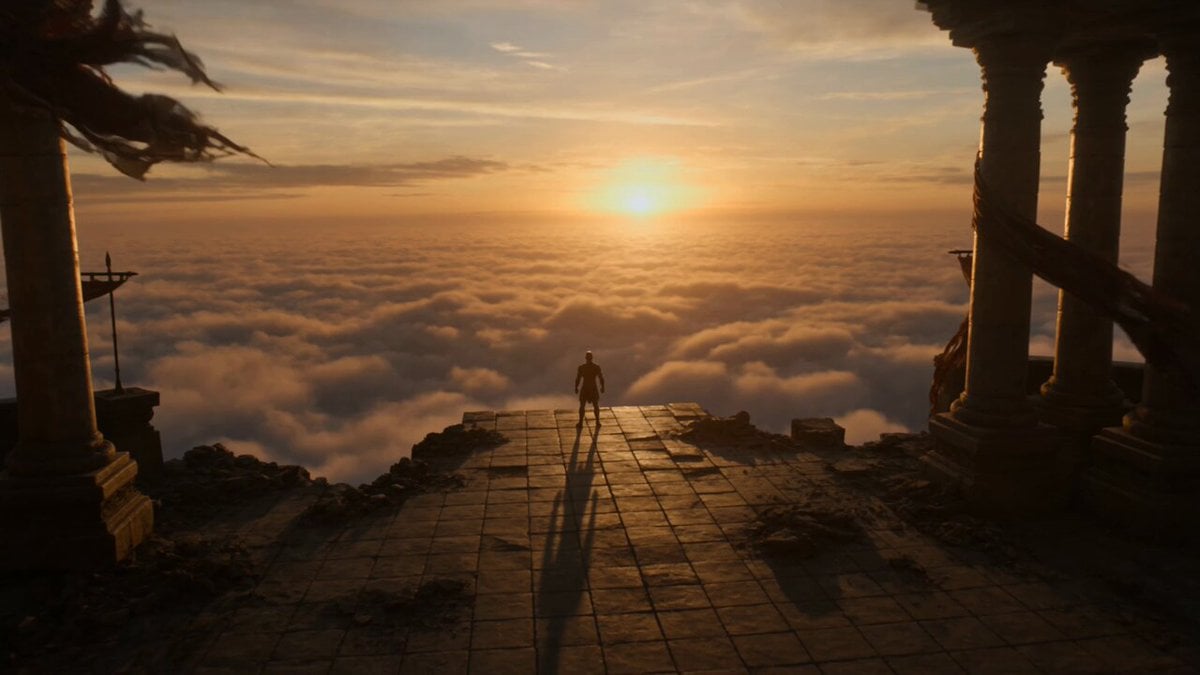
A comprehensive prompt for a 15-second cinematic fantasy sequence showing a warrior transforming into a phoenix at sunrise.
- Prompt included
- Model and format preset
- Free template
The prompt behind this video
Copy the exact prompt behind Phoenix Transformation Sequence, or open it in the studio and make it yours.
15-second ultra-cinematic fantasy transformation sequence atop a ruined cliff temple during sunrise. A lone warrior stands at the edge of an ancient stone platform overlooking a sea of clouds. The first rays of sunlight break across the horizon while wind moves through torn banners and scattered ruins. The camera slowly circles around the warrior as tiny golden embers begin appearing in the air. Warm light pulses beneath the skin like a second heartbeat awakening. The embers multiply rapidly. Streams of living fire spiral around the warrior's body without causing harm. Golden-orange energy flows through glowing cracks beneath the skin. The transformation begins. Fiery feather patterns emerge along the arms, shoulders, and face. Hair becomes strands of living flame moving gracefully in the wind. The camera pushes closer as magnificent wings of fire start forming behind the warrior. Thousands of glowing feathers materialize from swirling embers and solar energy. The transformation accelerates. The warrior rises slowly into the air while the surrounding ruins are illuminated by waves of radiant light. Burning feathers drift across the sky like glowing leaves. At the climax, the body dissolves into a storm of fire feathers and solar particles. A colossal phoenix silhouette forms within the explosion of light. The warrior is reborn as a Phoenix Avatar, surrounded by immense wings of living fire stretching across the horizon. Every wingbeat releases waves of glowing feathers into the clouds below. Final cinematic moment: the Phoenix Avatar launches upward through the sunrise sky while a gigantic celestial phoenix made of flame briefly appears behind them, filling the heavens with golden light. Style: ultra cinematic fantasy realism, divine phoenix transformation, living fire effects, feather particle simulation, sunrise atmosphere, mythological scale, celestial energy, dramatic aerial cinematography, AAA fantasy film quality, no text, no overlays. Audio: epic cinematic fantasy score, celestial choir, soaring strings, powerful percussion, ember crackling, divine energy resonance, wind, and majestic phoenix calls.
How to use Phoenix Transformation Sequence in 3 steps
- 1
Open
The prompt is already in the box next to the preview, with the template's model and format selected.
- 2…a portrait of your subject in softgolden-hour light, 85mm…
Personalize
Edit the subject and creative details for your destination.
- 3Generate
Generate
Press Generate — your video is created in PicX Studio, so you can compare it with the original and refine one variable at a time.
More like this
Templates with the same subject, style or setup. Open one to see its prompt.
Phoenix Knight Transformation Sequence

Magical Room Transformation - Seedance 2.5

Dark Tokusatsu Transformation - Seedance 2.5

RX-7 to Mech Transformation Cyberpunk
Cinematic Phoenix Summon Sequence
Magical Transformation Sequence
Fantasy Warrior Transformation Sequence

Neon Armor Epic Transformation Sequence
Cyberpunk Exosuit Transformation Sequence
Fashion Aesthetic Transformation Sequence
Civilization Timelapse — Centuries in One Shot
Mecha Transformation vs Kaiju — 4-Scene Epic
Make it yours
Phoenix Transformation Sequence works as-is. These are the safest ways to change it without losing the look.
Change one field
Copy a single group, rewrite it, and generate again so you can see what that field is doing.
Keep the frame, change the subject
Hold the composition and light of Phoenix Transformation Sequence, then swap wardrobe, props or the person for a new take.
| If the result… | Why | Fix |
|---|---|---|
| The result drifts from the preview | Too many fields changed at once. | Reuse Phoenix Transformation Sequence as-is first, then change one group — subject, light, or setting. |
| The model over-stylizes the scene | The prose prompt leaves finish and camera underspecified. | Add one camera or lighting sentence and stay on Seedance 2.0. |
More Seedance 2.0 templates
Other prompts made for Seedance 2.0.

Comical Martial Arts Punch Scene

Wuxia Protection and Trust Script

Vintage Korean Arcade MiniDV Vlog

Mercedes 190 SL Luxury Ad

Rainy Night Supernatural Reverse Comedy Video Script

Amazon Civilization Discovery

Futuristic South Asian City Transformation

Cozy Luxury Cafe Commercial

Cyber Ronin Nanotech Transformation Video

Desert Courier and Sandstorm Leviathan Chase
More video prompts
Fresh picks from across the catalog.
Cinematic Pianist Performance Prompt
second epic cinematic storm video prompt

Summer Beach BBQ and Anime Character Sticker
Alien Anthropologist Data Cube Video
Cowboy Playing Harmonica Technique
Red Carpet Character Reference Walk
Grotesque Monster Analog Horror
Realistic Spacecraft Flyby

Handheld Tokyo Travel Vlog - Seedance 2.5
First-Person Dragon Rider Image Prompt
Browse template categories
Phoenix Transformation Sequence questions
How do I use the Phoenix Transformation Sequence template?
Add your photo if the template asks for one, edit the prompt if you like — the template's model and format are already selected — and press Generate. Your version opens in PicX Studio.
Can I customize the Phoenix Transformation Sequence template?
Yes. You can change the subject, setting, lighting, mood, format, and available model controls before creating your video.
Is the Phoenix Transformation Sequence template free?
Opening and editing this template is free. Generating uses credits, shown on the Generate button when you are signed in.
Which AI model should I use?
Start with Seedance 2.0, which is the model associated with this template. You can compare another compatible model for a different finish.
Looking for something else? Browse all templates.

Your photo, any look
Thousands of ready templates for every top image and video model, from one credit balance.