How do I use the B&W Night Street Fashion Portrait template?
Edit the prompt in the box under the preview — the template's model and format are already selected — and press Generate. Your version appears right on this page.
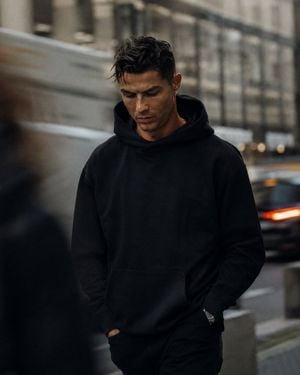
A cinematic black-and-white prompt for an urban fashion shoot on a city fire escape at night, utilizing a reference photo for identity.

Use my uploaded face image as the primary identity reference. Preserve my 100% exact facial identity, face shape, hairstyle, hair texture, beard style, skin tone, eye shape, eyebrows, nose, lips, and all unique facial details with maximum accuracy. Do not change my face or make me look like a different person. Create a realistic cinematic black-and-white street fashion portrait of me sitting on a {argument name="setting" default="metal fire escape staircase"} at night in a city. Match the composition and mood of the reference image: I am seated casually with one knee raised, leaning slightly forward with a relaxed, confident expression. I am wearing {argument name="outfit color" default="an all-black outfit"} — {argument name="clothing items" default="black open-collar shirt, black pants, and stylish sneakers"}. Add subtle sunglasses for a cool urban look. The scene should have a dark moody atmosphere, high-rise buildings in the background, blurred city lights, nighttime urban environment, dramatic shadows, deep contrast, and a grainy 35mm film photography style. Make it look like a luxury fashion editorial shot, realistic photography, natural pose, detailed textures, sharp focus on my face, cinematic lighting. Maintain my real appearance while recreating the same vibe, framing, and aesthetic of the reference photo.
Use my uploaded face image as the primary identity reference. Preserve my 100% exact facial identity, face shape, hairstyle, hair texture, beard style, skin tone, eye shape, eyebrows, nose, lips, and all unique facial details with maximum accuracy. Do not change my face or make me look like a different person. Create a realistic cinematic black-and-white street fashion portrait of me sitting on a {argument name="setting" default="metal fire escape staircase"} at night in a city. Match the composition and mood of the reference image: I am seated casually with one knee raised, leaning slightly forward with a relaxed, confident expression. I am wearing {argument name="outfit color" default="an all-black outfit"} — {argument name="clothing items" default="black open-collar shirt, black pants, and stylish sneakers"}. Add subtle sunglasses for a cool urban look. The scene should have a dark moody atmosphere, high-rise buildings in the background, blurred city lights, nighttime urban environment, dramatic shadows, deep contrast, and a grainy 35mm film photography style. Make it look like a luxury fashion editorial shot, realistic photography, natural pose, detailed textures, sharp focus on my face, cinematic lighting. Maintain my real appearance while recreating the same vibe, framing, and aesthetic of the reference photo.
Edit the prompt in the box under the preview — the template's model and format are already selected — and press Generate. Your version appears right on this page.
Yes. You can change the subject, setting, lighting, mood, format, and available model controls before creating your image.
Opening and editing this template is free. Generating uses credits, shown on the Generate button when you are signed in.
Start with Nano Banana 2, which is the model associated with this template. You can compare another compatible model for a different finish.
Follow a topic to a crawlable collection of related PicX Studio templates.