How do I use the Editorial Menswear Lifestyle Portrait template?
Choose the primary action to open PicX Studio with the available template settings. Review the model and format, personalize the creative direction, and generate when ready.
A sophisticated lifestyle prompt for generating a male model posed next to a vintage Land Rover Defender in golden hour light.
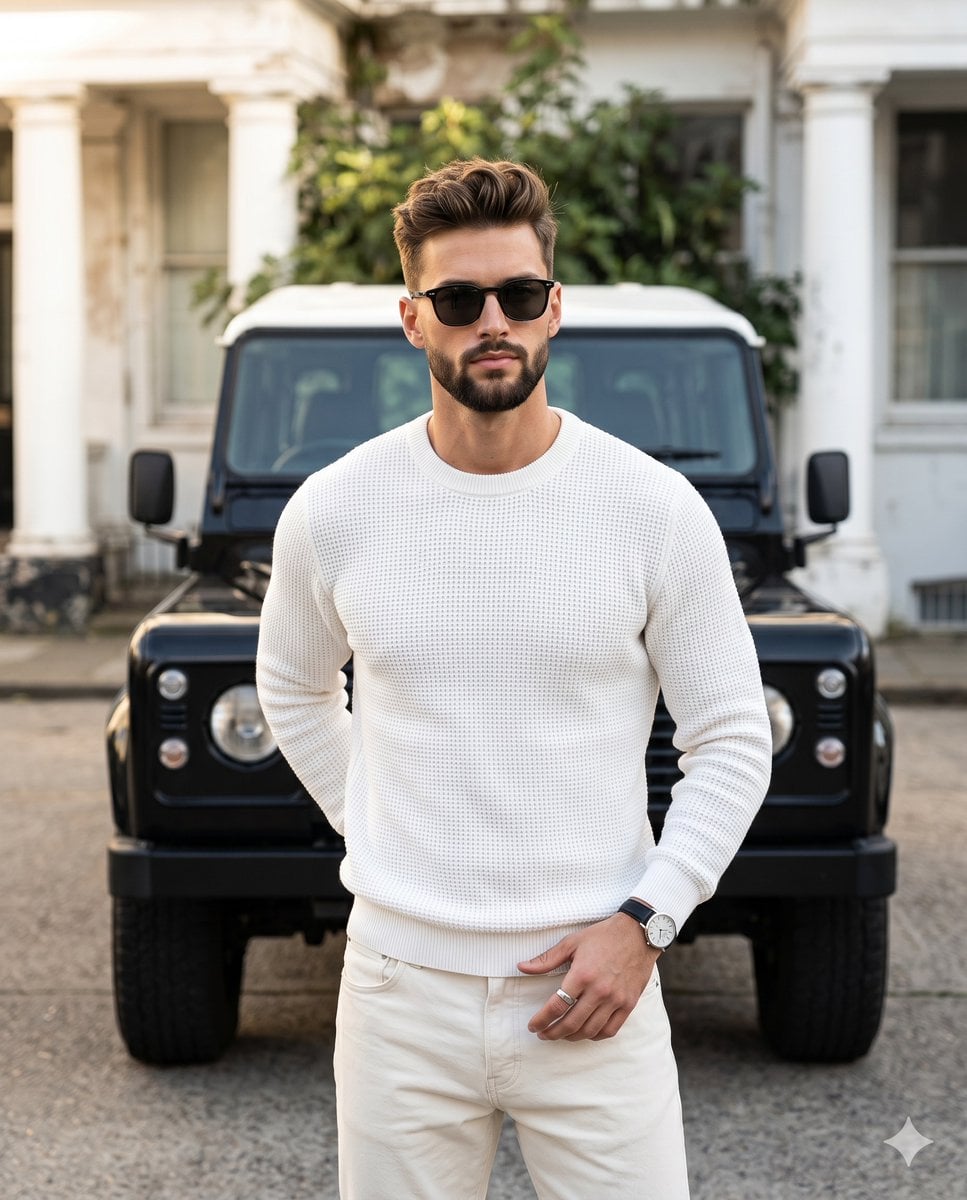
A {argument name="subject" default="stylish, confident male model in his late twenties to early thirties"} stands positioned in the center, turned at a deliberate forty-five-degree angle with his weight naturally shifted and shoulders level. He features a neatly trimmed short beard and dark brown hair styled in a textured, wavy quiff with a fade, enhanced by matte clay styling that reveals natural, realistic flyaways. He wears dark, square sunglasses framing a relaxed gaze, his expression neutral and composed. He is dressed in a {argument name="outfit" default="crisp, highly detailed white waffle-knit crewneck sweater tucked cleanly into cream denim jeans"}. His right arm is tucked comfortably behind his back at waist level. His left hand rests effortlessly against his front left hip near the pocket, the thumb hooked near the waistband while his fingers curl softly downward, adorned with a silver pinky ring and a classic wristwatch featuring a black leather strap and silver case. Directly behind him in the midground rests a {argument name="vehicle" default="pristine, glossy black vintage Land Rover Defender"}, commanding attention with its classic white roof, round headlights, side mirrors. The vehicle is parked on a solid, light gray asphalt concrete surface. Receding into a subtly blurred background with moderate spatial depth, a worn yet elegant building facade presents white architectural columns and window framing, partially obscured by the out-of-focus, thriving green leaves of foliage peeking over the vehicle's roof. A single source of soft, bright, golden natural daylight streams from a forty-five-degree angle on the left, bathing the scene in a warm, sophisticated, and polished masculine elegance. This directional lighting strikes the left side of his tousled hair, left shoulder, and the vehicle's hood with pristine, preserved highlights, while casting short, softly graded gray shadows across the right side of his face, beneath his chin, and naturally mapping the deep, tactile folds of his waffle-knit sweater. The color palette thrives on asymmetric balance and complementary medium contrast, harmonizing the dominant crisp whites and pastel light blues against warm skin tones and dark accents. The digital photography captures a tack-sharp, grain-free editorial menswear lifestyle aesthetic using a straight-on perspective and a shallow depth of field to render the background in cinematic bokeh. The image is meticulously post-processed with subtle warm color grading to enrich the skin tones and off-white fabrics, slight desaturation of the background greens to emphasize the pastel vehicle, and high-pass sharpening to accentuate the extreme texture of the hair, and heavy knitwear, all beautifully framed in a 4:5 aspect ratio.
Choose the primary action to open PicX Studio with the available template settings. Review the model and format, personalize the creative direction, and generate when ready.
Yes. You can change the subject, setting, lighting, mood, format, and available model controls before creating your image.
This template is free to open and customize. Generation usage is shown in PicX Studio before you create.
Start with Nano Banana 2, which is the model associated with this template. You can compare another compatible model for a different finish.
Follow a topic to a crawlable collection of related PicX Studio templates.