How do I use the Street Glamour Cake Knife Portrait template?
Choose the primary action to open PicX Studio with the available template settings. Review the model and format, personalize the creative direction, and generate when ready.
A cinematic high-angle portrait of a woman in Balenciaga-style clothing sitting on a carpet with a cake, licking a blade for a relaxed street glamour vibe.
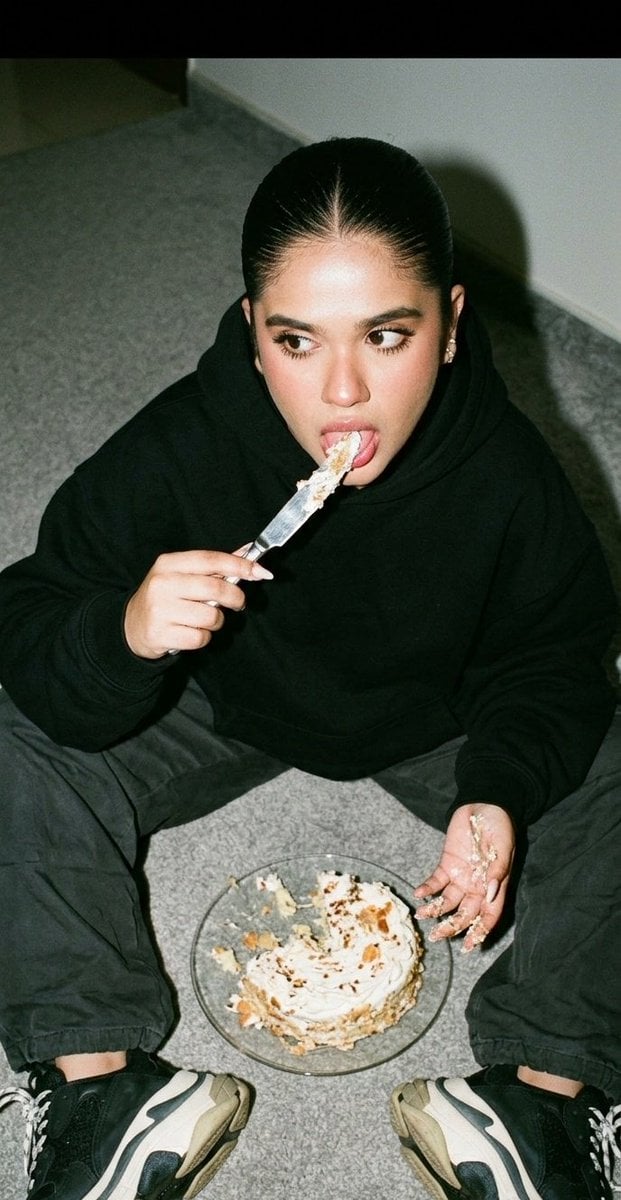
Do not change the facial features. A cinematic close-up portrait of a young woman. The photo is taken from a slightly high angle. She is sitting on the floor, which is covered with a gray carpet. She is facing the camera; one leg is bent, the other is straight and extended. Between her legs, there is a flat glass plate with a partially eaten cake on it. One hand is next to the cake and is smeared with it; with the other hand, she is holding a knife and licking the cake off the blade. Her gaze is slightly turned to the side. The photo is taken with flash. Film grain is added. The overall vibe of the frame is relaxed, with a street glamour feel. She is wearing {argument name="clothing style" default="Balenciaga-style clothing"}. A realistic, detailed photograph.
Choose the primary action to open PicX Studio with the available template settings. Review the model and format, personalize the creative direction, and generate when ready.
Yes. You can change the subject, setting, lighting, mood, format, and available model controls before creating your image.
This template is free to open and customize. Generation usage is shown in PicX Studio before you create.
Start with Nano Banana 2, which is the model associated with this template. You can compare another compatible model for a different finish.
Follow a topic to a crawlable collection of related PicX Studio templates.