
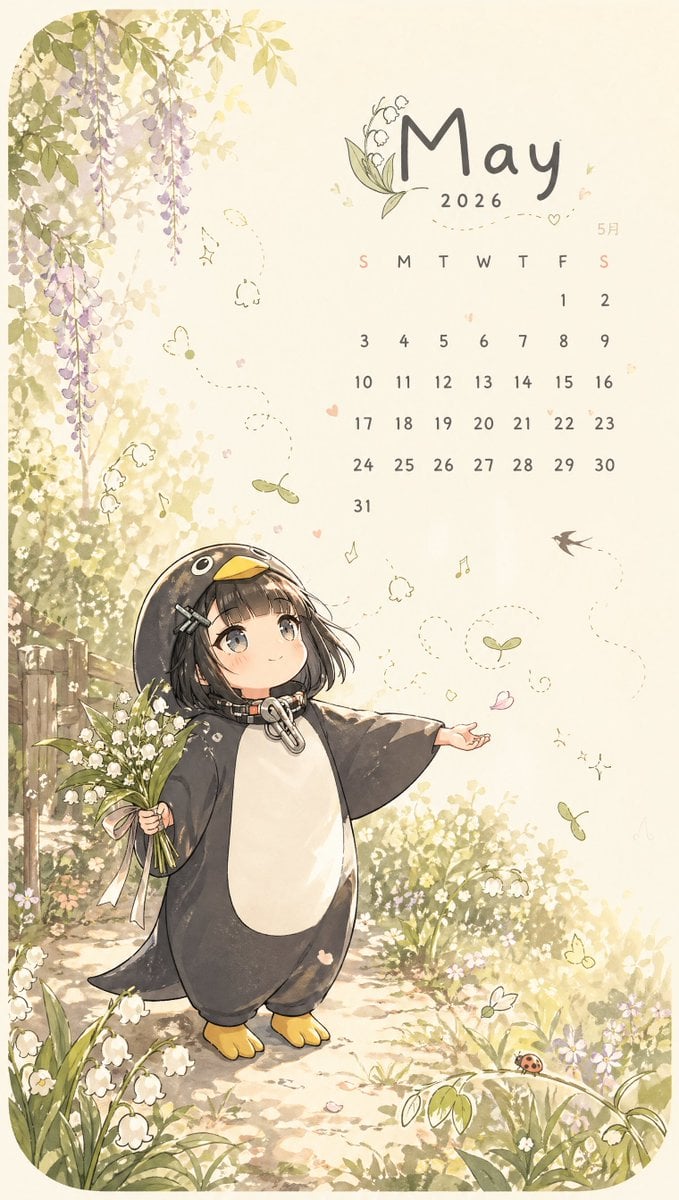
Whimsical May Garden Calendar Wallpaper
A cute spring-themed vertical wallpaper illustration featuring a May calendar, a penguin-costumed chibi child, and a dreamy flower-filled garden, ideal for seasonal phone backgrounds.

- Prompt included
- Model and format preset
- Free template
The prompt behind this image
Copy the exact prompt behind Whimsical May Garden Calendar Wallpaper, or open it in the studio and make it yours.
A vertical whimsical spring calendar illustration in a soft pastel anime storybook style, designed like a cute phone wallpaper for {argument name="month" default="May"}. The scene is a warm sun-dappled garden with creamy golden bokeh light, a narrow stone path, clover patches, tiny white daisies, ferns, and a few small ripe strawberries near the bottom right. Large fresh green maple leaves hang from the upper left, and cascading clusters of pale purple wisteria frame the left and right edges. Near the top right, place elegant hand-lettered script reading {argument name="headline text" default="May"} with small lily-of-the-valley doodles integrated into the lettering, a tiny swallow silhouette above, and the smaller text “5月” beneath it. Below that, add a clean mini calendar for May with the weekday row “S M T W T F S” and dates 1 through 31 arranged in a simple grid, using soft brown-gray text. Scatter tiny decorative hearts, dots, sparkles, and simple floral doodles around the calendar area. In the lower half, show a chibi child character standing on the path in a penguin kigurumi onesie with a dark charcoal body, white belly, yellow beak hood, and little yellow feet. The character has a short {argument name="hair color" default="ash brown"} bob peeking out from the hood, two silver hairpins on one side, and a large metal zipper ring pull at the neck. Replace the face with a smooth centered rectangular blur block as a privacy censor, keeping the rest of the head and hair visible. The character holds a bouquet of white lily-of-the-valley flowers in one hand and extends the other arm outward as if enjoying the breeze. Add pink flower petals drifting nearby, a red ladybug resting on a green leaf above the character, several floating maple seeds with dotted spiral motion trails, delicate white swirl lines suggesting wind around the character, and a few extra lily-of-the-valley sprigs around the composition. Use a soft cream, sage green, lavender, and warm beige palette, gentle linework, subtle shading, and a dreamy cute seasonal mood.
How to use Whimsical May Garden Calendar Wallpaper in 3 steps
- 1Upload ImagePNG, JPG or paste
Add your photo
Upload the photo the template builds on. The prompt, model and format are already set.
- 2…a portrait of your subject in softgolden-hour light, 85mm…
Personalize
Edit the subject and creative details for your destination.
- 3Generate
Generate
Press Generate — your image is created in PicX Studio, so you can compare it with the original and refine one variable at a time.
More like this
Templates with the same subject, style or setup. Open one to see its prompt.
Whimsical May Spring Calendar

Cute Layered Paper Cut Chibi Girl

Decorative Folk Flat Paper Cut Illustration
Romantic Whimsical Garden Portrait

Ghibli Final Takeoff Field

Ghibli Rainy Tram Interior

Ghibli Star Observatory

Ghibli Tiny House On Back

Ghibli Lantern River Festival

Ghibli Whale Bone Beach

Ghibli Abandoned Amusement

Ghibli Shadow Puppet Theater
Make it yours
Whimsical May Garden Calendar Wallpaper works as-is. These are the safest ways to change it without losing the look.
Change one field
Copy a single group, rewrite it, and generate again so you can see what that field is doing.
Keep the frame, change the subject
Hold the composition and light of Whimsical May Garden Calendar Wallpaper, then swap wardrobe, props or the person for a new take.
| If the result… | Why | Fix |
|---|---|---|
| The result drifts from the preview | Too many fields changed at once. | Reuse Whimsical May Garden Calendar Wallpaper as-is first, then change one group — subject, light, or setting. |
| The model over-stylizes the scene | The prose prompt leaves finish and camera underspecified. | Add one camera or lighting sentence and stay on GPT Image 2. |
More GPT Image 2 templates
Other prompts made for GPT Image 2.

Six VTuber Japanese Logo Sheet

Realistic Portrait of Woman and Deer

The Vista Modular Condo Poster

AI Model Routing Comparison Infographic

2.5D Anime Art Board

Isometric Productivity Desk Scene

New York Double Exposure Poster

Four-Panel AI Landscape Comparison

Japanese Tatami Lifestyle Magazine Cover

NESCAFÉ Coffee Map Poster
More image prompts
Fresh picks from across the catalog.

90s Movie Baddie Retro Portrait Prompt
24 Cute Mascot LINE Stickers

35mm Studio Fashion Portrait

Cinematic Wedding First Look Prompt

Y2K Flash Photo Aesthetic Prompt

European Street Fashion Mirror Selfie Prompt

Mobile Live Streaming App Interface

Character Headshot Comparison Prompt

Strawberry Milk Glass Lens Beauty Quad Prompt

Japanese Waterproof Rainwear Ad
Browse template categories
Whimsical May Garden Calendar Wallpaper questions
How do I use the Whimsical May Garden Calendar Wallpaper template?
Add your photo if the template asks for one, edit the prompt if you like — the template's model and format are already selected — and press Generate. Your version opens in PicX Studio.
Can I customize the Whimsical May Garden Calendar Wallpaper template?
Yes. You can change the subject, setting, lighting, mood, format, and available model controls before creating your image.
Is the Whimsical May Garden Calendar Wallpaper template free?
Opening and editing this template is free. Generating uses credits, shown on the Generate button when you are signed in.
Which AI model should I use?
Start with GPT Image 2, which is the model associated with this template. You can compare another compatible model for a different finish.
Looking for something else? Browse all templates.

Your photo, any look
Thousands of ready templates for every top image and video model, from one credit balance.