How do I use the Jungle Lab Giant Mantis Thriller template?
Edit the prompt in the box under the preview — the template's model and format are already selected — and press Generate. Your version appears right on this page.
An intense thriller prompt featuring a scientist encountering a giant mantis in a ruined laboratory, with cinematic camera work and technical details.
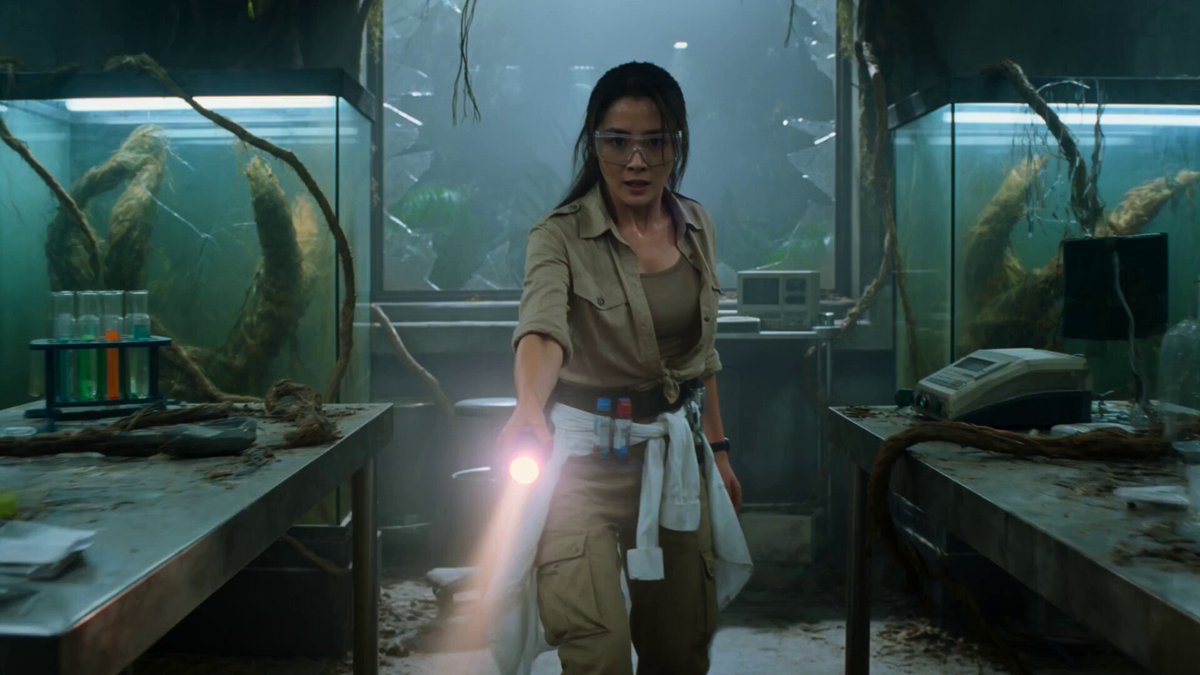
Image1 is the exact woman: beautiful field scientist, safety glasses pushed into her hair, khaki field shirt with rolled sleeves over a tank top, cargo trousers, a utility belt with vials and a flashlight, lab coat tied at the waist. Keep her face and outfit identical. Image2 is the exact location: an overgrown ruined jungle laboratory, cracked glass specimen tanks strangled by vines, flickering fluorescent tubes, overturned equipment, a shattered observation window with jungle mist, sparking cables.\n\nCREATURE: a colossal praying mantis, roughly 4 meters tall, glossy green-and-brown segmented chitin, huge spiked raptorial forearms, a triangular head with large black compound eyes and twitching antennae, moving in sharp insectile jerks.\n\nAction (15s, three clear beats, no clutter): (0-5s) The scientist backs between the lab benches with her flashlight as the colossal mantis unfolds from the shadows by the shattered window, its spiked forearms raised, head tilting at her. (5-10s) The mantis strikes a forearm down; she dives under a bench as the spike splits the steel, then she grabs a beaker of chemical and hurls it, splashing the mantis's eyes, and it rears back screeching. (10-15s) She sprints for the door, yanks a sparking severed cable from the wall and jams it against the mantis's leg; it convulses in the electric arc, and she slips out as it thrashes among the toppling tanks.\n\nCamera (technical): Beat 1 — a slow controlled push-in on her with the flashlight, then a smooth reveal craning up the unfolding mantis. Beat 2 — a controlled low angle as she dives and the spike splits the bench, a 90-degree arc as she hurls the beaker, rack focus to the splash. Beat 3 — a smooth tracking shot to the door, the sparking cable jab lighting the scene, then a push-in to a medium on her face. Smooth deliberate camera, 35mm anamorphic lens, motion blur, gentle handheld weight, no chaotic shake.\n\nSmooth fluid 24fps cinematic motion, consistent natural frame rate, motion-blurred but smooth, no stutter, no choppy or dropped frames, no strobing.\n\nLighting: flickering cold fluorescent key with green jungle spill, deep shadows, hot sparking-cable and electric-arc accents, haze. Sickly green and teal grade, Kodak Vision3 500T, 35mm grain, halation, anamorphic flare. Tense 1980s jungle-lab-creature-thriller.\n\nAudio: flickering fluorescent buzz and dripping water, the chittering clicks of the mantis, a sharp chitin-scrape as it unfolds, a steel bench splitting, shattering glass, the mantis's screech, the crackle and zap of the electric cable, her panicked breathing, a tense low orchestral-synth pulse.
Image1 is the exact woman: beautiful field scientist, safety glasses pushed into her hair, khaki field shirt with rolled sleeves over a tank top, cargo trousers, a utility belt with vials and a flashlight, lab coat tied at the waist. Keep her face and outfit identical. Image2 is the exact location: an overgrown ruined jungle laboratory, cracked glass specimen tanks strangled by vines, flickering fluorescent tubes, overturned equipment, a shattered observation window with jungle mist, sparking cables.\n\nCREATURE: a colossal praying mantis, roughly 4 meters tall, glossy green-and-brown segmented chitin, huge spiked raptorial forearms, a triangular head with large black compound eyes and twitching antennae, moving in sharp insectile jerks.\n\nAction (15s, three clear beats, no clutter): (0-5s) The scientist backs between the lab benches with her flashlight as the colossal mantis unfolds from the shadows by the shattered window, its spiked forearms raised, head tilting at her. (5-10s) The mantis strikes a forearm down; she dives under a bench as the spike splits the steel, then she grabs a beaker of chemical and hurls it, splashing the mantis's eyes, and it rears back screeching. (10-15s) She sprints for the door, yanks a sparking severed cable from the wall and jams it against the mantis's leg; it convulses in the electric arc, and she slips out as it thrashes among the toppling tanks.\n\nCamera (technical): Beat 1 — a slow controlled push-in on her with the flashlight, then a smooth reveal craning up the unfolding mantis. Beat 2 — a controlled low angle as she dives and the spike splits the bench, a 90-degree arc as she hurls the beaker, rack focus to the splash. Beat 3 — a smooth tracking shot to the door, the sparking cable jab lighting the scene, then a push-in to a medium on her face. Smooth deliberate camera, 35mm anamorphic lens, motion blur, gentle handheld weight, no chaotic shake.\n\nSmooth fluid 24fps cinematic motion, consistent natural frame rate, motion-blurred but smooth, no stutter, no choppy or dropped frames, no strobing.\n\nLighting: flickering cold fluorescent key with green jungle spill, deep shadows, hot sparking-cable and electric-arc accents, haze. Sickly green and teal grade, Kodak Vision3 500T, 35mm grain, halation, anamorphic flare. Tense 1980s jungle-lab-creature-thriller.\n\nAudio: flickering fluorescent buzz and dripping water, the chittering clicks of the mantis, a sharp chitin-scrape as it unfolds, a steel bench splitting, shattering glass, the mantis's screech, the crackle and zap of the electric cable, her panicked breathing, a tense low orchestral-synth pulse.
Edit the prompt in the box under the preview — the template's model and format are already selected — and press Generate. Your version appears right on this page.
Yes. You can change the subject, setting, lighting, mood, format, and available model controls before creating your video.
Opening and editing this template is free. Generating uses credits, shown on the Generate button when you are signed in.
Start with Seedance 2.0, which is the model associated with this template. You can compare another compatible model for a different finish.
Follow a topic to a crawlable collection of related PicX Studio templates.