
Anime Milk Pudding Café Greeting
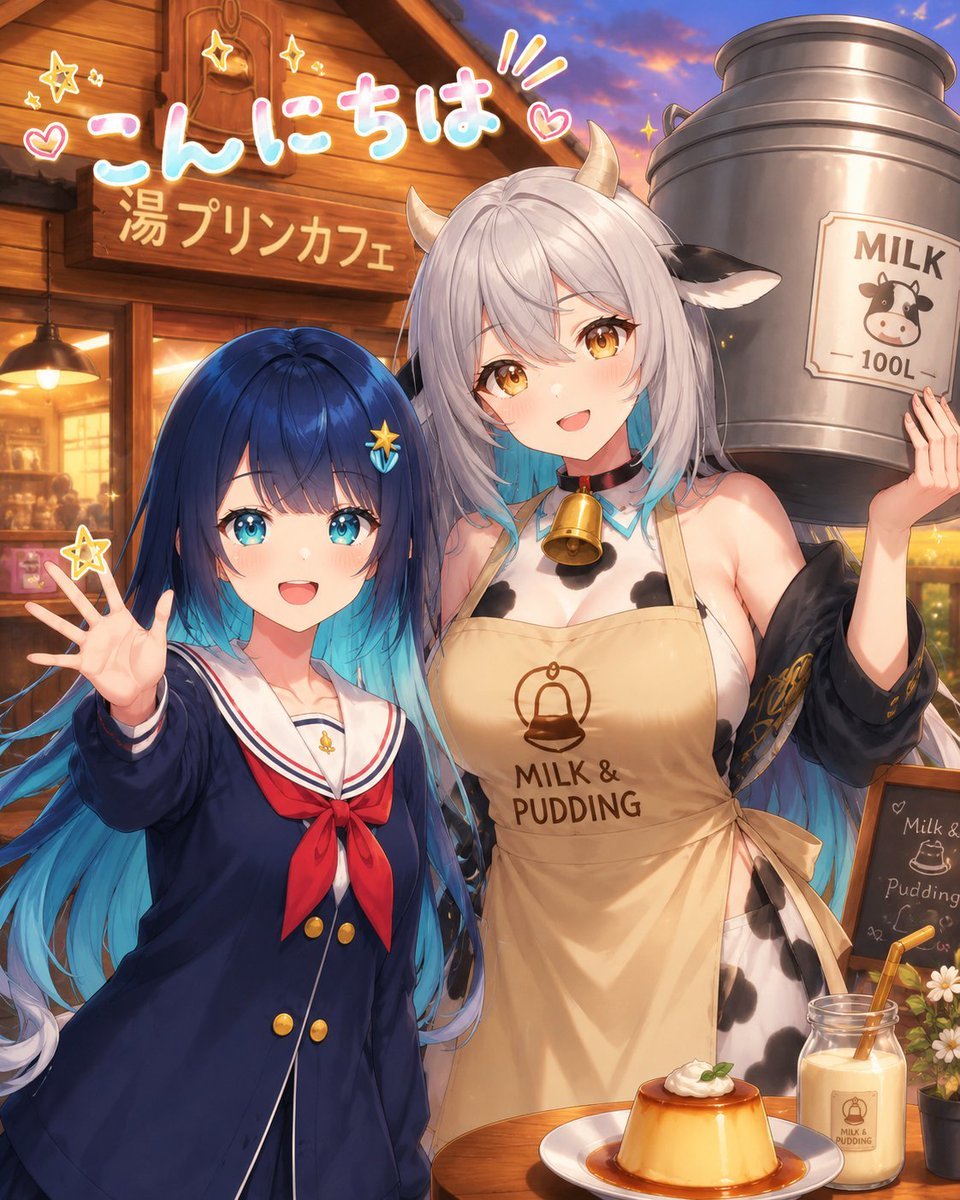
A detailed text prompt for generating a warm anime café scene with two girls, Japanese greeting text, milk-and-pudding branding, and cozy sunset lighting.
- Prompt included
- Model and format preset
- Premium template
The prompt behind this image
Copy the exact prompt behind Anime Milk Pudding Café Greeting, or open it in the studio and make it yours.
Create a vibrant anime-style café greeting illustration at sunset featuring exactly two female characters standing close together in front of a cozy wooden storefront. The left character is a petite schoolgirl with very long {argument name="hair color" default="dark navy blue fading into bright cyan"} hair, wearing a navy sailor-style school uniform with white trim, a red neck bow, gold buttons, and a small star hair clip; she raises one open hand toward the viewer in a cheerful wave. The right character is a taller cow-themed café waitress named {argument name="character name" default="Muumuu Bell"}, with long silver-white hair fading into blue tips, two small cream cow horns, black-and-white cow ears, cow-pattern markings on her outfit, a blue ribbon collar with a large gold cowbell, and a beige apron printed with a pudding icon and the words “MILK & PUDDING”; she holds one hand up beside a large metal milk can. Place simple rectangular privacy censor blocks over both characters’ faces, matching the image: one soft beige block over the waitress’s face and one darker beige-to-gray gradient block over the schoolgirl’s face. The background is a warmly lit wooden café exterior with glowing windows, hanging lamps, and a signboard. Add large cute handwritten Japanese greeting text at the top left reading {argument name="greeting text" default="こんにちは"} in white with pink and cyan outline, surrounded by small hearts, sparkles, and accent lines; below it, add the café sign text {argument name="cafe sign text" default="湯プリンカフェ"} in warm cream lettering. On the right, show exactly one oversized cylindrical silver milk can labeled “MILK 100L” with a cute cow face icon. In the foreground, show exactly two food/drink items on a wooden table: one caramel custard pudding on a white plate with whipped cream and mint, and one glass bottle of milk with a straw and a small “MILK & PUDDING” label. Include exactly one small chalkboard menu on the right with doodled pudding and milk text, and exactly one small flower pot with white daisies near it. Use rich golden-hour lighting, glossy high-detail anime rendering, soft bokeh, warm café ambience, saturated colors, clean linework, and a vertical 4:5 composition. Avoid extra characters, avoid extra foreground desserts, and keep the visible text legible.
How to use Anime Milk Pudding Café Greeting in 3 steps
- 1Upload ImagePNG, JPG or paste
Add your photo
Upload the photo the template builds on. The prompt, model and format are already set.
- 2…a portrait of your subject in softgolden-hour light, 85mm…
Personalize
Edit the subject and creative details for your destination.
- 3Generate
Generate
Press Generate — your image is created in PicX Studio, so you can compare it with the original and refine one variable at a time.
More like this
Templates with the same subject, style or setup. Open one to see its prompt.











Make it yours
Anime Milk Pudding Café Greeting works as-is. These are the safest ways to change it without losing the look.
Change one field
Copy a single group, rewrite it, and generate again so you can see what that field is doing.
Keep the frame, change the subject
Hold the composition and light of Anime Milk Pudding Café Greeting, then swap wardrobe, props or the person for a new take.
| If the result… | Why | Fix |
|---|---|---|
| The result drifts from the preview | Too many fields changed at once. | Reuse Anime Milk Pudding Café Greeting as-is first, then change one group — subject, light, or setting. |
| The model over-stylizes the scene | The prose prompt leaves finish and camera underspecified. | Add one camera or lighting sentence and stay on GPT Image 2. |
More GPT Image 2 templates
Other prompts made for GPT Image 2.

Six VTuber Japanese Logo Sheet

Realistic Portrait of Woman and Deer

The Vista Modular Condo Poster

AI Model Routing Comparison Infographic

2.5D Anime Art Board

Isometric Productivity Desk Scene

New York Double Exposure Poster

Four-Panel AI Landscape Comparison

Japanese Tatami Lifestyle Magazine Cover

NESCAFÉ Coffee Map Poster
More image prompts
Fresh picks from across the catalog.

Anime Style Character Transformation
Warm, Nostalgic Cinematic Video of a Woman with a Teddy Bear
Structured Prompt for Coffee Shop Lifestyle Photo

Lifestyle Sneaker Editorial Poster

Neo-Noir 1920s Gangster Portrait

Hyper-realistic commercial food photography of chocolate chip cookies
Operation Epic Furry Illustration Prompt
8 LINE stickers from a person image
Minimalist Fashion Runway Illustration
Golden Hour Rooftop Fashion Portrait
Browse template categories
Anime Milk Pudding Café Greeting questions
How do I use the Anime Milk Pudding Café Greeting template?
Add your photo if the template asks for one, edit the prompt if you like — the template's model and format are already selected — and press Generate. Your version opens in PicX Studio.
Can I customize the Anime Milk Pudding Café Greeting template?
Yes. You can change the subject, setting, lighting, mood, format, and available model controls before creating your image.
Is the Anime Milk Pudding Café Greeting template free?
Opening and editing this template is free. Generating uses credits, shown on the Generate button when you are signed in.
Which AI model should I use?
Start with GPT Image 2, which is the model associated with this template. You can compare another compatible model for a different finish.
Looking for something else? Browse all templates.

Your photo, any look
Thousands of ready templates for every top image and video model, from one credit balance.