
Sinking of the Battleship Yamato
A detailed cinematic prompt for generating a high-quality war film sequence depicting the sinking of the Battleship Yamato under heavy air assault.
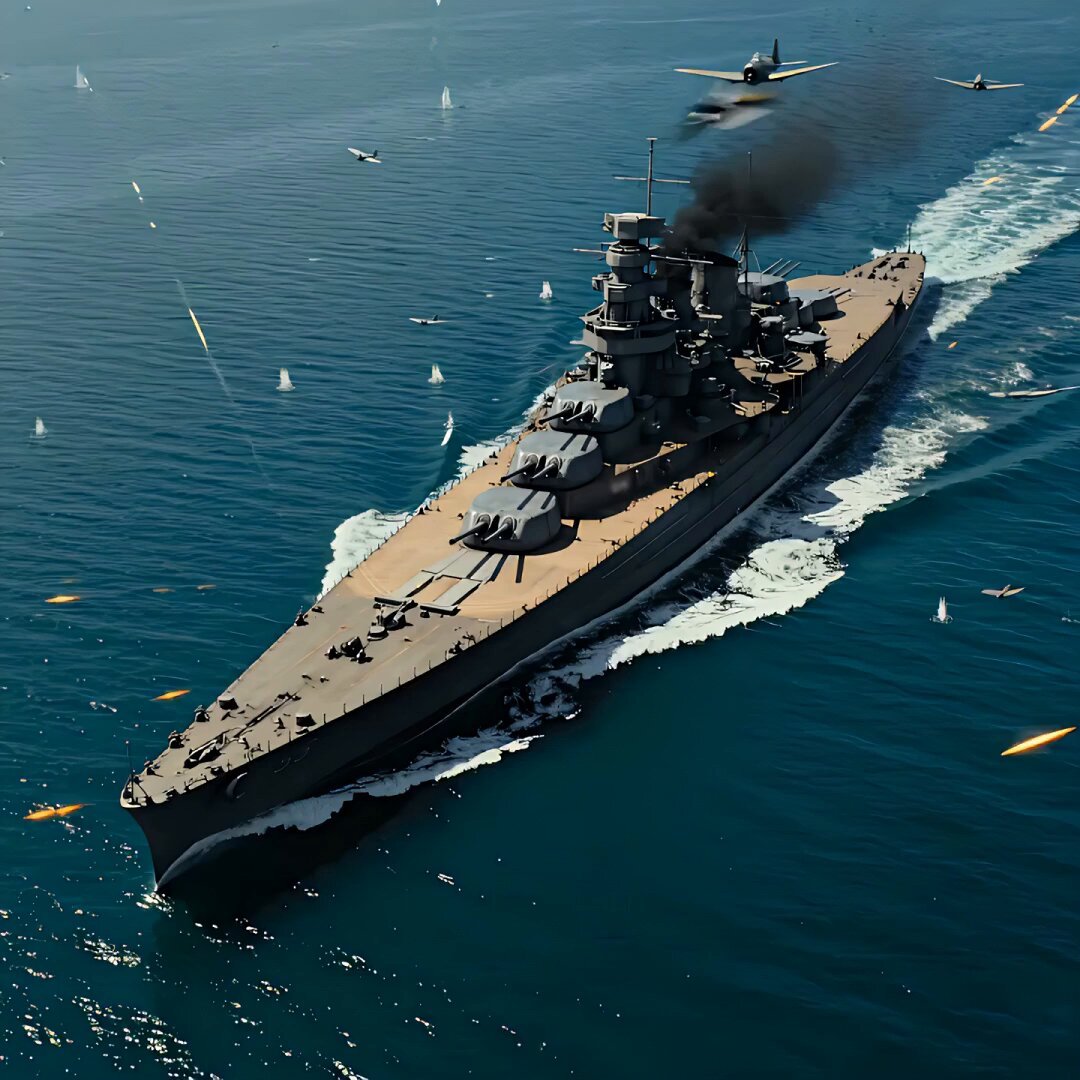
- Prompt included
- Model and format preset
- Premium template
The prompt behind this video
Copy the exact prompt behind Sinking of the Battleship Yamato, or open it in the studio and make it yours.
[CONDITION DEFINITION] 15秒、1:1スクエア、共有用、参照画像なし。戦艦大和は全長約263メートル、全幅約39メートル、第二次世界大戦期最大級の超大型戦艦として描く。第1フレームから米海軍艦載機群による波状総攻撃の最中。多数の爆弾、魚雷、近接爆発による損傷が蓄積し、最後は船体中央部を起点とする一度の致命的大爆発で撃沈が決定する。明るくクリアな高品質実写戦争映画映像。鮮やかな青空、青から青緑の海、暗灰色の鋼鉄船体、白い水柱、橙色の爆炎、濃い黒煙を明確に色分離する。 [SUBJECT / SCALE] 主役は戦艦大和。長大で幅広い船体、巨大な主砲塔群、高い塔型艦橋、多数の対空砲を備えた実物大の超大型戦艦。艦載機は大和より明確に小さく、複数方向から次々に襲来する。大和は単独攻撃では沈まず、総攻撃の蓄積によって最後の致命傷へ至る。 [SHOT / FLOW] 0.0〜2.1秒、左前方からの高い斜め俯瞰ワイド。戦艦大和の長い全長を画面中央に大きく見せる。多数の小さな艦載機が左右と上空から高速で横切り、対空砲火、爆弾着弾、不規則な水柱が広範囲に発生する。カメラは艦載機を追わない。 2.1〜4.2秒、右側面寄りの中高度斜め俯瞰ワイド。艦首から艦尾まで読める角度を維持し、別方向の複数編隊が前景・中景・遠景を高速で交差する。甲板と船体周囲への攻撃が続き、火災と黒煙が増える。 4.2〜5.8秒、高高度の超俯瞰ワイド。カメラは固定。一機の小さな急降下爆撃機だけが画面上方から大和へ高速降下して接近し、爆弾を投下した後、側方へ一瞬で抜ける。大和の全長と艦載機の小ささを同じ画面で維持する。 5.8〜8.3秒、海面すれすれの超低空。カメラは波頭の直上を一直線に猛烈な速度で進み、海水の飛沫が画面手前とレンズ脇へ激しく跳ね上がる。前方の巨大な大和へ急接近し、魚雷本体は大きく映さず、海面上の白い魚雷航跡とともに左舷水線下へ迫る。命中と同時に船体より高い巨大な水柱が立ち上がる。 8.3〜12.2秒、左側面寄りの高い斜め俯瞰ワイドを一つの連続ショットとして維持する。大和を画面内の最大対象とし、前方、左右、上空から艦載機群が途切れず高速横断する。魚雷航跡、爆弾直撃、近接爆発、不規則な水柱、対空砲火が長い船体全体へ集中する。攻撃を止めず、火災、黒煙、損傷、速度低下だけを増加させる。12.2秒までは致命的大爆発を起こさない。 12.2〜15.0秒、同じ斜め側面ワイドと同じ戦闘の流れを維持する。攻撃が継続する中、蓄積した損傷が限界に達し、船体中央部への最後の直撃を起点として一度の致命的大爆発が発生する。独立した球形火球や複数段の爆発にはせず、船体中央から横長に噴き上がる橙白色の爆炎、濃い黒煙、衝撃波、水しぶきを一体化する。大和の船体と爆発の起点を同じ画面内に残し、カメラは大きく動かさず、少し広い全景で終了する。 [CAMERA / EDITING] 左前方斜め俯瞰 → 右側面寄り斜め俯瞰 → 固定超俯瞰の急降下攻撃 → 海面超低空의 魚雷追跡 → 左側面寄り斜め俯瞰の連続総攻撃 → 同一ショットの致命的大爆発。後方斜め俯瞰は使わない。艦載機を追跡せず、画面を一瞬で横切らせて速度を表現する。カメラが激しく直線移動するのは魚雷シーンだけ。 [SOUND] 効果音のみ。多数の航空機音、風切り音、対空砲火、爆弾炸裂、魚雷命中、水しぶき、鋼鉄のきしみ、連続着弾、最後の巨大爆発。BGM、台詞、ナレーションなし。 [NEGATIVE] 後方斜め俯瞰、艦載機を追い続けるカメラ、魚雷シーン以外の直線追従、寄りすぎた画角、艦載機が大和より大きく見える構図、似た俯瞰カットの反復、カット順の入れ替え、魚雷シーンの省略、12.2秒以前の致命的大爆発、総攻撃が途中で止まる展開、傾斜、転覆、船体破断、複数段の球形火球、船体から切り離された爆発、夜戦、暗くくすんだ色調、現代戦闘機、ジェット機、ミサイル、特攻、文字、字幕、ロゴ、人体損傷、死体、ミニチュア感、玩具感、安いCG表現。
How to use Sinking of the Battleship Yamato in 3 steps
- 1
Open
The prompt is already in the box next to the preview, with the template's model and format selected.
- 2…a portrait of your subject in softgolden-hour light, 85mm…
Personalize
Edit the subject and creative details for your destination.
- 3Generate
Generate
Press Generate — your video is created in PicX Studio, so you can compare it with the original and refine one variable at a time.
More like this
Templates with the same subject, style or setup. Open one to see its prompt.
Pearl Harbor Attack — Seedance 2.0 FPV
Motocross Jump to Hover Battleship
Gym Bathroom Found-Footage Horror
Everyday Morning Routine Bathroom Vlog

Japanese Inspired Psychedelic Abstract Animation
Morning Skincare Routine Vlog Script
Late-Night Gym Found-Footage Horror
Cooking Vlog with 2D Sticker Raccoon

Rushed Morning Routine Montage
Blueprint to House Timelapse Transformation
Morning Reset Sunrise Routine
Sunset Desert Horse Chase
Make it yours
Sinking of the Battleship Yamato works as-is. These are the safest ways to change it without losing the look.
Change one field
Copy a single group, rewrite it, and generate again so you can see what that field is doing.
Keep the frame, change the subject
Hold the composition and light of Sinking of the Battleship Yamato, then swap wardrobe, props or the person for a new take.
| If the result… | Why | Fix |
|---|---|---|
| The result drifts from the preview | Too many fields changed at once. | Reuse Sinking of the Battleship Yamato as-is first, then change one group — subject, light, or setting. |
| The model over-stylizes the scene | The prose prompt leaves finish and camera underspecified. | Add one camera or lighting sentence and stay on Seedance 2.0. |
More Seedance 2.0 templates
Other prompts made for Seedance 2.0.

Comical Martial Arts Punch Scene

Maglev Train Action Sequence

Martial Arts Fight Sequence

Wuxia Protection and Trust Script

Vintage Korean Arcade MiniDV Vlog

Mercedes 190 SL Luxury Ad

Rainy Night Supernatural Reverse Comedy Video Script

Amazon Civilization Discovery

Futuristic South Asian City Transformation

Cozy Luxury Cafe Commercial
More video prompts
Fresh picks from across the catalog.
Luxury Restaurant Floor Manager Video

Magical Living Painting Fashion Video
Korean Beauty Editorial Animation
Nighttime Anime Graffiti Tunnel Scene
Character Speaking Famous Quote
Arborpunk Hanging Orchid Mandala

Cinematic AD for Mobile Holder
Desert Canyon FPV Rally Race
Realistic lifestyle cinematic video of an East Asian woman
Starship Rocket Vertical Ascent Drone Shot
Browse template categories
Sinking of the Battleship Yamato questions
How do I use the Sinking of the Battleship Yamato template?
Add your photo if the template asks for one, edit the prompt if you like — the template's model and format are already selected — and press Generate. Your version opens in PicX Studio.
Can I customize the Sinking of the Battleship Yamato template?
Yes. You can change the subject, setting, lighting, mood, format, and available model controls before creating your video.
Is the Sinking of the Battleship Yamato template free?
Opening and editing this template is free. Generating uses credits, shown on the Generate button when you are signed in.
Which AI model should I use?
Start with Seedance 2.0, which is the model associated with this template. You can compare another compatible model for a different finish.
Looking for something else? Browse all templates.

Your photo, any look
Thousands of ready templates for every top image and video model, from one credit balance.