How do I use the Retro-Modern Neon Anime Painting template?
Choose the primary action to open PicX Studio with the available template settings. Review the model and format, personalize the creative direction, and generate when ready.
A chic, low-angle anime portrait with a synthwave color palette.
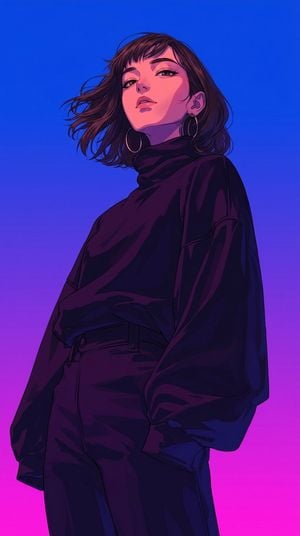
A retro-modern anime digital painting of a chic young woman in a dramatic low-angle perspective. Tousled dark {argument name="hair style" default="shoulder-length wavy"} hair, straight wispy micro-bangs, silver hoop earrings, subtle warm makeup, looking down toward the camera with a calm, aloof gaze. Wearing a {argument name="outfit" default="loose, baggy black oversized turtleneck"} with draped sleeves tucked into high-waisted black casual trousers, hands in pockets. Atmospheric {argument name="lighting color" default="neon split-lighting"}, warm pink rim light contrasting against deep purple and midnight-blue ambient shadows, clean graphic vector edges, cel-shaded anime style, smooth cobalt blue to hot pink gradient backdrop, synthwave color palette, cinematic lighting, masterpiece.
Choose the primary action to open PicX Studio with the available template settings. Review the model and format, personalize the creative direction, and generate when ready.
Yes. You can change the subject, setting, lighting, mood, format, and available model controls before creating your image.
This template is free to open and customize. Generation usage is shown in PicX Studio before you create.
Start with gemini-3-pro-image-preview, which is the model associated with this template. You can compare another compatible model for a different finish.
Follow a topic to a crawlable collection of related PicX Studio templates.