
Chiropractic Clinic Treatment Session
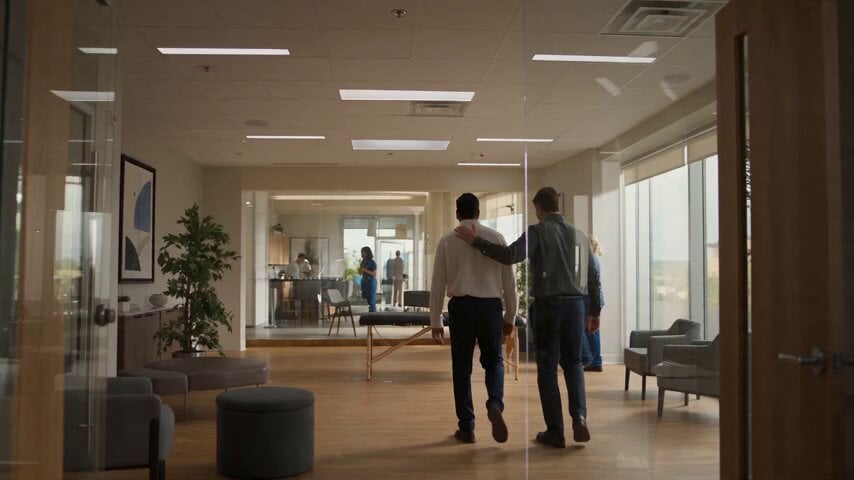
A comprehensive prompt for a multi-scene cinematic video of a professional chiropractic treatment session, focusing on realistic anatomy, contact, and patient reactions.
- Prompt included
- Model and format preset
- Free template
The prompt behind this video
Copy the exact prompt behind Chiropractic Clinic Treatment Session, or open it in the studio and make it yours.
Create a 30 second 16:9 cinematic social video set inside a modern chiropractic and mobility clinic during late morning. The room has pale warm walls, clean wood flooring, black padded treatment tables, gray visitor chairs, a few green plants, subtle wall art, and tall windows overlooking leafy trees. Use natural daylight mixed with soft ceiling light, realistic skin texture, true fabric behavior, accurate anatomy, physically believable contact, consistent faces, and natural micro expressions. No text, no logos, no watermarks, no surreal motion. From 0 to 4 seconds, open on a wide establishing shot with a slow handheld push through the clinic. A calm male practitioner in a charcoal shirt guides an adult male client in a white shirt toward a treatment table. Other staff move softly in the distant background. The mood feels professional, relaxed, and observational. From 4 to 8 seconds, cut to a medium seated shot. The client sits centered while the practitioner stands behind him, gently checking shoulder level and neck rotation. Use small natural camera drift, shallow depth of field, window light on one side of the face, and realistic eye contact. Show quiet anticipation without exaggerated acting. From 8 to 12 seconds, move into a close side angle as the practitioner carefully positions the head for a controlled neck release. Keep the motion restrained and anatomically correct. Capture a quick release, a subtle facial reaction, a sharp breath, and an immediate smile. Let the camera react with a tiny authentic handheld movement rather than a dramatic shake. From 12 to 17 seconds, cut to a medium wide side view of the client lying on his side on the table. The practitioner braces the shoulder and pelvis, pauses, then performs one compact lumbar adjustment. Show realistic weight transfer, table cushion compression, shirt folds, breathing, hand pressure, and a brief surprised laugh from the client. From 17 to 22 seconds, cut to the client lying face down. The practitioner palpates the upper back, stacks both hands, and applies one controlled thoracic compression. Use a slightly lower camera angle, soft reflections on the table, gentle background activity, and a brief focus pull from the hands to the client’s relieved expression. From 22 to 26 seconds, transition to a head of table view. The client lies on his back while the practitioner places a black traction strap beneath the base of the skull. Build tension slowly and safely, then deliver one short controlled pull. The client reacts with wide eyes, then laughs and covers his face for a moment. From 26 to 30 seconds, finish with the client sitting upright, rolling his shoulders and turning his neck comfortably while the practitioner stands beside him. End on an honest shared smile and a slow pullback that reveals the bright clinic. Keep the final moment calm and satisfying, not promotional.
How to use Chiropractic Clinic Treatment Session in 3 steps
- 1
Open
The prompt is already in the box next to the preview, with the template's model and format selected.
- 2…a portrait of your subject in softgolden-hour light, 85mm…
Personalize
Edit the subject and creative details for your destination.
- 3Generate
Generate
Press Generate — your video is created in PicX Studio, so you can compare it with the original and refine one variable at a time.
More like this
Templates with the same subject, style or setup. Open one to see its prompt.

1970s Japanese Diet Session Animation
Amateur POV Ferrari Yoga Session
Dreamy Forest Photography Session

Silat Slaughterhouse Fight Scene

Outdoor Campfire Burger Cooking
Fashion Runway Couture Walk
Taj Mahal Fashion Shoot

Pharaoh Storyboard Layout

Luxury Skincare Product Commercial Video
Cinematic Exercise Bike Cavalry Charge Misdirection

DV Tape Camcorder Gym Vlog
Cinematic Morning Gym Commercial Prompt
Make it yours
Chiropractic Clinic Treatment Session works as-is. These are the safest ways to change it without losing the look.
Change one field
Copy a single group, rewrite it, and generate again so you can see what that field is doing.
Keep the frame, change the subject
Hold the composition and light of Chiropractic Clinic Treatment Session, then swap wardrobe, props or the person for a new take.
| If the result… | Why | Fix |
|---|---|---|
| The result drifts from the preview | Too many fields changed at once. | Reuse Chiropractic Clinic Treatment Session as-is first, then change one group — subject, light, or setting. |
| The model over-stylizes the scene | The prose prompt leaves finish and camera underspecified. | Add one camera or lighting sentence and stay on Seedance 2.0. |
More Seedance 2.0 templates
Other prompts made for Seedance 2.0.

Comical Martial Arts Punch Scene

Maglev Train Action Sequence

Martial Arts Fight Sequence

Wuxia Protection and Trust Script

Vintage Korean Arcade MiniDV Vlog

Mercedes 190 SL Luxury Ad

Rainy Night Supernatural Reverse Comedy Video Script

Amazon Civilization Discovery

Futuristic South Asian City Transformation

Cozy Luxury Cafe Commercial
More video prompts
Fresh picks from across the catalog.

Lone Warrior Medieval Battlefield Video Prompt
Street Dance Battle Sony Headphones
Skincare Commercial Macro Foam Detail
Ancient Style Fashion Outfit Swap

Cinematic Clifftop Samurai Reveal
Hyper-realistic Classroom Action Sequence
Low-effort UGC video for skincare brand

Wasteland Battle Cinematic Video Sequence

Michael Jackson Moonwalk video

Surreal time-bending reverie video prompt
Browse template categories
Chiropractic Clinic Treatment Session questions
How do I use the Chiropractic Clinic Treatment Session template?
Add your photo if the template asks for one, edit the prompt if you like — the template's model and format are already selected — and press Generate. Your version opens in PicX Studio.
Can I customize the Chiropractic Clinic Treatment Session template?
Yes. You can change the subject, setting, lighting, mood, format, and available model controls before creating your video.
Is the Chiropractic Clinic Treatment Session template free?
Opening and editing this template is free. Generating uses credits, shown on the Generate button when you are signed in.
Which AI model should I use?
Start with Seedance 2.0, which is the model associated with this template. You can compare another compatible model for a different finish.
Looking for something else? Browse all templates.

Your photo, any look
Thousands of ready templates for every top image and video model, from one credit balance.