
Golden Academia Anime Scholar
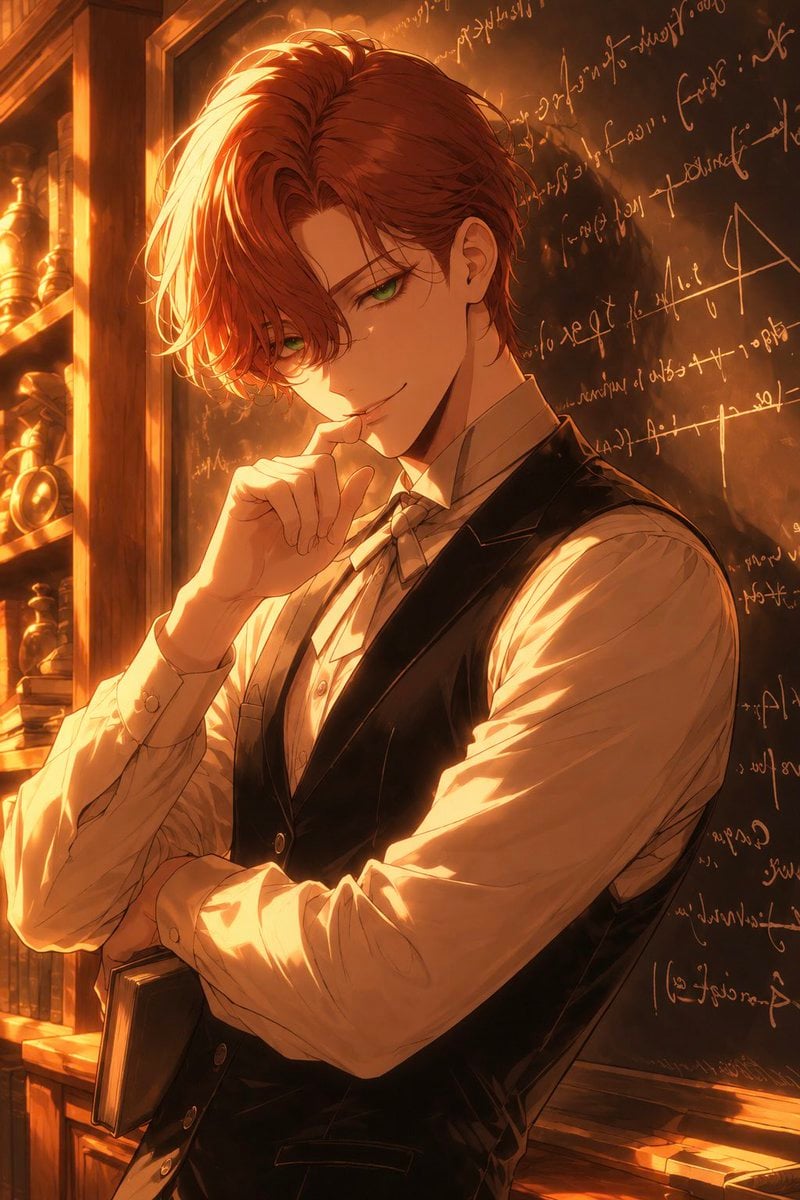
A cinematic anime portrait prompt for creating a handsome red-haired scholar in a warm antique study with chalkboard formulas and dramatic sunset lighting.
- Prompt included
- Model and format preset
- Free template
The prompt behind this image
Copy the exact prompt behind Golden Academia Anime Scholar, or open it in the studio and make it yours.
Create a vertical 2:3 anime-style portrait illustration of a charismatic young male scholar in a warm, old-world study. The subject is a slim, handsome young man with {argument name="hair color" default="deep auburn red"} wavy medium-length hair, long bangs falling over one eye, sharp {argument name="eye color" default="emerald green"} eyes, fair skin, and a subtle confident smile. He stands in a three-quarter pose, looking directly at the viewer, with one hand raised thoughtfully to his lips and the other arm folded across his torso while holding a closed dark book. Dress him in a crisp cream dress shirt with slightly rolled, wrinkled sleeves, a small tied cravat, and a fitted black waistcoat with buttons, giving him a refined professor or alchemist look. Place him beside a dark chalkboard covered with glowing handwritten cursive formulas, equations, symbols, and sketch marks, but keep the writing decorative and mostly unreadable. Add wooden bookshelves and antique objects on the left side, including exactly 3 visible brass or gold-toned instruments/ornaments and a row of old books near the bottom. Use dramatic golden sunset light streaming from the upper left, strong rim lighting on his hair and sleeves, warm amber reflections, deep shadows, and atmospheric dust motes. Render with polished high-detail anime painting, cinematic composition, rich linework, glossy eyes, soft bloom, warm environmental color grading, and elegant romantic academia mood. Keep the background detailed but secondary, avoid modern items, avoid extra characters, and do not include readable text or watermark.
How to use Golden Academia Anime Scholar in 3 steps
- 1Upload ImagePNG, JPG or paste
Add your photo
Upload the photo the template builds on. The prompt, model and format are already set.
- 2…a portrait of your subject in softgolden-hour light, 85mm…
Personalize
Edit the subject and creative details for your destination.
- 3Generate
Generate
Press Generate — your image is created in PicX Studio, so you can compare it with the original and refine one variable at a time.
More like this
Templates with the same subject, style or setup. Open one to see its prompt.












Make it yours
Golden Academia Anime Scholar works as-is. These are the safest ways to change it without losing the look.
Change one field
Copy a single group, rewrite it, and generate again so you can see what that field is doing.
Keep the frame, change the subject
Hold the composition and light of Golden Academia Anime Scholar, then swap wardrobe, props or the person for a new take.
| If the result… | Why | Fix |
|---|---|---|
| The result drifts from the preview | Too many fields changed at once. | Reuse Golden Academia Anime Scholar as-is first, then change one group — subject, light, or setting. |
| The model over-stylizes the scene | The prose prompt leaves finish and camera underspecified. | Add one camera or lighting sentence and stay on GPT Image 2. |
More GPT Image 2 templates
Other prompts made for GPT Image 2.

Six VTuber Japanese Logo Sheet

Realistic Portrait of Woman and Deer

The Vista Modular Condo Poster

AI Model Routing Comparison Infographic

2.5D Anime Art Board

Isometric Productivity Desk Scene

New York Double Exposure Poster

Four-Panel AI Landscape Comparison

Japanese Tatami Lifestyle Magazine Cover

NESCAFÉ Coffee Map Poster
More image prompts
Fresh picks from across the catalog.
Twitter Profile Doodle Art Transformation
Soft Window Portrait with Lace Outfit

Snack Kingdom Potato Fries Ad

High-Quality Photo of Man Flying Above Clouds
Portrait of a Middle-Aged Man Lying Down

Protein Powder Splash Hero Shot
Pixar Cat Desk Storyboard
Jimbocho Book Town Poster
Editorial Fashion Collage Poster

Cat to Human Portrait Transformation
Browse template categories
Golden Academia Anime Scholar questions
How do I use the Golden Academia Anime Scholar template?
Add your photo if the template asks for one, edit the prompt if you like — the template's model and format are already selected — and press Generate. Your version opens in PicX Studio.
Can I customize the Golden Academia Anime Scholar template?
Yes. You can change the subject, setting, lighting, mood, format, and available model controls before creating your image.
Is the Golden Academia Anime Scholar template free?
Opening and editing this template is free. Generating uses credits, shown on the Generate button when you are signed in.
Which AI model should I use?
Start with GPT Image 2, which is the model associated with this template. You can compare another compatible model for a different finish.
Looking for something else? Browse all templates.

Your photo, any look
Thousands of ready templates for every top image and video model, from one credit balance.