How do I use the Gigastructure Chinese Aesthetic Landscape template?
Choose the primary action to open PicX Studio with the available template settings. Review the model and format, personalize the creative direction, and generate when ready.
A creative prompt combining megastructures with traditional Chinese aesthetics, utilizing randomized elements like scenery, weather, and figures to create atmos
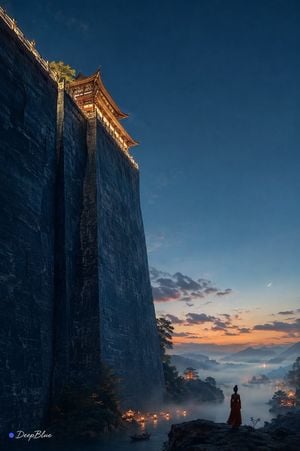
🇨🇳🧱⬆️⬆️⬆️🏯〰️🟨🌲〰️👤🔴 🏔️☁️🌊🏞️🪷🏮🌫️❄️🌧️🌙🌅 🎲1️⃣场景随机|{argument name="随机场景" default="🏔️山巅"}|☁️云海|🌊江岸|🪷莲池|🏯古城|🧱巨构内部|🏜️荒原 🎲2️⃣天气随机|{argument name="随机天气" default="🌅夕阳"}|🌫️晨雾|🌧️雨后|❄️薄雪|🌙月夜|☁️云隙光 🎲3️⃣元素随机|{argument name="随机元素" default="🛶孤舟"}|🏮灯笼|🪨巨石|🍂落叶|🪷荷花|🐦飞鸟|💧雨滴 🎲4️⃣人物随机|🧍独立|🚶缓行|🧘静坐|👀远眺 📐⬆️🎬📷|低角度|超大尺度|真实材质|自然光影|超写实电影质感|8K 🌌🔵⬜⬜⬜|深邃青蓝天空|大量留白|暖金 × 冷青|庄严|空灵|清雅|宋画意境 ✒️ ● DeepBlue
Choose the primary action to open PicX Studio with the available template settings. Review the model and format, personalize the creative direction, and generate when ready.
Yes. You can change the subject, setting, lighting, mood, format, and available model controls before creating your image.
This template is free to open and customize. Generation usage is shown in PicX Studio before you create.
Start with GPT Image 2, which is the model associated with this template. You can compare another compatible model for a different finish.
Follow a topic to a crawlable collection of related PicX Studio templates.