How do I use the Anime Selfie on Smartphone template?
Choose the primary action to open PicX Studio with the available template settings. Review the model and format, personalize the creative direction, and generate when ready.
Creates a polished anime-style smartphone selfie of a smiling girl with a social-story caption bar, useful for character art or social media visuals.
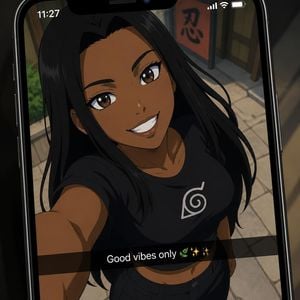
Create a stylized anime screenshot displayed inside a modern black smartphone screen, as if viewing a social media story or selfie. The phone fills the frame at a slight diagonal angle, with rounded black bezels, a top notch, small status icons, and the time shown as 11:27. Inside the phone screen is a close-up overhead selfie of a smiling young woman with {argument name="skin tone" default="deep warm brown skin"}, {argument name="hair color" default="long straight black hair"}, large glossy brown anime eyes, defined brows, and a bright friendly grin. She is holding the camera above herself with one arm extended, creating a dynamic wide-angle selfie perspective. She wears a fitted black cropped T-shirt with a white leaf spiral emblem on the chest and dark pants. The setting behind her is a softly blurred anime village street with tan stone pavement, wooden storefronts, greenery at the side, and an orange vertical sign bearing the Japanese character 「忍」. Add a translucent black caption bar across the lower third of the phone screen with centered white text reading {argument name="caption text" default="Good vibes only 🌿✨✨"}. Use polished high-quality anime rendering, clean linework, warm cinematic shading, expressive face details, subtle screen glare, shallow depth of field, and a vertical smartphone composition. Keep the image focused on exactly one person, one phone, one caption bar, one visible chest emblem, and one orange background sign.
Choose the primary action to open PicX Studio with the available template settings. Review the model and format, personalize the creative direction, and generate when ready.
Yes. You can change the subject, setting, lighting, mood, format, and available model controls before creating your image.
This template is free to open and customize. Generation usage is shown in PicX Studio before you create.
Start with GPT Image 2, which is the model associated with this template. You can compare another compatible model for a different finish.
Follow a topic to a crawlable collection of related PicX Studio templates.