
Detailed Image Prompt for Nano Banana Pro
A highly detailed image generation prompt for the Nano Banana Pro model, describing a young woman in a school uniform aesthetic, sitting on a stool in a modern convenience store (Konbini) while gripping a sheathed black…
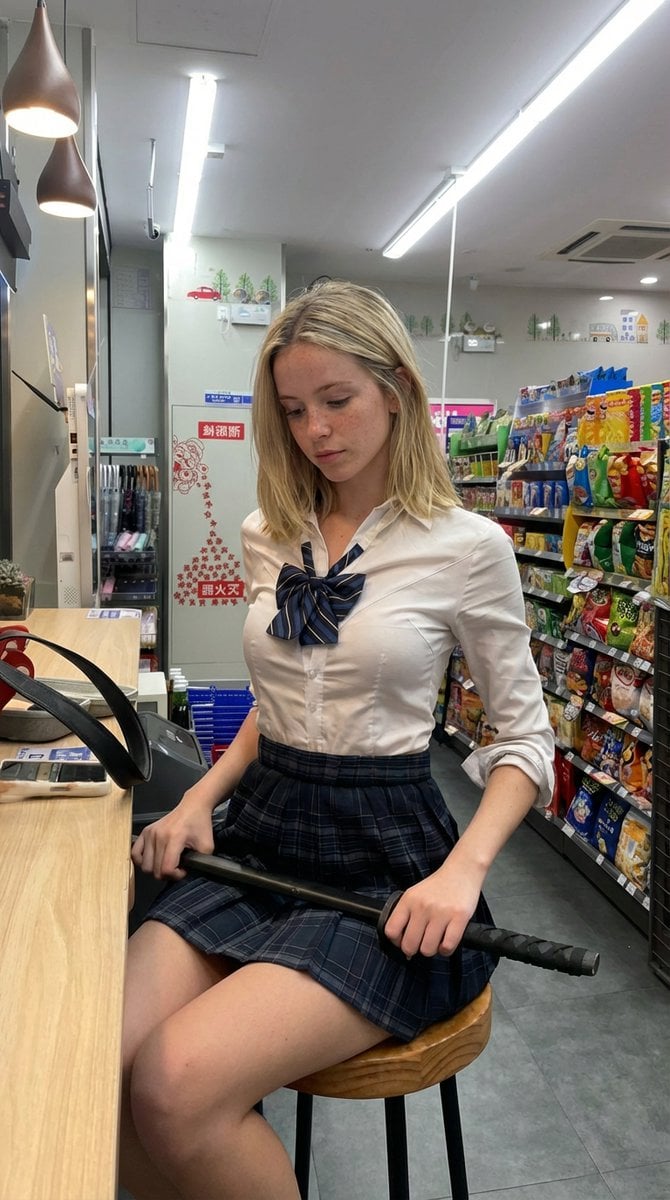
- Prompt included
- Model and format preset
- Premium template
The prompt behind this image
Copy the exact prompt behind Detailed Image Prompt for Nano Banana Pro, or open it in the studio and make it yours.
- Image Prompt › Subject › Demographics
- Young woman, approximately late teens or early 20s.
- Image Prompt › Subject › Hair
- Shoulder-length blonde hair, straight texture, parted in the middle, slightly messy.
- Image Prompt › Subject › Face
- Light skin tone, visible freckles across the nose and cheeks, looking down with a pensive, serious, or neutral expression. No eye contact with the camera.
- Image Prompt › Attire › Style
- School uniform aesthetic.
- Image Prompt › Attire › Top
- Fitted white button-down shirt, long sleeves rolled up to the elbows, top button unbuttoned.
- Image Prompt › Attire › Neckwear
- Blue and white striped school ribbon/bow tie.
- Image Prompt › Attire › Bottom
- Dark blue and grey plaid pleated mini skirt.
- Image Prompt › Pose And Action › Posture
- Sitting on a round wooden stool with black metal legs.
- Image Prompt › Pose And Action › Hands
- Both hands gripping a sheathed black katana (sword) resting across her lap.
- Image Prompt › Pose And Action › Body Orientation
- Angled slightly towards the left, sitting at a counter.
- Image Prompt › Environment › Setting
- Interior of a modern convenience store (Konbini style).
- Image Prompt › Environment › Right Side
- Shelves fully stocked with colorful bags of chips and snacks.
- Image Prompt › Environment › Left Side
- Light wood veneer counter/eating bar.
- Image Prompt › Environment › Background
- White walls, a white refrigerator unit, an umbrella stand with umbrellas, and wall signage with red graphics and text (possibly Asian characters).
- Image Prompt › Environment › Ceiling
- Standard drop ceiling with bright fluorescent strip lighting.
- Image Prompt › Lighting And Details › Lighting
- Bright, cool-toned artificial overhead lighting mixed with warm accents from brown pendant lamps above the counter.
- Image Prompt › Lighting And Details › Props
- A black katana with a textured handle (tsuka) and black sheath (saya). A smartphone and a black strap lying on the counter.
- Image Prompt › Lighting And Details › Atmosphere
- Candid, slice-of-life photography with a surreal contrast between the mundane setting and the weapon.
Raw JSON
{
  "image_prompt": {
    "subject": {
      "demographics": "Young woman, approximately late teens or early 20s.",
      "hair": "Shoulder-length blonde hair, straight texture, parted in the middle, slightly messy.",
      "face": "Light skin tone, visible freckles across the nose and cheeks, looking down with a pensive, serious, or neutral expression. No eye contact with the camera."
    },
    "attire": {
      "style": "School uniform aesthetic.",
      "top": "Fitted white button-down shirt, long sleeves rolled up to the elbows, top button unbuttoned.",
      "neckwear": "Blue and white striped school ribbon/bow tie.",
      "bottom": "Dark blue and grey plaid pleated mini skirt."
    },
    "pose_and_action": {
      "posture": "Sitting on a round wooden stool with black metal legs.",
      "hands": "Both hands gripping a sheathed black katana (sword) resting across her lap.",
      "body_orientation": "Angled slightly towards the left, sitting at a counter."
    },
    "environment": {
      "setting": "Interior of a modern convenience store (Konbini style).",
      "right_side": "Shelves fully stocked with colorful bags of chips and snacks.",
      "left_side": "Light wood veneer counter/eating bar.",
      "background": "White walls, a white refrigerator unit, an umbrella stand with umbrellas, and wall signage with red graphics and text (possibly Asian characters).",
      "ceiling": "Standard drop ceiling with bright fluorescent strip lighting."
    },
    "lighting_and_details": {
      "lighting": "Bright, cool-toned artificial overhead lighting mixed with warm accents from brown pendant lamps above the counter.",
      "props": "A black katana with a textured handle (tsuka) and black sheath (saya). A smartphone and a black strap lying on the counter.",
      "atmosphere": "Candid, slice-of-life photography with a surreal contrast between the mundane setting and the weapon."
    }
  }
}How to use Detailed Image Prompt for Nano Banana Pro in 3 steps
- 1
Open
The prompt is already in the box next to the preview, with the template's model and format selected.
- 2…a portrait of your subject in softgolden-hour light, 85mm…
Personalize
Edit the subject and creative details for your destination.
- 3Generate
Generate
Press Generate — your image is created in PicX Studio, so you can compare it with the original and refine one variable at a time.
More like this
Templates with the same subject, style or setup. Open one to see its prompt.

Woman in Mall with Chanel Bag - Heart Gesture

VFX Comparison Image Prompt (Before/After) for Nano Banana Pro

Nano Banana Prompt for Consistent Character Jumpshots

Cinematic Camera Instructions for Nano Banana Pro

Manga Generation Prompt Template for Nano Banana Pro

Hyper-Realistic Commercial Food Photography Prompt for Gemini Nano Banana Pro
Cinematic Portrait Prompt for Google Nano Banana Pro

Multi-Frame Lifestyle Portrait Prompt for Nano Banana Pro

Low-Key Product Photography Prompt for Gemini Nano Banana Pro
Masterpiece Political Caricature Prompt for Nano Banana 2
Commercial Perfume Photography Prompt for Nano Banana Pro
Realistic Gaming Couple Portrait Prompt for Nano Banana 2
Make it yours
Detailed Image Prompt for Nano Banana Pro works as-is. These are the safest ways to change it without losing the look.
Swap the setting
Keep the rest of the prompt and replace the location block. The current setting is “Interior of a modern convenience store (Konbini style).”.
Swap the light
One lighting change is enough to compare takes. Current light: “Bright, cool-toned artificial overhead lighting mixed with warm accents from bro”.
Change one field
Copy a single group, rewrite it, and generate again so you can see what that field is doing.
| If the result… | Why | Fix |
|---|---|---|
| The result drifts from the preview | Too many fields changed at once. | Reuse Detailed Image Prompt for Nano Banana Pro as-is first, then change one group — subject, light, or setting. |
| Nano Banana 2 ignores part of the JSON | Some models flatten or skip nested keys. | Keep the same values and paste them as a short paragraph instead. |
More Nano Banana 2 templates
Other prompts made for Nano Banana 2.

Photorealistic Leaf Shaped Like a Dragon

K-Pop Idol Portrait Grid for Rapid Selection

Poetic Rain Forest Portrait During Golden Hour

Urban Street Portrait with Cartoon Inner Self Duo

Candid Nighttime Photo with Cat Prompt

High-Concept 3D Diorama Generation Prompt

Cinematic Futuristic Studio Portrait Template

Skincare Editorial Photography Collage Prompt

Hyper-Realistic Commercial Product Photography (Splash Effect)

Hyper-Realistic Nightclub Portrait Prompt
More image prompts
Fresh picks from across the catalog.
Windblown Ink Samurai Portrait
Vintage Photo to Graphite Sketch
Slow Motion Pour Food Photography Prompt for Nano Banana 2
Cinematic studio portrait with moody lighting
14 Napa Valley Vineyard — California Series
NanoBanana2
Mirror Selfie Athleisure Look with Detailed Anatomy
Expressive Mixed-Media Ink Portrait
Gen Z Mirror Selfie Collage
Holographic Cockatiel Embroidery Hoop
Browse template categories
Detailed Image Prompt for Nano Banana Pro questions
How do I use the Detailed Image Prompt for Nano Banana Pro template?
Add your photo if the template asks for one, edit the prompt if you like — the template's model and format are already selected — and press Generate. Your version opens in PicX Studio.
Can I customize the Detailed Image Prompt for Nano Banana Pro template?
Yes. You can change the subject, setting, lighting, mood, format, and available model controls before creating your image.
Is the Detailed Image Prompt for Nano Banana Pro template free?
Opening and editing this template is free. Generating uses credits, shown on the Generate button when you are signed in.
Which AI model should I use?
Start with Nano Banana 2, which is the model associated with this template. You can compare another compatible model for a different finish.
Looking for something else? Browse all templates.

Your photo, any look
Thousands of ready templates for every top image and video model, from one credit balance.