
Emily Seedance Pixel Horror Rpg
Seedance V2 pixel art horror RPG — pale-haired girl sprite in decaying Victorian mansion, flickering candlelight, shadow figure encounter.
- Prompt included
- Model and format preset
- Free template
The prompt behind this video
Copy the exact prompt behind Emily Seedance Pixel Horror Rpg, or open it in the studio and make it yours.
Seedance V2 on Runway I generated this video from my phone. The future of video games really promising. Screen recording of a 2D top-down pixel art horror RPG game, Japanese indie style reminiscent of The Witch's House and Ib. A stoic pale-haired anime girl sprite navigates a decaying Victorian mansion interior, dark muted palette with flickering candlelight casting long pixel shadows. Sparse windows reveal a pale moonlit night sky outside. [0s–3s] The girl sprite walks up to a large ornate door and interacts with it. A pixel dialogue box appears on screen reading: "The door is locked… I need to find a key somewhere." [3s–6s] The sprite moves right and examines a dusty wooden table. A centered dialogue box slides in displaying a torn note: "Beware of what you cannot see." A small pixel question mark bubble pops above her head. [7s–11s] The sprite stands motionless. In the dim corridor behind her, a distorted black shadowy figure silently materializes and drifts closer. The moment it reaches directly behind her, a red exclamation mark bubble bursts above her head. She spins around instantly. The shadow vanishes. [11s–15s] A dialogue box appears: "Was that… just my imagination…?" The sprite cautiously resumes exploring the dark hallways, checking bookshelves and paintings on cracked walls. Atmospheric BGM: haunting ethereal piano melody layered with faint antique clock ticking. CRT scanline filter, 16-bit color depth, pixel-perfect animation. Slow camera follows the sprite with subtle screen shake during the shadow encounter. Dark ambient lighting, desaturated cool tones with warm candlelight accents.
How to use Emily Seedance Pixel Horror Rpg in 3 steps
- 1
Open
The prompt is already in the box next to the preview, with the template's model and format selected.
- 2…a portrait of your subject in softgolden-hour light, 85mm…
Personalize
Edit the subject and creative details for your destination.
- 3Generate
Generate
Press Generate — your video is created in PicX Studio, so you can compare it with the original and refine one variable at a time.
More like this
Templates with the same subject, style or setup. Open one to see its prompt.
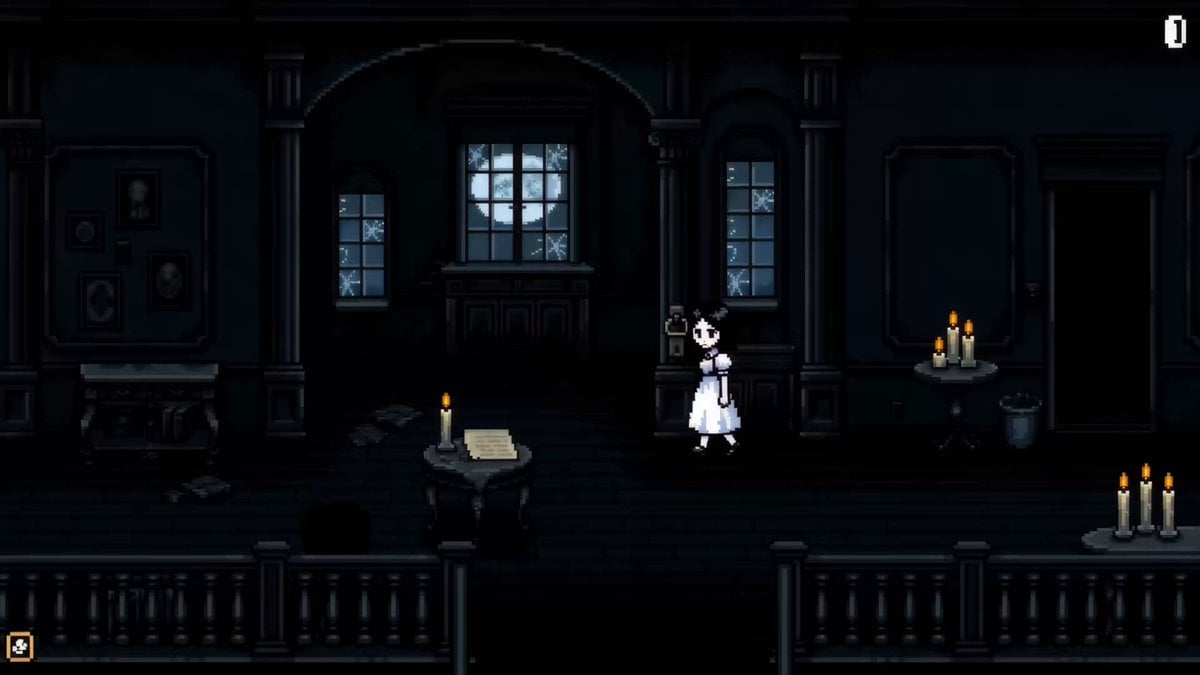
Pixel Art Horror RPG Gameplay Scene
Ankitpatel Time Freeze Viral
Duttasomrat Time Freeze Viral V2
Johnnywang Tokyo Time Freeze
Duttasomrat Time Freeze Viral
Mayorking Time Freeze Higgsfield
Misa Time Freeze Japanese
Lillyli Time Freeze Avatar
Cuchocapilla Time Freeze
Monetizationdon Time Freeze Higgsfield
Rovvmut Time Freeze Nsketchai
Miilesus Sports Bar Time Freeze
Make it yours
Emily Seedance Pixel Horror Rpg works as-is. These are the safest ways to change it without losing the look.
Change one field
Copy a single group, rewrite it, and generate again so you can see what that field is doing.
Keep the frame, change the subject
Hold the composition and light of emily-seedance-pixel-horror-rpg, then swap wardrobe, props or the person for a new take.
| If the result… | Why | Fix |
|---|---|---|
| The result drifts from the preview | Too many fields changed at once. | Reuse emily-seedance-pixel-horror-rpg as-is first, then change one group — subject, light, or setting. |
| The model over-stylizes the scene | The prose prompt leaves finish and camera underspecified. | Add one camera or lighting sentence and stay on Video Seedance. |
More Video Seedance templates
Other prompts made for Video Seedance.

X Johnagi168 Work Seedance Video

X Johnagi168 This Is My Work Gpt Image 2 Seedance 2 0
X Chillaikalan Nano Banana Pro Seedance 20
Gpt2 Gpt2 Seedance Storyboard to Video
Seedance Seedance 20 Urban Romance Wall Pin Kiss
Mrdasonx Quantum Missile Bullet Time
Alla Kling World Acceleration
Time Stealer — Seedance 2.0
City Timelapse Growth — Seedance 2.0
Underground Temple Escape — Seedance 2.0
More video prompts
Fresh picks from across the catalog.

Wildlife Predator-Prey Chase

Woman in Digital Space with Cinematic Camera

Video Prompt: Hyper-realistic Black Comedy Wedding

Cyberpunk Samurai Ronin Animation
Fluid Sketch Martial Arts Battle

Grok Imagine Prompt: Beautiful Fairy Fantasy Art

Dynamic Drone Camera Movement on Subject

Golden Sea Creature and Angel Fin Gift
Ralph Steadman Style Illustration Prompt

Cool Cat Cartoon Action Sequence
Browse template categories
Emily Seedance Pixel Horror Rpg questions
How do I use the emily-seedance-pixel-horror-rpg template?
Add your photo if the template asks for one, edit the prompt if you like — the template's model and format are already selected — and press Generate. Your version opens in PicX Studio.
Can I customize the emily-seedance-pixel-horror-rpg template?
Yes. You can change the subject, setting, lighting, mood, format, and available model controls before creating your video.
Is the emily-seedance-pixel-horror-rpg template free?
Opening and editing this template is free. Generating uses credits, shown on the Generate button when you are signed in.
Which AI model should I use?
Start with Video Seedance, which is the model associated with this template. You can compare another compatible model for a different finish.
Looking for something else? Browse all templates.

Your photo, any look
Thousands of ready templates for every top image and video model, from one credit balance.