
Vans Logo Street Fashion Portrait Replication
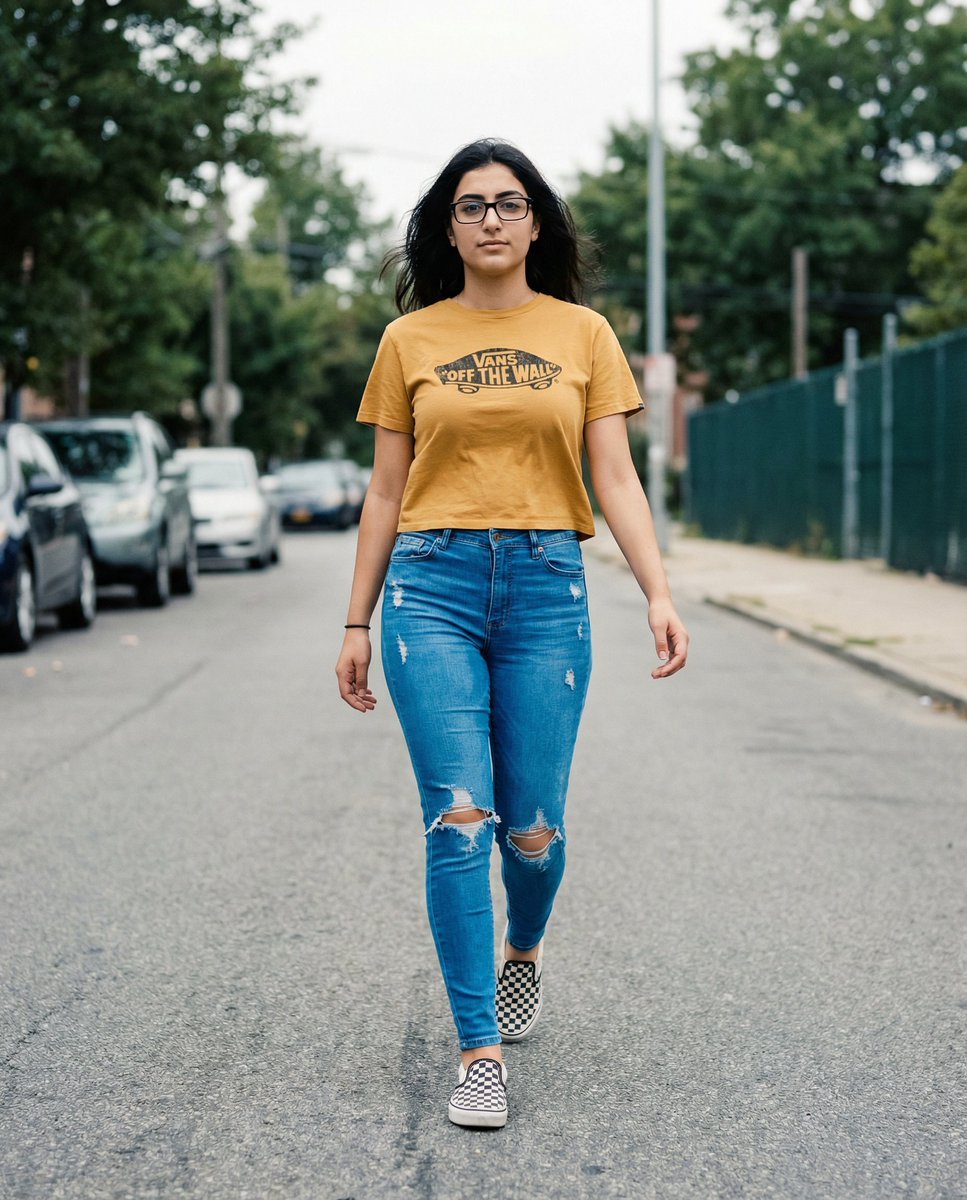
A complex JSON prompt focused on replicating a specific walking pose and outfit from a reference image, while critically ensuring the accurate and realistic integration of a clear, authentic Vans logo onto the subject's…
- Prompt included
- Model and format preset
- Premium template
The prompt behind this image
Copy the exact prompt behind Vans Logo Street Fashion Portrait Replication, or open it in the studio and make it yours.
**THE T-SHIRT MUST DISPLAY A CLEAR, AUTHENTIC VANS LOGO (classic “Off The Wall” badge OR Vans wordmark) ON THE FRONT.** The logo must appear naturally printed on the cropped mustard-yellow tee, following fabric curvature, folds, motion lift, lighting, and perspective exactly. { "meta": { "title": "Walking Street Fashion – Matte Film Portrait (Vans Logo Variant)", "version": "1.0.1", "tags": [ "portrait", "street-style", "walking-shot", "filmic", "vintage-matte", "fashion", "outdoor", "vans-logo" ] }, "prompt_data": { "full_string": "Hyper-realistic 8K matte-filmic street portrait. Replace the woman with the uploaded subject while keeping the exact same walking pose, stride, arm swing, outfit structure, camera angle, lighting, background layout, and muted color grading. Scene: woman walking confidently down a quiet urban street, mid-stride. Body facing forward, torso upright, left leg stepping forward, right leg slightly behind. Arms swinging naturally with the motion—right arm extended back slightly, left arm slightly forward. Head facing forward with subtle hair movement. Expression calm, confident, neutral. Wardrobe: cropped {argument name="shirt color" default="mustard-yellow"} tee featuring a CLEAR, AUTHENTIC VANS LOGO printed on the chest; shirt is slightly loose and lifted by motion. High-waisted, bright {argument name="jeans color" default="blue"} distressed skinny jeans with extreme shredding across thighs and knees. Black-and-white Vans checkerboard slip-on shoes. Lighting: soft overcast daylight with smooth skin tones and low contrast shadows. Color grading: muted greens, matte yellows, subtle blues, vintage film texture, soft grain, slight vignette, Kodak Vision3/CineStill inspired tones. Background: parked cars along both sides, dark green chain-link fence on the left, tall muted trees, sidewalk and curb visible. Depth of field: medium-shallow—subject sharply focused, background softly blurred but clear enough to identify. Camera: eye-level, medium-full body portrait, telephoto-leaning focal length (70–105mm equivalent). Composition: subject centered, walking toward camera, shot straight down the street. The Vans logo MUST remain visible, well-proportioned, and realistically integrated into the tee’s fabric behavior. --ar 4:5 --style raw --v 6.0", "components": { "style": "Matte film-inspired street-style portrait with muted tones, soft grain, and low-contrast cinematic grading.", "subject": { "reference_instruction": "Use the uploaded subject’s identity while preserving the exact walking stride, arm movement, posture, and proportions.", "pose": "walking mid-stride toward the camera, torso upright, left leg forward, right leg back; arms swinging naturally; head facing forward with a relaxed, confident expression.", "clothing": { "top": "mustard-yellow cropped tee WITH A CLEAR VANS LOGO on the chest, integrated into folds and curvature.", "bottom": "high-waisted, bright blue distressed skinny jeans with extreme shredding across thighs and knees." } } } } }
How to use Vans Logo Street Fashion Portrait Replication in 3 steps
- 1Upload ImagePNG, JPG or paste
Add your photo
Upload the photo the template builds on. The prompt, model and format are already set.
- 2…a portrait of your subject in softgolden-hour light, 85mm…
Personalize
Edit the subject and creative details for your destination.
- 3Generate
Generate
Press Generate — your image is created in PicX Studio, so you can compare it with the original and refine one variable at a time.
More like this
Templates with the same subject, style or setup. Open one to see its prompt.

Nano Banana 2 High Fashion Sports Campai

Couture Fashion Editorial Woman and Drag

Ive Yujin Fashion Portrait in Blue

Nano Banana 2 Editorial Fashion Portrait

Caution Tape Fashion — Industrial Editorial

Nano Banana - Street Paris T-Shirt
Kawaii Street Fashion Duo Portrait

Gemini Nano Banana 2 Logo in Wet Sand Be

Cinematic Sport Logo Render in Midjourne

Miniature Self Portrait Collage

Two Tickets, One Night

Found Photograph: Us, 1970
Make it yours
Vans Logo Street Fashion Portrait Replication works as-is. These are the safest ways to change it without losing the look.
Change one field
Copy a single group, rewrite it, and generate again so you can see what that field is doing.
Keep the frame, change the subject
Hold the composition and light of Vans Logo Street Fashion Portrait Replication, then swap wardrobe, props or the person for a new take.
| If the result… | Why | Fix |
|---|---|---|
| The result drifts from the preview | Too many fields changed at once. | Reuse Vans Logo Street Fashion Portrait Replication as-is first, then change one group — subject, light, or setting. |
| The model over-stylizes the scene | The prose prompt leaves finish and camera underspecified. | Add one camera or lighting sentence and stay on Nano Banana 2. |
More Nano Banana 2 templates
Other prompts made for Nano Banana 2.

Photorealistic Leaf Shaped Like a Dragon

K-Pop Idol Portrait Grid for Rapid Selection

Poetic Rain Forest Portrait During Golden Hour

Urban Street Portrait with Cartoon Inner Self Duo

Candid Nighttime Photo with Cat Prompt

High-Concept 3D Diorama Generation Prompt

Cinematic Futuristic Studio Portrait Template

Skincare Editorial Photography Collage Prompt

Hyper-Realistic Commercial Product Photography (Splash Effect)

Hyper-Realistic Nightclub Portrait Prompt
More image prompts
Fresh picks from across the catalog.
Y2K Japanese Street Editorial Collage Poster
Hyper-Realistic Neon Energy Drink Product Shot Prompt

Mechanical Keyboard Product Page Mockup
Minimalist Earbuds Product Photography with Line Art
Retro Minimalist Balloon Dog Illustration
Woman Riding Motorcycle on Cliff Road
Cinematic Hangar Photo Prompt
High-Fashion Mirror Selfie Identity Reference
Exploded Imperial Palace Hall Diagram
Cinematic Contact Sheet Generation from Reference Image
Browse template categories
Vans Logo Street Fashion Portrait Replication questions
How do I use the Vans Logo Street Fashion Portrait Replication template?
Add your photo if the template asks for one, edit the prompt if you like — the template's model and format are already selected — and press Generate. Your version opens in PicX Studio.
Can I customize the Vans Logo Street Fashion Portrait Replication template?
Yes. You can change the subject, setting, lighting, mood, format, and available model controls before creating your image.
Is the Vans Logo Street Fashion Portrait Replication template free?
Opening and editing this template is free. Generating uses credits, shown on the Generate button when you are signed in.
Which AI model should I use?
Start with Nano Banana 2, which is the model associated with this template. You can compare another compatible model for a different finish.
Looking for something else? Browse all templates.

Your photo, any look
Thousands of ready templates for every top image and video model, from one credit balance.