
Detailed JSON Prompt for Dimensional Slash Effect in Seedance 2
A highly structured JSON prompt designed for Seedance 2 to generate a dynamic video effect of a dimensional slash and space shattering, suitable for an anime character's attack motion.
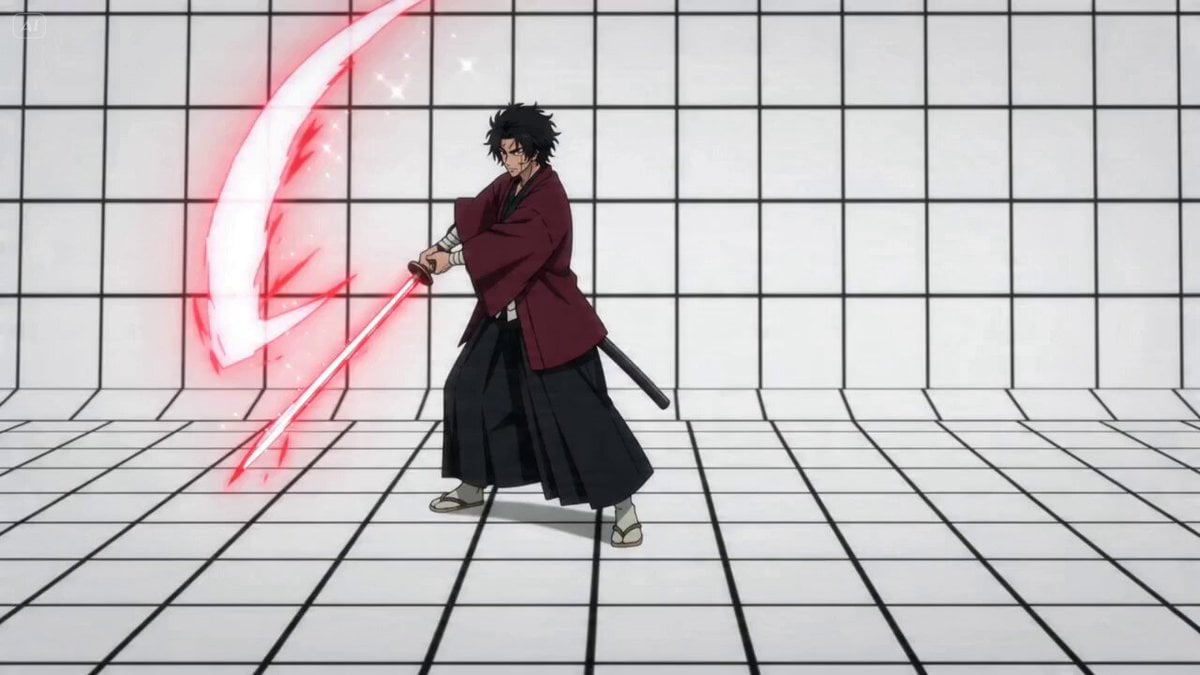
- Prompt included
- Model and format preset
- Premium template
The prompt behind this video
Copy the exact prompt behind Detailed JSON Prompt for Dimensional Slash Effect in Seedance 2, or open it in the studio and make it yours.
- Effect Analysis › Theme
- Dimensional Slash and Space Shattering
- Effect Analysis › Primary Colors
- Vibrant Red, Deep Black, Bright White, Pale Cyan (Character)
- Effect Analysis › Visual Elements
- Sharp curved energy trails, Radial glass-shattering lines, Debris and floating rock fragments, Nebula-like cosmic background, Intense lens flare and glow
- Reproduction Prompts › Character Action › Description
- キャラクターの攻撃モーション用
- Reproduction Prompts › Character Action › Prompt
- Dynamic action shot, anime style girl with light blue hair, wielding a glowing sword, performing a wide horizontal slash, vibrant red energy arc trail, sparks and light particles, white grid floor, cinematic lighting.
- Reproduction Prompts › Impact Shatter › Description
- 空間が割れる瞬間の演出用
- Reproduction Prompts › Impact Shatter › Prompt
- Screen-breaking effect, radial cracks spreading from the center, red and black high contrast lines, shattered glass fragments flying towards the camera, intense white light explosion in the center, high energy, sharp edges.
- Reproduction Prompts › Cosmic Explosion › Description
- 後半の空間崩壊・宇宙背景用
- Reproduction Prompts › Cosmic Explosion › Prompt
- Cosmic explosion aftermath, floating dark rock debris, glowing red nebula background, stars and stardust, cinematic depth of field, high resolution, dramatic impact, red light rays piercing through darkness.
- Technical Parameters › Rendering Style
- High-fidelity anime/game VFX
- Technical Parameters › Motion Keywords
- Fast transition, Radial blur, Screen shake, Time dilation (slow motion)
- Technical Parameters › Aspect Ratio
- 16:9
Raw JSON
{
  "effect_analysis": {
    "theme": "Dimensional Slash and Space Shattering",
    "primary_colors": ["Vibrant Red", "Deep Black", "Bright White", "Pale Cyan (Character)"],
    "visual_elements": [
      "Sharp curved energy trails",
      "Radial glass-shattering lines",
      "Debris and floating rock fragments",
      "Nebula-like cosmic background",
      "Intense lens flare and glow"
    ]
  },
  "reproduction_prompts": {
    "character_action": {
      "description": "キャラクターの攻撃モーション用",
      "prompt": "Dynamic action shot, anime style girl with light blue hair, wielding a glowing sword, performing a wide horizontal slash, vibrant red energy arc trail, sparks and light particles, white grid floor, cinematic lighting."
    },
    "impact_shatter": {
      "description": "空間が割れる瞬間の演出用",
      "prompt": "Screen-breaking effect, radial cracks spreading from the center, red and black high contrast lines, shattered glass fragments flying towards the camera, intense white light explosion in the center, high energy, sharp edges."
    },
    "cosmic_explosion": {
      "description": "後半の空間崩壊・宇宙背景用",
      "prompt": "Cosmic explosion aftermath, floating dark rock debris, glowing red nebula background, stars and stardust, cinematic depth of field, high resolution, dramatic impact, red light rays piercing through darkness."
    }
  },
  "technical_parameters": {
    "rendering_style": "High-fidelity anime/game VFX",
    "motion_keywords": ["Fast transition", "Radial blur", "Screen shake", "Time dilation (slow motion)"],
    "aspect_ratio": "16:9"
  }
}How to use Detailed JSON Prompt for Dimensional Slash Effect in Seedance 2 in 3 steps
- 1
Open
The prompt is already in the box next to the preview, with the template's model and format selected.
- 2…a portrait of your subject in softgolden-hour light, 85mm…
Personalize
Edit the subject and creative details for your destination.
- 3Generate
Generate
Press Generate — your video is created in PicX Studio, so you can compare it with the original and refine one variable at a time.
More like this
Templates with the same subject, style or setup. Open one to see its prompt.

Wholesome Puppy and Kitten Story - Seedance 2.5

Mysterious Home Exploration Vlog - Seedance 2.5

Dark Tokusatsu Transformation - Seedance 2.5

Cinematic Xinjiang Drone Landscapes - Seedance 2.5

Late Night Kitchen Phone Recording - Seedance 2.5

3D Animated Cat and Old Man - Seedance

Realistic City Street Story Cinematic Video - Seedance

Seedance 2.0 First Test — Dynamic Motion Showcase

Dragon Rider Cinematic Flight — Seedance 2.5

Sneaker Product Commercial

Cinematic Short Film Scene 2

Cinematic Short Film Scene
Make it yours
Detailed JSON Prompt for Dimensional Slash Effect in Seedance 2 works as-is. These are the safest ways to change it without losing the look.
Change one field
Copy a single group, rewrite it, and generate again so you can see what that field is doing.
Keep the frame, change the subject
Hold the composition and light of Detailed JSON Prompt for Dimensional Slash Effect in Seedance 2, then swap wardrobe, props or the person for a new take.
| If the result… | Why | Fix |
|---|---|---|
| The result drifts from the preview | Too many fields changed at once. | Reuse Detailed JSON Prompt for Dimensional Slash Effect in Seedance 2 as-is first, then change one group — subject, light, or setting. |
| Seedance 2.0 ignores part of the JSON | Some models flatten or skip nested keys. | Keep the same values and paste them as a short paragraph instead. |
More Seedance 2.0 templates
Other prompts made for Seedance 2.0.

Comical Martial Arts Punch Scene

Maglev Train Action Sequence

Martial Arts Fight Sequence

Wuxia Protection and Trust Script

Vintage Korean Arcade MiniDV Vlog

Mercedes 190 SL Luxury Ad

Rainy Night Supernatural Reverse Comedy Video Script

Amazon Civilization Discovery

Futuristic South Asian City Transformation

Cozy Luxury Cafe Commercial
More video prompts
Fresh picks from across the catalog.
Surreal Storyboard Transition Sequence
Tesla FSD Instead of a Ring
Red Carnation Flower Exchange

Animated Ramen Chef Sequence
Octopus Reading in Library
Street Musician Magical Realism Film
Cyberpunk Anime Kunoichi Rooftop Battle

Talking Woman with Synchronized Subtitles

Cinematic Chinese Ghost Romance Short Film
Anime Music Video: Silver-Haired Idol on Tokyo Rooftop
Browse template categories
Detailed JSON Prompt for Dimensional Slash Effect in Seedance 2 questions
How do I use the Detailed JSON Prompt for Dimensional Slash Effect in Seedance 2 template?
Add your photo if the template asks for one, edit the prompt if you like — the template's model and format are already selected — and press Generate. Your version opens in PicX Studio.
Can I customize the Detailed JSON Prompt for Dimensional Slash Effect in Seedance 2 template?
Yes. You can change the subject, setting, lighting, mood, format, and available model controls before creating your video.
Is the Detailed JSON Prompt for Dimensional Slash Effect in Seedance 2 template free?
Opening and editing this template is free. Generating uses credits, shown on the Generate button when you are signed in.
Which AI model should I use?
Start with Seedance 2.0, which is the model associated with this template. You can compare another compatible model for a different finish.
Looking for something else? Browse all templates.

Your photo, any look
Thousands of ready templates for every top image and video model, from one credit balance.