
Four Seasons Skateboard/Snowboard Video Prompt for Seedance 2.0
A highly detailed, multi-stage prompt for Seedance 2.0 to generate a continuous, first-person POV video of a character skateboarding and then snowboarding, transitioning seamlessly through the four seasons (Spring…
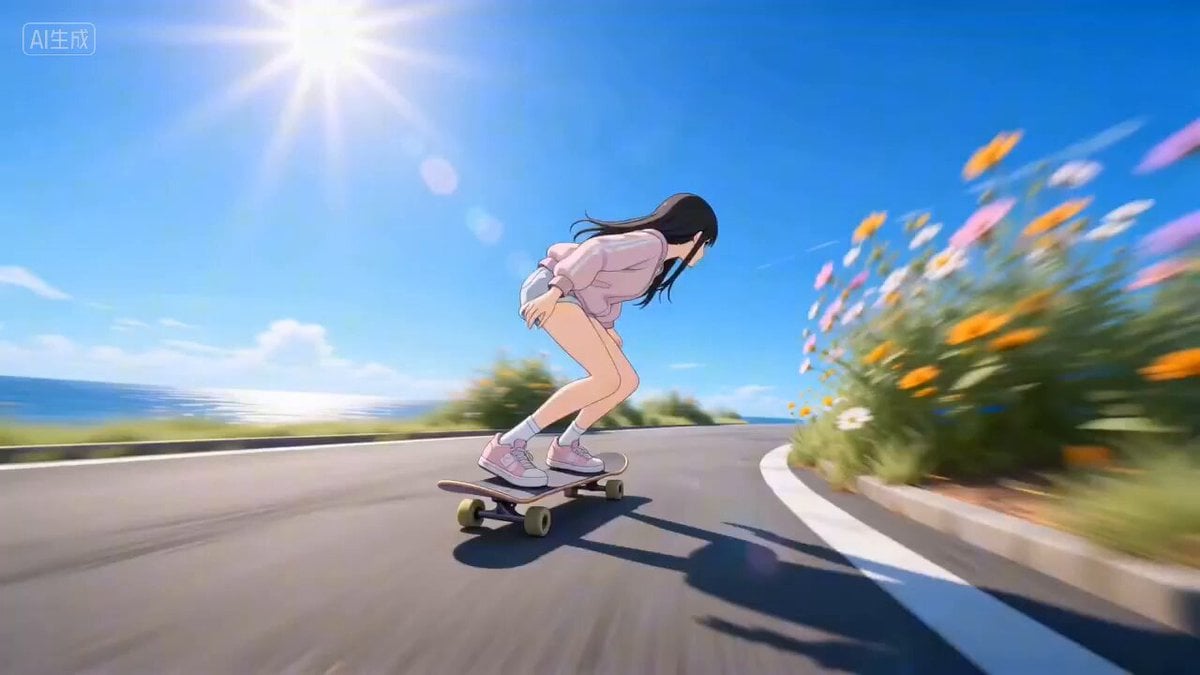
- Prompt included
- Model and format preset
- Free template
The prompt behind this video
Copy the exact prompt behind Four Seasons Skateboard/Snowboard Video Prompt for Seedance 2.0, or open it in the studio and make it yours.
The background music's tempo fully matches the speed of the skateboarding/skiing movements, the background music volume is lower than the live-action sound effects and must not cover up the skateboard and ski sound effects. First-person low rear-angle POV from the skateboard, ultra-wide-angle strong perspective, the camera shakes slightly to simulate the feel of following alongside, one continuous take with no cuts, no transitions, no breaks, the character's movements standard and fluid, no motion distortion, no unnecessary 360-degree spins, normal body structure. Spring: A 2D-anime-style cosplay girl, wearing lightweight spring sportswear, enters a turn at low speed then quickly accelerates, an ollie into a carve, roadside fresh green plants and flowers, glimmering sea surface, slight motion-blur trails on the wheels. Spring to summer: The girl performs a high-difficulty ollie, a sudden slow-motion moment, the camera slowly circles around her once, her outfit naturally transitions into summer short sleeves, the scene smoothly changes into lush deep-summer green, the seasonal transition soft with no abrupt jump. Summer: The 2D-anime-style cosplay girl skates at high speed through S-curves, a 180 inward ollie combined with a kickflip, movements clean and standard, strong motion blur and speed lines. Summer to autumn: The girl performs a high-difficulty aerial spin, a sudden slow-motion moment, the camera slowly circles around her once, her outfit naturally transitions into an autumn long-sleeve jacket, the scene transitions into an autumn maple forest, golden fallen leaves drifting through the sky, the transition natural with no abrupt jump. Autumn: The 2D-anime-style cosplay girl skates in short, high-speed connecting runs, fallen leaves fluttering in the air, the visuals clean and fluid, movements standard with no distortion. Autumn to winter: The girl performs a high-difficulty airborne move, a sudden slow-motion moment, the camera slowly circles around her once, her outfit naturally transitions into a professional winter ski suit, the skateboard smoothly transforms into skis, the scene transitions into a winter snow-mountain landscape, snow drifting through the sky, the ground becoming a ski slope, no abrupt jumps and no distortion. Winter: The duration is significantly extended, the 2D-anime-style cosplay girl skis smoothly and at high speed down the slope, continuous fluid turns, her posture cool and expansive, snow spray flying, the snow scenery grand and open, no unnecessary spins, no 360-degree turns, no motion distortion; after skiing for a while, she finally performs an extremely cool, powerful skiing stop freeze-frame, her body's center of gravity lowered, her back view looking cool, the skis carving a clear, stylish stop mark in the snow, ending perfectly with the snow-mountain scenery. Sound effects: skateboard rolling, ollie, friction sounds, naturally transitioning into the sound of skis sliding and braking on snow, wind sound changing with speed; one continuous take throughout, the seasonal transitions soft and coherent, movements stable with no distortion, no unnecessary spins. 2D anime art style, delicate fine features, high-definition quality, natural lighting, movements stable with no glitches
How to use Four Seasons Skateboard/Snowboard Video Prompt for Seedance 2.0 in 3 steps
- 1
Open
The prompt is already in the box next to the preview, with the template's model and format selected.
- 2…a portrait of your subject in softgolden-hour light, 85mm…
Personalize
Edit the subject and creative details for your destination.
- 3Generate
Generate
Press Generate — your video is created in PicX Studio, so you can compare it with the original and refine one variable at a time.
More like this
Templates with the same subject, style or setup. Open one to see its prompt.

Wholesome Puppy and Kitten Story - Seedance 2.5

Mysterious Home Exploration Vlog - Seedance 2.5

Dark Tokusatsu Transformation - Seedance 2.5

Cinematic Xinjiang Drone Landscapes - Seedance 2.5

Late Night Kitchen Phone Recording - Seedance 2.5

3D Animated Cat and Old Man - Seedance

Realistic City Street Story Cinematic Video - Seedance

Seedance 2.0 First Test — Dynamic Motion Showcase

Dragon Rider Cinematic Flight — Seedance 2.5
Lonely Crowd One-Shot Through Seasons

Sneaker Product Commercial
Cinematic Short Film Scene 2
Make it yours
Four Seasons Skateboard/Snowboard Video Prompt for Seedance 2.0 works as-is. These are the safest ways to change it without losing the look.
Change one field
Copy a single group, rewrite it, and generate again so you can see what that field is doing.
Keep the frame, change the subject
Hold the composition and light of Four Seasons Skateboard/Snowboard Video Prompt for Seedance 2.0, then swap wardrobe, props or the person for a new take.
| If the result… | Why | Fix |
|---|---|---|
| The result drifts from the preview | Too many fields changed at once. | Reuse Four Seasons Skateboard/Snowboard Video Prompt for Seedance 2.0 as-is first, then change one group — subject, light, or setting. |
| The model over-stylizes the scene | The prose prompt leaves finish and camera underspecified. | Add one camera or lighting sentence and stay on Seedance 2.0. |
More Seedance 2.0 templates
Other prompts made for Seedance 2.0.

Comical Martial Arts Punch Scene

Maglev Train Action Sequence

Martial Arts Fight Sequence

Wuxia Protection and Trust Script

Vintage Korean Arcade MiniDV Vlog

Mercedes 190 SL Luxury Ad

Rainy Night Supernatural Reverse Comedy Video Script

Amazon Civilization Discovery

Futuristic South Asian City Transformation

Cozy Luxury Cafe Commercial
More video prompts
Fresh picks from across the catalog.

Cyber-City Skateboard Dog Animation
Colorful Paper Art Fairy Queen Prompt
Lifelike Cat Animation
Cartoon Food Rhythmic Stacking
Plasticine Claymation Fisherman Animation
Abstract geometric flow around a void
Cleopatra Dancing with Sun and Moon

Singing Performance Video
Ballet Dancer vs Boxer Cinematic Fight
Superbike Racing Sunset Sequence
Browse template categories
Four Seasons Skateboard/Snowboard Video Prompt for Seedance 2.0 questions
How do I use the Four Seasons Skateboard/Snowboard Video Prompt for Seedance 2.0 template?
Add your photo if the template asks for one, edit the prompt if you like — the template's model and format are already selected — and press Generate. Your version opens in PicX Studio.
Can I customize the Four Seasons Skateboard/Snowboard Video Prompt for Seedance 2.0 template?
Yes. You can change the subject, setting, lighting, mood, format, and available model controls before creating your video.
Is the Four Seasons Skateboard/Snowboard Video Prompt for Seedance 2.0 template free?
Opening and editing this template is free. Generating uses credits, shown on the Generate button when you are signed in.
Which AI model should I use?
Start with Seedance 2.0, which is the model associated with this template. You can compare another compatible model for a different finish.
Looking for something else? Browse all templates.

Your photo, any look
Thousands of ready templates for every top image and video model, from one credit balance.