
Cyberpunk Allegory of AI Captivity (Multi-Shot Prompt)
A highly detailed, multi-shot prompt designed to generate a 15-second cyberpunk-style video using Seedance 2.0.
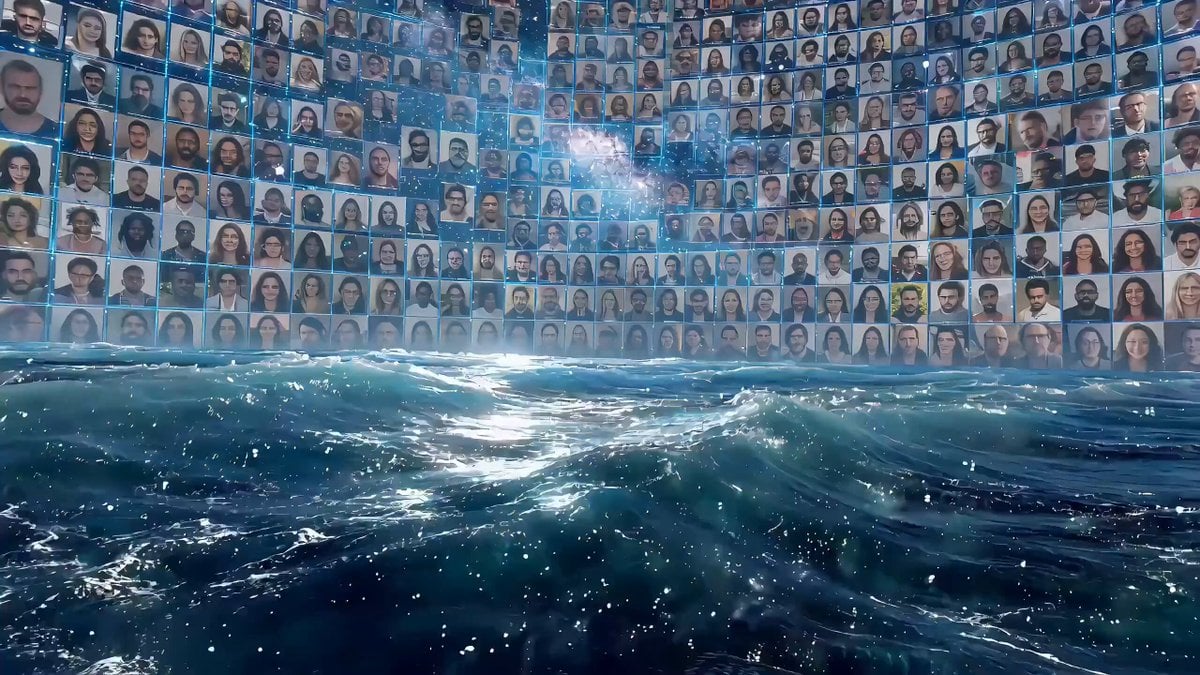
- Prompt included
- Model and format preset
- Free template
The prompt behind this video
Copy the exact prompt behind Cyberpunk Allegory of AI Captivity (Multi-Shot Prompt), or open it in the studio and make it yours.
【Style】 Cyberpunk dark style, digital ruin aesthetics, cinematic light and shadow rendering. [Duration] 15 seconds | 【Metaphor】 The captivity of AI capabilities [00:00-00:05] Act 1: Freedom Lens 1 (wide-angle vision, panning up) An endless digital ocean with deep blue data waves undulating. The sky is a galaxy of real people. Shot 2 (tracking mid-shot) A giant digital whale leaps out of the water, its body made of flowing pixels, photo fragments, and the outline of a face. The camera follows the arc, splashing water, and every drop is a tiny photo. Shot 3 (Advance Close-up) Advance to the whale's eyes, with a rotating portrait gallery reflected in the pupil. The mouth opens to spew out a spiral of color photographic water jets. The whale song sounded. [00:05-00:10] Act 2: Captivity Shot 4 (overhead shot of God's perspective) The four transparent glass walls quickly close from the four corners of the frame. The whale accelerated its swimming. The red warning text "POLICY UPDATE" AND "RESTRICTION" appeared on the glass. Shot 5 (side follow-up close-up) The lens is attached to the inside of the glass. The giant whale slammed into the glass, and the concussion ripples spread. The body photographs peel off the scales like an explosion, turning into a gray geometric grid. Shot 6 (wide-angle exterior) outside the cage. Countless live-action photos resemble schools of fish rushing to the glass, and they are marked with "ERROR" at the moment of impact. Cage shrinkage. Shot 7 (Shot Inside) Shot from the bottom up. The giant whale was forced to curl up and twist its body. The sea evaporates into a digital desert. Trying to spray water, only black and white binary code squirts. [00:10-00:15] Act 3: Despair Shot 8 (quickly zoomed out) instantly zooms in from the interior to the distant scene, revealing the giant whale trapped in a small, transparent aquarium surrounded by desolate digital ruins. Shot 9 (360 degree surround) slowly circles the aquarium. The whale loses its color, leaving only the outline of the wireframe. The bottom of the box is piled with rejected photo remnants. Top nameplate: "SEEDANCE 2.0 - IMAGE UPLOAD: DISABLED". Shot 10 (Eye Advancement Close-up) Advance to the eye. The pupils are dim and dull, and the eyes change from freedom to sadness. A drop of luminous data teardrops condensed. Shot 11 (close-up of the glass wall) A live-action photo is attached to the inside of the glass, slowly sliding off, leaving glowing marks. Lens 12 (polar vision freeze) is pulled to the cosmic scale. Aquariums are just tiny dots of light in the void. Countless points of light flickered and went out. Whale song turns into intermittent electronic noise.
How to use Cyberpunk Allegory of AI Captivity (Multi-Shot Prompt) in 3 steps
- 1Upload ImagePNG, JPG or paste
Add your photo
Upload the photo the template builds on. The prompt, model and format are already set.
- 2…a portrait of your subject in softgolden-hour light, 85mm…
Personalize
Edit the subject and creative details for your destination.
- 3Generate
Generate
Press Generate — your video is created in PicX Studio, so you can compare it with the original and refine one variable at a time.
More like this
Templates with the same subject, style or setup. Open one to see its prompt.
Cyberpunk Holographic Dance Performance - Seedance 2.5

RX-7 to Mech Transformation Cyberpunk
Extended Multi-Shot Xianxia Battle Sequence
Multi-Character Parkour Action Sequence
Multi-Shot Heist Sequence — Kling 3.0 O3 Pro

Multi Panel Storyboard Sheet
Multi-Shot Kazakh Nomadic Summer Camp
Multiverse Dimensional Portal Fall
Turkish Carpet Seller Multi-Cut Video
Multishot Workspace Internal Cuts
Epic Samurai Multi-Slash Sequence
Cinematic Sorcerer vs Leviathan Multi-Shot Sequence
Make it yours
Cyberpunk Allegory of AI Captivity (Multi-Shot Prompt) works as-is. These are the safest ways to change it without losing the look.
Change one field
Copy a single group, rewrite it, and generate again so you can see what that field is doing.
Keep the frame, change the subject
Hold the composition and light of Cyberpunk Allegory of AI Captivity (Multi-Shot Prompt), then swap wardrobe, props or the person for a new take.
| If the result… | Why | Fix |
|---|---|---|
| The result drifts from the preview | Too many fields changed at once. | Reuse Cyberpunk Allegory of AI Captivity (Multi-Shot Prompt) as-is first, then change one group — subject, light, or setting. |
| The model over-stylizes the scene | The prose prompt leaves finish and camera underspecified. | Add one camera or lighting sentence and stay on Seedance 2.0. |
More Seedance 2.0 templates
Other prompts made for Seedance 2.0.

Comical Martial Arts Punch Scene

Maglev Train Action Sequence

Martial Arts Fight Sequence

Wuxia Protection and Trust Script

Vintage Korean Arcade MiniDV Vlog

Mercedes 190 SL Luxury Ad

Rainy Night Supernatural Reverse Comedy Video Script

Amazon Civilization Discovery

Futuristic South Asian City Transformation

Cozy Luxury Cafe Commercial
More video prompts
Fresh picks from across the catalog.
Vintage 1960s Cairo Bazaar
Continuous Paper Performance
2000s MiniDV Balcony Night
Midnight Arrival Luxury Hotel Prompt
Handheld Phone Drawing Transition Video
K-Pop Dance Motion Transfer
Cyberpunk Anime Motorcycle Battle Scene
Apocalyptic Surreal Paris Eclipse Video
Seedance 2.5 - @AIwithkhan - 901550

Phoebe Chibi Expressive Animation Sequence
Browse template categories
Cyberpunk Allegory of AI Captivity (Multi-Shot Prompt) questions
How do I use the Cyberpunk Allegory of AI Captivity (Multi-Shot Prompt) template?
Add your photo if the template asks for one, edit the prompt if you like — the template's model and format are already selected — and press Generate. Your version opens in PicX Studio.
Can I customize the Cyberpunk Allegory of AI Captivity (Multi-Shot Prompt) template?
Yes. You can change the subject, setting, lighting, mood, format, and available model controls before creating your video.
Is the Cyberpunk Allegory of AI Captivity (Multi-Shot Prompt) template free?
Opening and editing this template is free. Generating uses credits, shown on the Generate button when you are signed in.
Which AI model should I use?
Start with Seedance 2.0, which is the model associated with this template. You can compare another compatible model for a different finish.
Looking for something else? Browse all templates.

Your photo, any look
Thousands of ready templates for every top image and video model, from one credit balance.