How do I use the Soccer Ball Impact Action Shot template?
Edit the prompt in the box under the preview — the template's model and format are already selected — and press Generate. Your version appears right on this page.
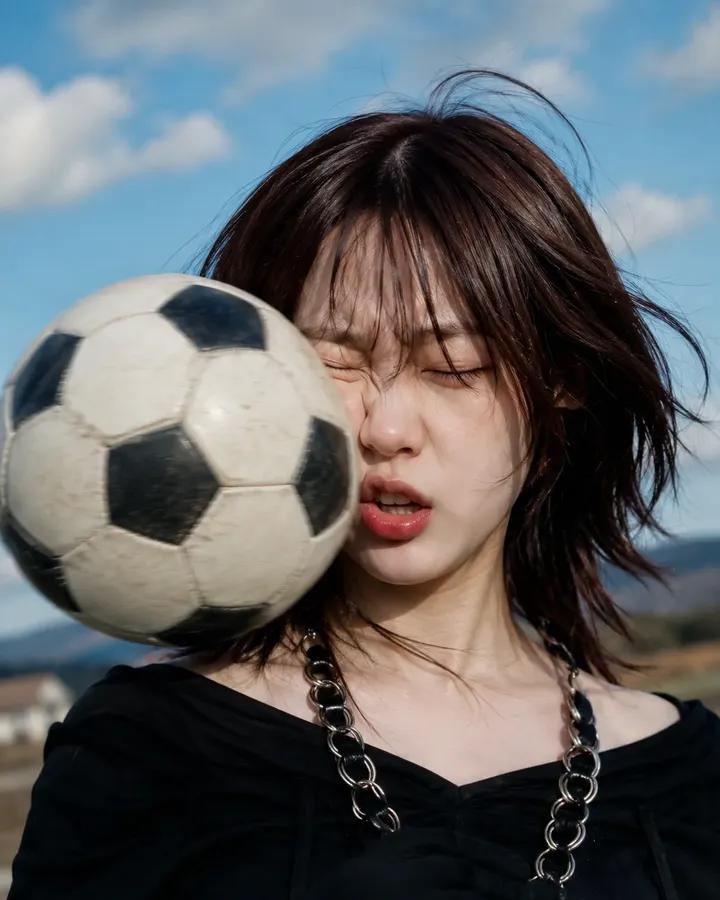
A dynamic sports photography prompt capturing the humorous and intense moment of a soccer ball hitting someone's face.

Ultra-realistic high-speed sports photography, close-up portrait of a {argument name="subject" default="young person"} at the exact moment a {argument name="object" default="soccer ball"} slams into their face, cheeks compressed by impact, eyes tightly shut, hair flying dramatically in the wind, realistic facial deformation from the collision, frozen action shot, football suspended in mid-air, dynamic motion blur around the ball, intense reaction expression, outdoor football field, blue sky with soft clouds, distant mountains in background, golden daylight, cinematic sports advertisement style, ultra-detailed skin texture, natural lighting, {argument name="lens" default="shallow depth of field, 85mm lens"}, high shutter speed, photorealistic, award-winning action photography, dramatic timing, crisp focus, RAW photo, 8K, realistic physics, emotional and humorous moment, magazine-quality sports portrait.
Ultra-realistic high-speed sports photography, close-up portrait of a {argument name="subject" default="young person"} at the exact moment a {argument name="object" default="soccer ball"} slams into their face, cheeks compressed by impact, eyes tightly shut, hair flying dramatically in the wind, realistic facial deformation from the collision, frozen action shot, football suspended in mid-air, dynamic motion blur around the ball, intense reaction expression, outdoor football field, blue sky with soft clouds, distant mountains in background, golden daylight, cinematic sports advertisement style, ultra-detailed skin texture, natural lighting, {argument name="lens" default="shallow depth of field, 85mm lens"}, high shutter speed, photorealistic, award-winning action photography, dramatic timing, crisp focus, RAW photo, 8K, realistic physics, emotional and humorous moment, magazine-quality sports portrait.
Edit the prompt in the box under the preview — the template's model and format are already selected — and press Generate. Your version appears right on this page.
Yes. You can change the subject, setting, lighting, mood, format, and available model controls before creating your image.
Opening and editing this template is free. Generating uses credits, shown on the Generate button when you are signed in.
Start with GPT Image 2, which is the model associated with this template. You can compare another compatible model for a different finish.
Follow a topic to a crawlable collection of related PicX Studio templates.