
Futuristic Luxury Watch Ad
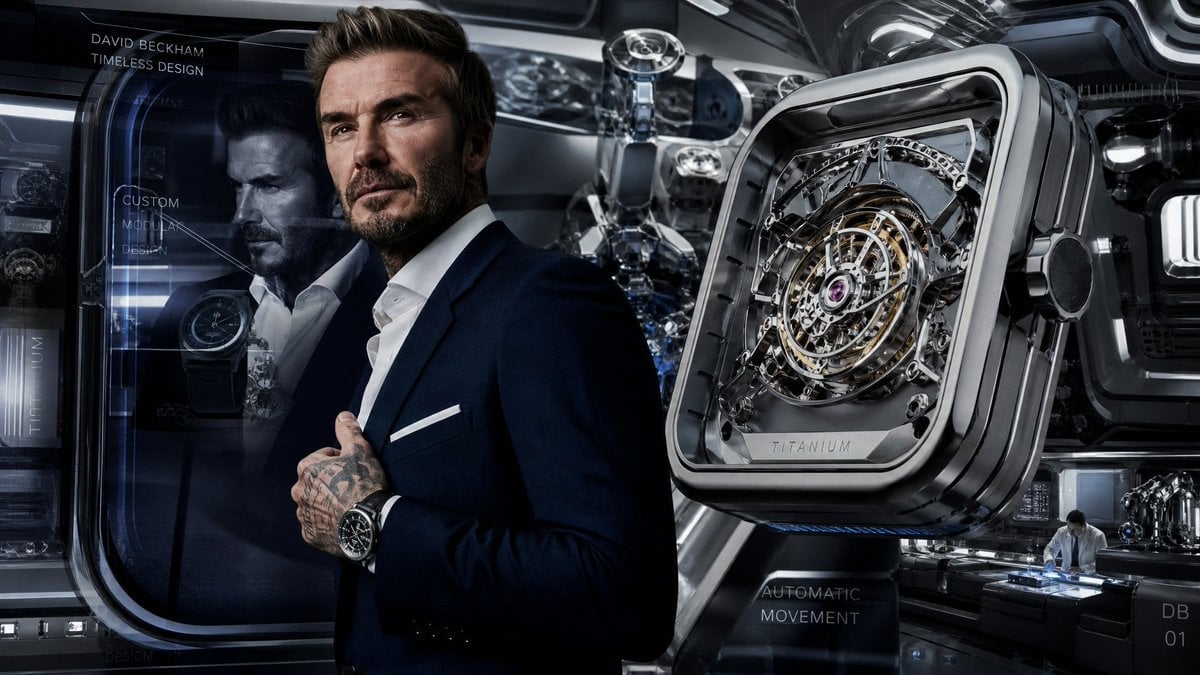
A cinematic wide-format luxury watch advertisement featuring a suited ambassador, futuristic watch lab, holographic text, and an oversized skeleton titanium timepiece.
- Prompt included
- Model and format preset
- Free template
The prompt behind this image
Copy the exact prompt behind Futuristic Luxury Watch Ad, or open it in the studio and make it yours.
Goal: Create a cinematic luxury watch advertisement concept for {argument name="brand ambassador" default="David Beckham"}, blending a high-fashion male portrait with a futuristic watchmaking laboratory and oversized mechanical product hero shot. Canvas: Wide 16:9 banner, dark metallic palette, ultra-detailed photorealistic CGI, glossy black chrome, blue-gray reflections, high contrast studio lighting, shallow depth of field. Layout: Place the male ambassador slightly left of center, cropped from mid-thigh upward, wearing a tailored dark navy suit, white open-collar shirt, white pocket square, visible tattooed hands clasping the jacket, and a black luxury wristwatch on his left wrist. His face is intentionally obscured by exactly 2 solid censor blocks: 1 large warm brown square over the upper face/head area and 1 smaller dark blue-gray rectangle over the lower-left face area. On the right half, show 1 enormous floating square-cushion titanium watch case angled in perspective, with rounded corners, thick polished bezel, side crown, transparent skeleton dial, tourbillon-like circular mechanism, gold rings, chrome bridges, purple jewel center, and the engraved word “TITANIUM” on the bottom plate. Background: Futuristic watch design studio with layered glass panels, curved transparent display pods, robotic machinery, precision tools, reflections, blue holographic UI lines, and dark industrial luxury ambience. Include a small watchmaker scene in the lower right: exactly 1 technician in a white coat seated at a workstation under cool blue light, assembling a watch beside miniature mechanical components. Visible product and design elements to include: exactly 4 prominent watch-related objects: 1 giant floating skeleton watch on the right, 1 wristwatch worn by the ambassador, 1 smaller watch displayed inside the left glass module, and 1 small mechanical watch assembly on the lower-right workbench. Text content: Add exactly 7 visible text elements in thin uppercase futuristic sans-serif typography: 1) “{argument name="headline name" default="DAVID BECKHAM"}” at top left, 2) “{argument name="tagline" default="TIMELESS DESIGN"}” directly below it, 3) “CUSTOM MODULAR DESIGN” stacked inside the left glass panel with a fine leader line, 4) vertical “TITANIUM” along the far-left display edge, 5) engraved “TITANIUM” on the giant watch, 6) “AUTOMATIC MOVEMENT” near the lower center-right, and 7) “{argument name="model code" default="DB 01"}” at bottom right. Style constraints: Premium automotive-inspired horology advertisement, moody reflections, crisp micro-mechanical detail, realistic suit fabric and skin tattoos, no extra logos, no watermark, no additional text beyond the 7 specified text elements.
How to use Futuristic Luxury Watch Ad in 3 steps
- 1Upload ImagePNG, JPG or paste
Add your photo
Upload the photo the template builds on. The prompt, model and format are already set.
- 2…a portrait of your subject in softgolden-hour light, 85mm…
Personalize
Edit the subject and creative details for your destination.
- 3Generate
Generate
Press Generate — your image is created in PicX Studio, so you can compare it with the original and refine one variable at a time.
More like this
Templates with the same subject, style or setup. Open one to see its prompt.











Make it yours
Futuristic Luxury Watch Ad works as-is. These are the safest ways to change it without losing the look.
Change one field
Copy a single group, rewrite it, and generate again so you can see what that field is doing.
Keep the frame, change the subject
Hold the composition and light of Futuristic Luxury Watch Ad, then swap wardrobe, props or the person for a new take.
| If the result… | Why | Fix |
|---|---|---|
| The result drifts from the preview | Too many fields changed at once. | Reuse Futuristic Luxury Watch Ad as-is first, then change one group — subject, light, or setting. |
| The model over-stylizes the scene | The prose prompt leaves finish and camera underspecified. | Add one camera or lighting sentence and stay on GPT Image 2. |
More GPT Image 2 templates
Other prompts made for GPT Image 2.

Six VTuber Japanese Logo Sheet

Realistic Portrait of Woman and Deer

The Vista Modular Condo Poster

AI Model Routing Comparison Infographic

2.5D Anime Art Board

Isometric Productivity Desk Scene

New York Double Exposure Poster

Four-Panel AI Landscape Comparison

Japanese Tatami Lifestyle Magazine Cover

NESCAFÉ Coffee Map Poster
More image prompts
Fresh picks from across the catalog.
Moonlit Snow Leopard Leap
Black and White Contemplative Portrait
Cute Ball Shaped Animal Characters
Cinematic Night Portrait of a Young Woman

Candlelit Anime Birthday Twins
Cinematic Winter Night Couple Triptych
Kitchen Utensil to Interstellar Warship Transformation
Industrial Blueprint Generation Prompt
Degree Forest World Panorama Grid
Overhead Spiral Staircase Portrait
Browse template categories
Futuristic Luxury Watch Ad questions
How do I use the Futuristic Luxury Watch Ad template?
Add your photo if the template asks for one, edit the prompt if you like — the template's model and format are already selected — and press Generate. Your version opens in PicX Studio.
Can I customize the Futuristic Luxury Watch Ad template?
Yes. You can change the subject, setting, lighting, mood, format, and available model controls before creating your image.
Is the Futuristic Luxury Watch Ad template free?
Opening and editing this template is free. Generating uses credits, shown on the Generate button when you are signed in.
Which AI model should I use?
Start with GPT Image 2, which is the model associated with this template. You can compare another compatible model for a different finish.
Looking for something else? Browse all templates.

Your photo, any look
Thousands of ready templates for every top image and video model, from one credit balance.