How do I use the Vogue Cover with Emily Blunt template?
Choose the primary action to open PicX Studio with the available template settings. Review the model and format, personalize the creative direction, and generate when ready.
A photorealistic fashion photography prompt for a magazine cover featuring Emily Blunt and an Afghan Hound in an avant-garde style. Change the subject, setting, or lighting one variable at a time.
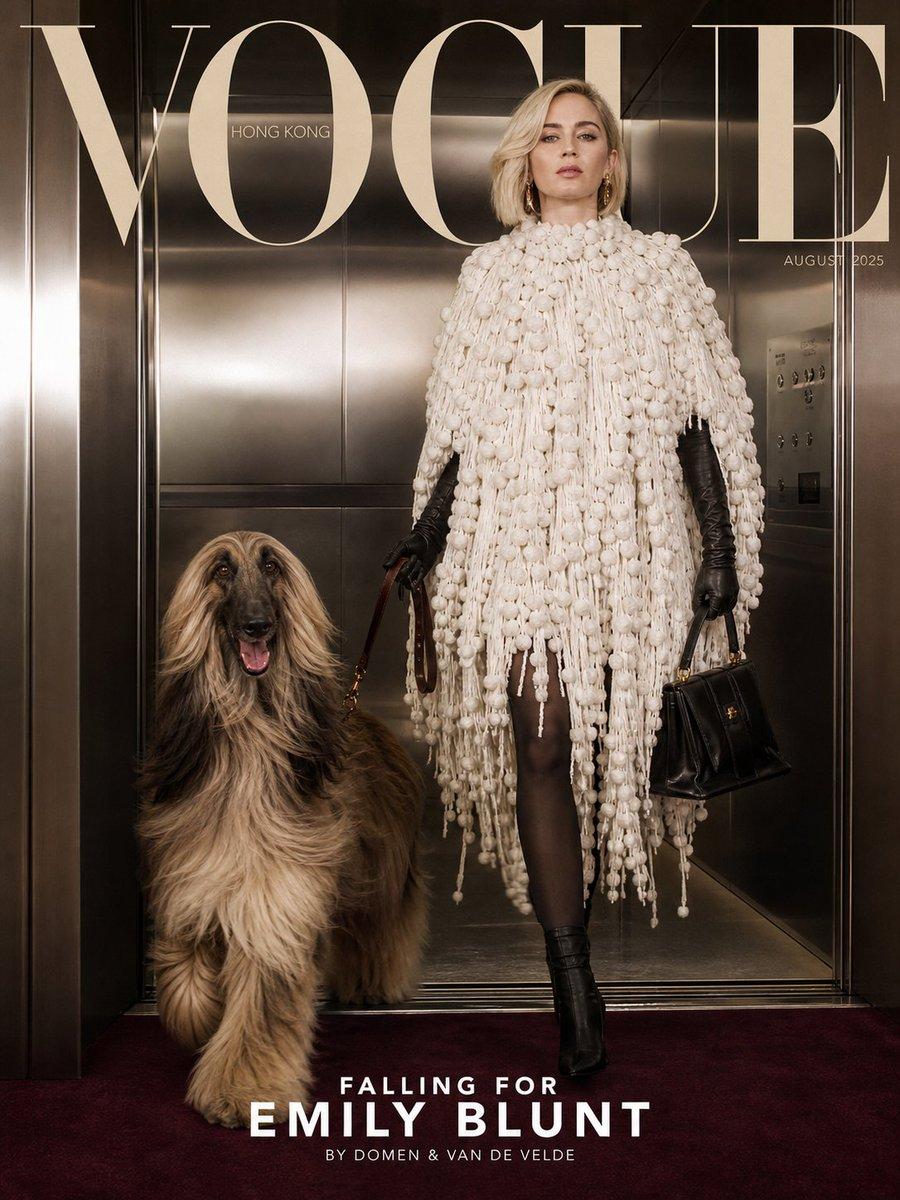
A high-fashion Vogue magazine cover photograph, August 2025 issue, Vogue Hong Kong. {argument name="subject" default="Emily Blunt as a glamorous elegant woman"} with shoulder-length straight platinum blonde hair, wearing dramatic makeup, standing in a modern minimalist interior with metallic reflective walls and a reddish-brown carpet floor. She is wearing a luxurious {argument name="outfit" default="avant-garde white textured cape/poncho made of thick chunky yarn"}, black long leather opera gloves, black tights, and black heeled boots. She is holding a brown leather leash in one hand and a small black handbag in the other. Next to her is a {argument name="pet" default="large, beautiful Afghan Hound dog with long flowing silky fur"} in shades of beige, gold, and dark brown/gray, wearing a small gold collar, walking beside her. The composition is cinematic and editorial, with soft dramatic lighting. Large elegant text at the top reads "VOGUE" in cream color with "HONG KONG" underneath. Date "AUGUST 2025" on the right. Bottom text in elegant serif font: "FALLING FOR EMILY BLUNT" and smaller credit "BY DOMEN & VAN DE VELDE". Photorealistic, high resolution, fashion photography style like Annie Leibovitz or Mario Testino, sharp details, luxurious atmosphere.
Choose the primary action to open PicX Studio with the available template settings. Review the model and format, personalize the creative direction, and generate when ready.
Yes. You can change the subject, setting, lighting, mood, format, and available model controls before creating your image.
This template is free to open and customize. Generation usage is shown in PicX Studio before you create.
Start with GPT Image 2, which is the model associated with this template. You can compare another compatible model for a different finish.
© 2026 PicX Studio. All rights reserved.

Follow a topic to a crawlable collection of related PicX Studio templates.
43,474 public templates available. Verified via the PicX Studio public templates API; refreshed hourly.










![Minimalist Flat Vector Travel Poster — Premium minimalist flat-vector travel poster for {argument name="city name" default="[CITY_NAME]"}, 3:4 vertical format.](https://cms-assets.youmind.com/media/1787917359711_3ug846_HQX205cbMAA6F6S-300x400.jpg)



















![Hyper-Realistic Sculpture Carved from Banana Flesh — Imagine a hyper-realistic sculpture of a majestic {argument name="subject" default="[SUBJECT]"}, carved ent](https://pbs.twimg.com/media/G8ZuZ4Ha8AAVSEH.jpg)