
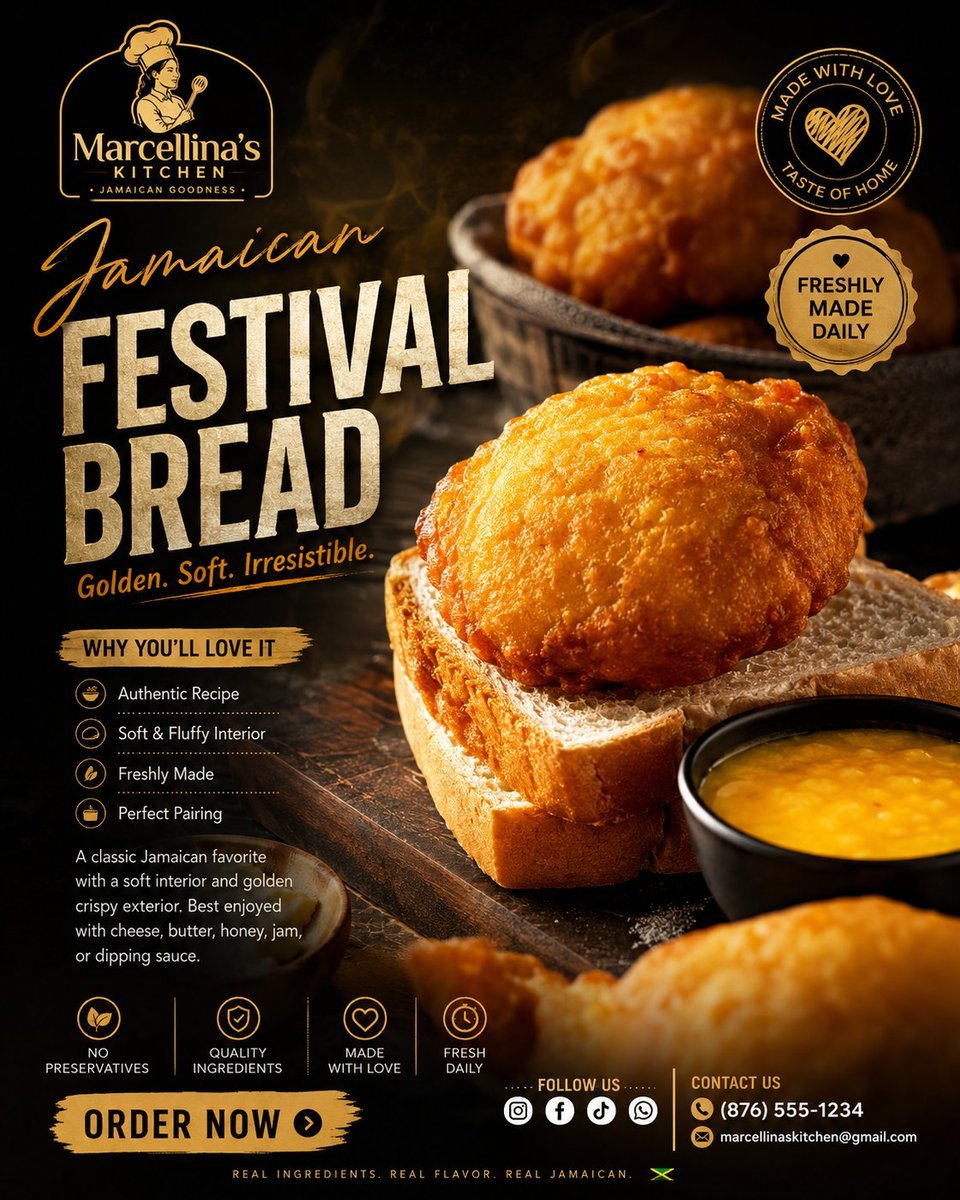
Luxury Jamaican Festival Bread Poster
A premium dark cinematic food advertising poster for Marcellina’s Kitchen featuring golden Jamaican festival bread, brand badges, benefits, and contact details.
- Prompt included
- Model and format preset
- Free template
The prompt behind this image
Copy the exact prompt behind Luxury Jamaican Festival Bread Poster, or open it in the studio and make it yours.
Goal: Create a premium luxury food advertising poster for a Jamaican street food brand, centered on a close-up hero shot of golden fried Jamaican festival bread resting on thick slices of soft white sandwich bread, with a dark cinematic background and warm orange-gold lighting. Canvas: Square 1:1 poster, high-resolution, dark moody food photography aesthetic. Use a black and deep-brown rustic wooden table background with smoky atmospheric haze, dramatic side lighting, shallow depth of field, and glossy highlights on the fried bread. Main subject: In the right-center foreground, place one large oval piece of golden Jamaican festival bread with a crisp bubbled crust, sitting on two stacked thick slices of white bread. Add a small black bowl of yellow dipping sauce at the lower right edge, partly cropped. Add additional blurred fried festival breads in the upper-right background inside a dark rustic bowl and one very blurred fried bread in the bottom foreground for depth. Branding and text: Top left, place a gold line-art logo for {argument name="brand name" default="Marcellina’s Kitchen"}, featuring a Jamaican woman chef illustration inside a rounded arch frame, with small text below reading “JAMAICAN GOODNESS.” Large headline on the left: script word “Jamaican” in golden handwritten lettering, then huge distressed cream block text “FESTIVAL BREAD.” Under the headline, add the tagline {argument name="tagline" default="Golden. Soft. Irresistible."} in small golden italic text. Badges: Include exactly 2 round badges in the upper-right area: 1) a thin gold circular stamp reading “MADE WITH LOVE” at top and “TASTE OF HOME” at bottom, with a hand-drawn heart in the center; 2) a scalloped gold seal reading “FRESHLY MADE DAILY” with a small heart above. Information panel: On the lower-left, add a rough gold brush-stroke label reading “WHY YOU’LL LOVE IT.” Beneath it list exactly 4 benefit rows with small circular gold icons and white text: 1) “Authentic Recipe,” 2) “Soft & Fluffy Interior,” 3) “Freshly Made,” 4) “Perfect Pairing.” Add a short paragraph below: {argument name="description text" default="A classic Jamaican favorite with a soft interior and golden crispy exterior. Best enjoyed with cheese, butter, honey, jam, or dipping sauce."} Bottom feature strip: Along the lower section, show exactly 4 small gold icon features separated by thin vertical lines: 1) leaf icon “NO PRESERVATIVES,” 2) shield icon “QUALITY INGREDIENTS,” 3) heart icon “MADE WITH LOVE,” 4) clock icon “FRESH DAILY.” Call to action and footer: Bottom left, create a bold gold paint-brush button reading {argument name="call to action" default="ORDER NOW"} with a black circular arrow icon. Bottom center, add “FOLLOW US” above exactly 5 white social media icons: Instagram, Facebook, TikTok, WhatsApp, and a generic chat/message icon. Bottom right, add “CONTACT US” with phone and email lines: {argument name="contact details" default="(876) 555-1234 · [email protected]"}. Very bottom, add tiny spaced-out text “REAL INGREDIENTS. REAL FLAVOR. REAL JAMAICAN.” followed by a small Jamaican flag mark. Visual style: Premium Caribbean food advertisement, high contrast, black-and-gold palette, cream distressed typography, golden handwritten accents, rustic wood texture, appetizing macro detail, cinematic steam and glow, luxury street-food branding. Keep all text legible and spelled correctly. Avoid extra foods, extra badges, extra icons, or clutter.
How to use Luxury Jamaican Festival Bread Poster in 3 steps
- 1Upload ImagePNG, JPG or paste
Add your photo
Upload the photo the template builds on. The prompt, model and format are already set.
- 2…a portrait of your subject in softgolden-hour light, 85mm…
Personalize
Edit the subject and creative details for your destination.
- 3Generate
Generate
Press Generate — your image is created in PicX Studio, so you can compare it with the original and refine one variable at a time.
More like this
Templates with the same subject, style or setup. Open one to see its prompt.










Make it yours
Luxury Jamaican Festival Bread Poster works as-is. These are the safest ways to change it without losing the look.
Change one field
Copy a single group, rewrite it, and generate again so you can see what that field is doing.
Keep the frame, change the subject
Hold the composition and light of Luxury Jamaican Festival Bread Poster, then swap wardrobe, props or the person for a new take.
| If the result… | Why | Fix |
|---|---|---|
| The result drifts from the preview | Too many fields changed at once. | Reuse Luxury Jamaican Festival Bread Poster as-is first, then change one group — subject, light, or setting. |
| The model over-stylizes the scene | The prose prompt leaves finish and camera underspecified. | Add one camera or lighting sentence and stay on GPT Image 2. |
More GPT Image 2 templates
Other prompts made for GPT Image 2.

Six VTuber Japanese Logo Sheet

Realistic Portrait of Woman and Deer

The Vista Modular Condo Poster

AI Model Routing Comparison Infographic

2.5D Anime Art Board

Isometric Productivity Desk Scene

New York Double Exposure Poster

Four-Panel AI Landscape Comparison

Japanese Tatami Lifestyle Magazine Cover

NESCAFÉ Coffee Map Poster
More image prompts
Fresh picks from across the catalog.
Panel Chibi VTuber Comic Strip
High-Fashion Mirror Selfie Identity Reference
Urban Skywalk Cinematic Couple Portrait

Clumsy MS Paint Style Redraw
Avatar Zuko Fan Photo Prompt for Nano Banana Pro
Cyberpunk Neon Street Food Advertisement Prompt
Exploding Chocolate Lava Cake Prompts (Motion and Still)

High-Contrast Cinematic Neon Portrait
MMO Game World Screenshot

High-Fidelity Mirror Selfie with Valentine's Roses and Identity Lock
Browse template categories
Luxury Jamaican Festival Bread Poster questions
How do I use the Luxury Jamaican Festival Bread Poster template?
Add your photo if the template asks for one, edit the prompt if you like — the template's model and format are already selected — and press Generate. Your version opens in PicX Studio.
Can I customize the Luxury Jamaican Festival Bread Poster template?
Yes. You can change the subject, setting, lighting, mood, format, and available model controls before creating your image.
Is the Luxury Jamaican Festival Bread Poster template free?
Opening and editing this template is free. Generating uses credits, shown on the Generate button when you are signed in.
Which AI model should I use?
Start with GPT Image 2, which is the model associated with this template. You can compare another compatible model for a different finish.
Looking for something else? Browse all templates.

Your photo, any look
Thousands of ready templates for every top image and video model, from one credit balance.