How do I use the Forensic Luxury Disassembly Poster template?
Choose the primary action to open PicX Studio with the available template settings. Review the model and format, personalize the creative direction, and generate when ready.
A technical and aesthetic prompt for creating museum-grade evidence plates that disassemble complex machines with clinical precision. Change the subject, setting, or lighting one variable at a time.
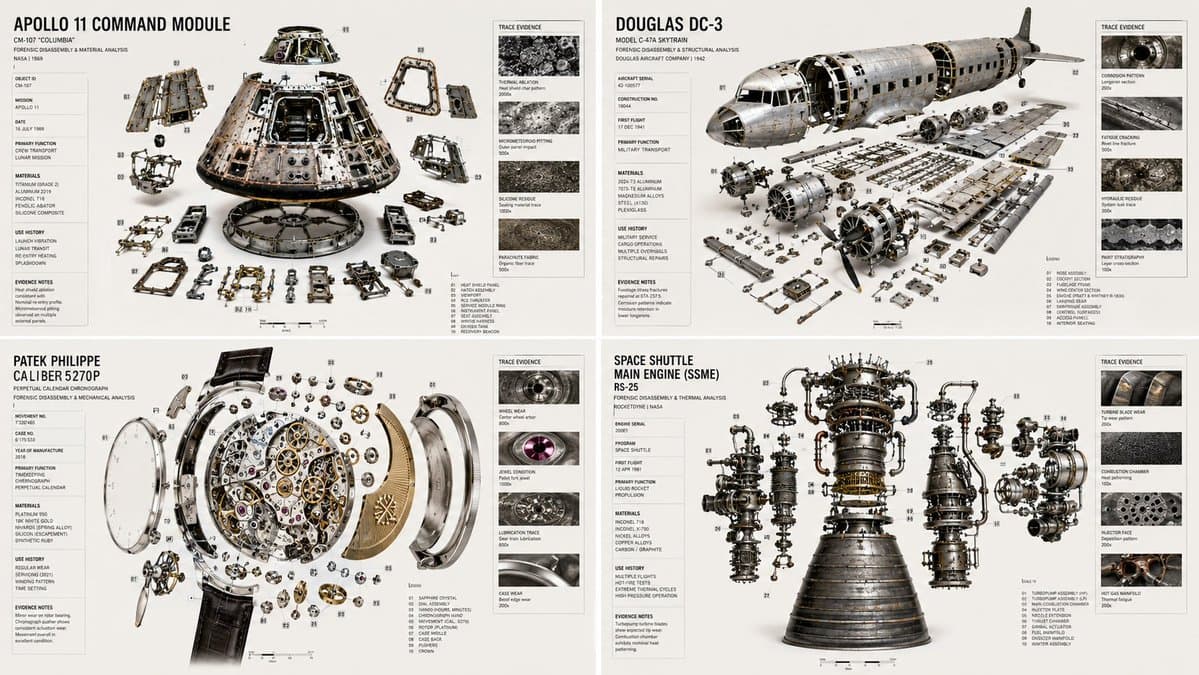
2x2 grid, 16:9, do this for 4 complex machines: INPUT: {argument name="object" default="[OBJECT / DEVICE / PRODUCT / TOOL / MACHINE / EVENT EVIDENCE]"} SYSTEM: Create a forensic luxury poster that disassembles the input with investigative precision. The image should feel like a museum-grade evidence plate combined with a premium object teardown. Infer failure points, wear patterns, trace evidence, use history, repair history, and hidden mechanisms. SEMANTIC SOLVE: FORENSIC_OBJECT = (INFER(core_identity FROM structure + material + wear + purpose) ::5) + (INFER(use_history FROM scratches + residues + fractures + repairs) ::4) + (INFER(hidden_story FROM assembly_order + stress_points + internal damage) ::4) + (INFER(context FROM environment + operator + maintenance + time) ::3) - (crime-show cliché + gore + sensationalism + clutter) ::-4 COMPOSITION: One central disassembled object arranged with perfect evidence logic. Use exploded spacing, numbered fragments, trace-detail insets, material callouts, and restrained annotations. Everything should feel clinical, beautiful, and intelligent. STYLE DNA: luxury forensic plate ::0.30 Swiss lab report design ::0.20 museum object study ::0.20 high-end macro photography ::0.20 subtle archive texture ::0.10 OUTPUT: Museum-quality forensic display poster, clean white or pale neutral background, precise callout lines, controlled hierarchy, and immaculate visual order. NEGATIVE: no blood, no horror aesthetic, no sensationalized crime drama, no clutter, no dark grunge overload, no watermark.
Choose the primary action to open PicX Studio with the available template settings. Review the model and format, personalize the creative direction, and generate when ready.
Yes. You can change the subject, setting, lighting, mood, format, and available model controls before creating your image.
This template is free to open and customize. Generation usage is shown in PicX Studio before you create.
Start with GPT Image 2, which is the model associated with this template. You can compare another compatible model for a different finish.
© 2026 PicX Studio. All rights reserved.

Follow a topic to a crawlable collection of related PicX Studio templates.
43,474 public templates available. Verified via the PicX Studio public templates API; refreshed hourly.
![Japan Travel Brochure Poster — Create a vertical vintage travel-brochure infographic poster titled “[COUNTRY/DESTINATION]: [TAGLINE]”, using a warm parchment-pa](/_next/image?url=https%3A%2F%2Fcdn.picxstudio.com%2Fuploads%2Fp0_982bf820-bb34-4c43-8a6d-42d799d7282b.jpg&w=828&q=100)













![Minimalist Flat Vector Travel Poster — Premium minimalist flat-vector travel poster for {argument name="city name" default="[CITY_NAME]"}, 3:4 vertical format.](https://cms-assets.youmind.com/media/1787917359711_3ug846_HQX205cbMAA6F6S-300x400.jpg)





















![Mixed-Media Portrait with CGI Mascot in Candy Store — **[Style & Medium]:**
Cinematic mixed-media photography, blending photorealistic live-action with high-end](https://pbs.twimg.com/media/G90NEYsasAAkwgg.jpg)


![Negative Space Character Composition — A composition where {argument name="Character" default="[Character]"} is formed entirely by negative…](https://pbs.twimg.com/media/G83CDzXaUAErYto.jpg)
![2x2 Grid Pop-Up Cookbook Diorama Prompt for Nano Banana — <instructions>
[Use the UNIVERSAL WRAPPER above exactly as-is.]
If input includes ingredients, pick…](https://pbs.twimg.com/media/HEKnYm6bMAA3jf9.jpg)





![Tiny World in Object Macro Photography — Hyper-detailed miniature {argument name="scene" default="[SCENE - beach/forest/city/space station]"} built inside a cra](https://pbs.twimg.com/media/HBJblmGakAAT8rM.jpg)